“I think it’s going to take weeks before I can reduce all unconscious bias in this job description”. “I don’t think I’m going to finish creating this job description on time”. “I’m tired of scrolling through different files to find past JDs to use as templates”.
I’m certain the above are some issues you frequently tell yourself when creating your job descriptions. But we’re in 2026, not 2010, and you shouldn’t struggle to create your job descriptions because there are solutions.
So, in this article, I’m going to explain 10 common job description challenges Ongig is solving for JD teams in 2026.
Let’s dive in.
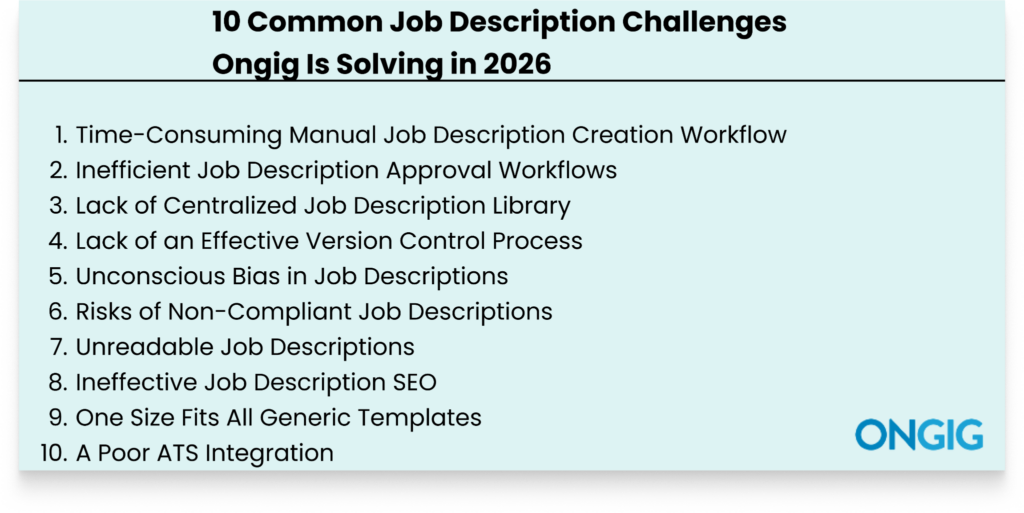
1. Time-Consuming Manual Job Description Creation Workflow
Manual JD creation workflows build an inefficient process that disorganizes your entire job description process.
Firstly, a manual process wastes your time because you have to start writing your JD from scratch each time.
And now, since the process is disorganized from working on the Shared Drives, Spreadsheets, and Google Docs, more challenges arise. For instance:
- There’s no central source of truth, so you can’t understand the progress of the creation of the JDs
- There are no reliable templates to use as inspiration
- Collaboration becomes a mess because there’s no central working location
- Approval becomes chaotic because there’s no organized approval workflow
Now, with this manual JD creation process, you end up producing poor and inconsistent JDs. And you end up missing the publishing deadline.
HOW ONGIG IS REPLACING MANUAL JOB DESCRIPTION WORKFLOWS
Here’s a step-by-step process on how Ongig helps you build a JD without any manual steps:
Using Ongig’s Automated Builder to build JDs is quick and easy. First, type your job title into the tool.
In Text Analyzer, open a new job, click the “Write Sample” button, and write in your job title, “Web Developer,” for example:
Next, choose the sections you want to include in your JD (based on your customized templates or a template Ongig suggests based on research) and click the “Generate Now” button:
After that, Text Analyzer leverages AI to create for you a Web Developer JD to use. At this stage, if the JD is missing any content, you can edit to include that:
The next step is optimizing your content. For instance, in this JD, to minimize bias and shorten the long sentences, you’ll click “Optimize Content” and the “Rewrite Now” button.
Next, the platform leverages AI to improve your JD draft. You’ll notice a JD score boost as you optimize your JD. For instance, the total score for this JD rose from 79.5% to 83.3%.
To further improve the content of the JD draft, click to delete and replace feminine terms to boost JD gender neutrality. You’ll see the score increase even more.
Plus, you can also click to replace any other type of bias Ongig has flagged. Ongig flags 12+ types of bias based on sex, gender, mental health, and more. (This JD has none.)
Next, click “View Changes” to see the JD versions you’ve created and choose the one that seems appropriate to proceed with.
Once you’re satisfied with your JD draft, easily export a copy of your job post to Word, HTML, or PDF. If you’re on our professional and premium plans, easily push your job post directly to your ATS through API integration.
Tip: If you prefer video learning, this short video will help you get started:
2. Inefficient Job Description Approval Workflows
You’ve written a good JD, or you’re still in the process of creating the JD, but one thing holds you back each time: approval of the JD.
So you wait for weeks or many days for the person responsible for the approval to approve the JD.
In the end, this approval inefficiency makes you publish your JD late, and it starts manifesting in some of these ways:
- Endless Email Threads: Approval feedback gets buried in emails. So, before the person responsible for the approval sees the email, valuable time has already passed.
- Unclear Approval Ownership: Because you don’t have a clear JD approval process, no one on your team knows for sure who’s supposed to approve what content in the JD.
- Many Approvers: Having more people than necessary slows the approval process.
- No Visibility: Since all communication happens via email and in-person conversations, there’s no way to track the approval process and know what’s working and what’s failing.
With this disorganized approval, you waste hiring resources and take a long time to fill your open roles.
HOW ONGIG IS CREATING CONTROLLED JOB DESCRIPTION APPROVAL WORKFLOWS
Ongig smooths your JD approval process in some of these ways:
- Role- Based Controls and Permissions: Not everyone in the JD process needs to review and see every JD. And not everyone must have access to all the steps in the JD. So Ongig makes it easy to assign permissions based on everyone’s role. For instance, the HR team suggests edits and compliance approves the JD.
- Smart Role-Based JD Workflow: Ongig lets you build a structured approval workflow that follows specific steps. And all steps must follow an order. For instance, you can have a workflow that has steps such as edit> review> approve.
- Automated Personalized Email Alerts: No more searching for approval status in email threads. Ongig lets you build an automated email notification. Once an individual’s turn to approve arrives, they receive an email trigger that has the JD’s link and deadline.
- Dashboards for Visibility: With the tool, you get real-time visibility into all approval stages. So no more guesswork. You’ll see the JDs still in the review stage, who’s done with approval, and the team delaying the process.
3. Lack of Centralized Job Description Library
Without a central repository for your job description management process, all your JD information gets scattered everywhere.
Mostly, the job description process is scattered across Google Docs, email threads, nudges, outdated folders, and shared Google Drives.
In the end, this scattered process leads to time wastage and inconsistency in these ways:
- Redundant Work: No one knows who’s worked on what. So, sometimes some team members might start working on already done tasks.
- Brand Inconsistency: Everyone creates their JDs without adhering to the correct brand guidelines because of the scattered job description process.
- Poor Collaboration: There’s no central feedback channel, so providing and receiving feedback becomes a painful process.
- Starting the Creation Process from scratch: With no available JDs to use as inspiration, the JD team writes a JD from a blank document each time.
And the painful result of this lack of central repository is that you’ll post your JD late, thus missing out on hiring qualified talent in the market.
HOW ONGIG IS SOLVING SCATTERED JOB DESCRIPTION PROCESSES
Ongig provides a live cloud library for your JDs that simplifies your JD management process in these ways:
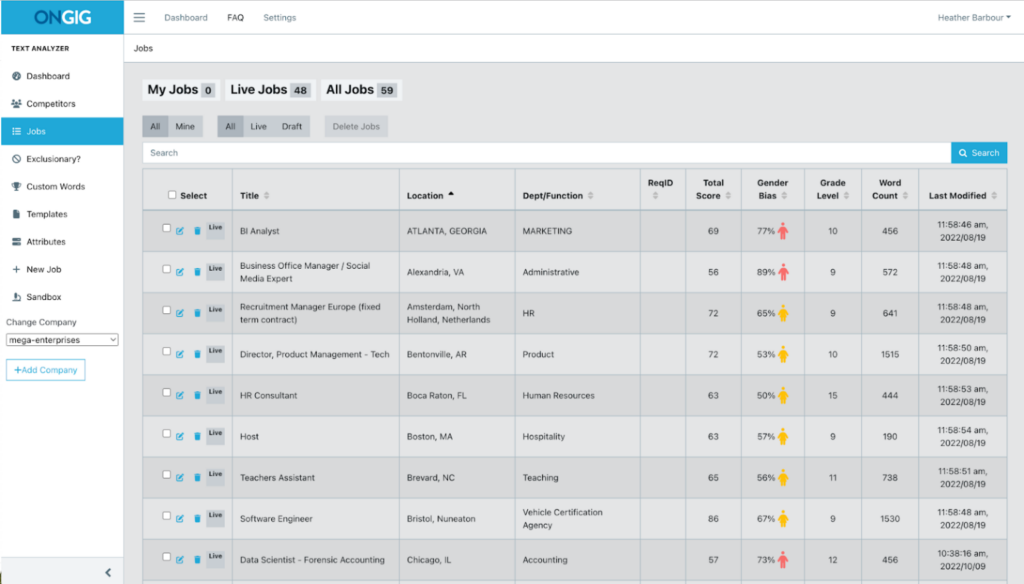
- Builds a Searchable Library: Everyone on your team works on the same system. And they can create JDs and collaborate on the same system. This searchable library also helps to search and filter JDs by title, keywords, location, and department. So no one has to search endless files to get the JD information they want.
- Quick JD Writing: Your team has access to a library of your JDs, so they use the JDs as inspiration to write the draft instead of starting the process from scratch each time.
- Organized JD Archiving: A central JD repository system stores your JDs’ history. All your team members can access and see any role’s lifecycle over time. This becomes crucial if a role evolved and the JD needs an update to reflect the work the current employee does.
- Custom Views: Each user can create their view. This is perfect for legal vs comp teams vs recruiters who want to have a view of what they want.
- Easy Template Building: With a job description library, it’s easy to build and store templates that you can apply to the JDs you’re creating. Or use the templates to bulk-update hundreds of JDs. This way, you don’t update hundreds of JDs one by one.
4. Lack of an Effective Version Control Process
“What’s the latest feedback on this document”? “Who’s currently working on this document now”? “Who worked on this document the last time”?
The above are some frequent questions you’ll always ask yourself when writing JDs without a proper version control process.
JD version control not only helps with naming and locating documents, but it’s also a system that guides your whole JD creation process.
For instance, with good version control, you can easily ensure your JDs don’t go against any employment laws because you can track the whole creation and editing process.
On the other hand, with poor version control, you:
- Can’t track who worked on what JD
- Can’t understand the editing process, so you have back-and-forth conflicting edits
- Produce JDs with poor standardization because everyone follows their own formatting guidelines
This leads to publishing JDs with confusing requirements for your potential candidates.
HOW ONGIG IS ENHANCING EFFECTIVE VERSION CONTROL
Ongig provides an effective version control system that helps you in these ways:
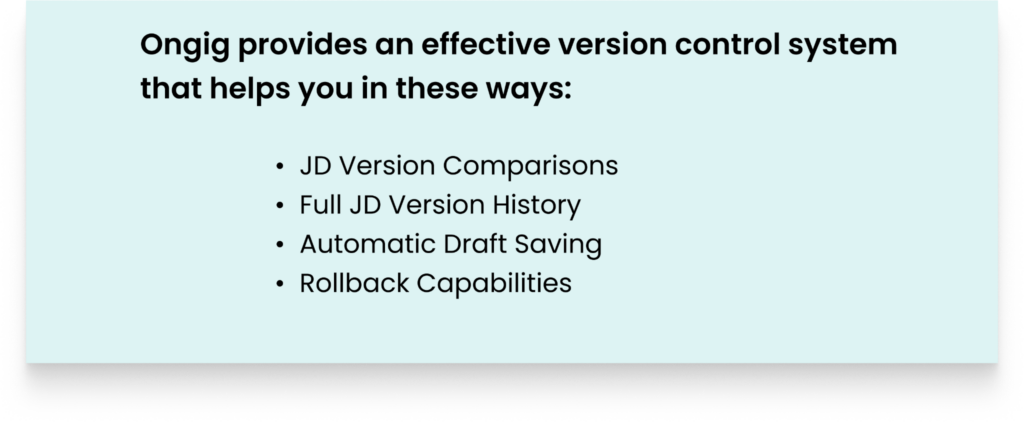
- JD Version Comparisons: The tool lets you compare two JD documents. So you can decide which version to proceed with.
- Full JD Version History: Ongig ensures every stage of your JD gets logged with a timestamp and the person responsible for the changes. This audit trail also becomes critical if you encounter compliance challenges in the future. You can provide the audit trail as evidence.
- Automatic Draft Saving: The tool automatically saves all your work, so you never lose any content because you forgot to click save.
- Rollback Capabilities: No manual process. If you’ve made mistakes or unwanted changes, easily go back to the version of the document you want.
5. Unconscious Bias in Job Descriptions
While your intentions when writing a JD are good for your organization to get qualified candidates, sometimes the job description language you use might prevent different candidates from applying to your job ads.
For instance, you’ve probably used some of these phrases in your JDs: “Our ideal candidates are recent graduates”, Or, This job ad is open to candidates over 35 years”.
You may not have known it when writing the JD, but those two phrases are examples of biased language towards applicants because of their age.
And unfortunately, age bias isn’t the only unconscious bias you have to factor when writing your JD. There are many factors to keep in mind to not discriminate against any candidate.
For example, you need to ensure your JD isn’t discriminatory towards candidates because of their race, gender, school they attended, nationality, felony status, disability, and more.
With all the factors to consider, I’m sure you now understand why unconscious bias remains a big challenge in job description writing. And you can see that a manual JD process can’t eliminate biased phrases.
HOW ONGIG IS HELPING WITH JOB DESCRIPTION BIAS
Ongig automates bias detection in your JDs and helps you in these ways:
- Flags Discriminatory Words and Phrases: As you write your JD, the tool flags any discriminatory language creeping into your JD. In 2026, Ongig scans and flags 12+ different types of biased words and phrases related to race, elitism, LGBTQ+ status, gender, and disability.
- Recommends Inclusive Words: Ongig doesn’t just flag the discriminatory words. The tool also provides inclusive synonyms to replace the biased words.
- Bias Inclusion Score: At the end, the tool provides you with a score that highlights the inclusiveness of your JD. Plus, the score also comes with more recommendations on what you’re supposed to eliminate to boost the score.
- Highlights Jargon and Complex Phrases: Unnecessary words make it hard for some candidates to follow through the JD. So Ongig shows you any jargon and complex words to eliminate. For instance, instead of using a complex phrase such as “in order to”, the tool will recommend using a simpler alternative such as “to”.
6. Risks of Non-Compliant Job Descriptions
Poorly written job descriptions become a compliance liability over time.
They result in discriminatory recruitment, wrong salary range, misclassification of workers’ status, wrongful termination, and breaches of labor laws.
And all these compliance risks don’t only get you on the wrong side of employment laws. But they also prevent you from hiring most of the qualified candidates.
For instance, if a black candidate reads your JD and sees that it’s using racially discriminatory words, the candidate won’t apply.
Plus, if a candidate reads your JD and finds no salary ranges, they’ll not be sure whether to apply or not because they aren’t sure if the pay matches what they’re looking for.
So, before you get to understand that the reason you aren’t attracting and hiring qualified candidates is because of compliance issues, you would have already wasted a lot of hiring resources.
HOW ONGIG IS HELPING CREATE COMPLIANT JOB DESCRIPTIONS
Ongig eliminates any manual process of checking for compliance and automates the process to help in:
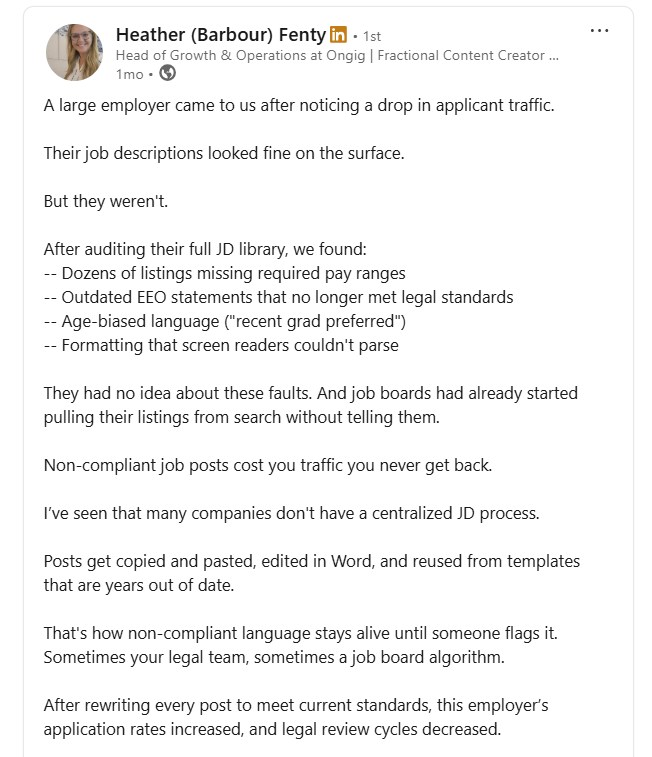
- Bulk Updates for Compliance Changes: Ongig stays up to date with regulatory changes. So if a regulatory change occurs and you want to bulk update hundreds of JDs, you don’t do it manually. The tool does it for you.
- Pay Transparency Checks: Ongig flags any JDs that don’t have salary details and the benefits that come with the job.
- Flags Dismissive Language: The platform scans JDs for inclusivity against a library of more than 10,000 discriminatory words and phrases. Then the tool provides reasons why those words are discriminatory. And then gives you synonyms to use.
- Mandatory Section Inclusion: The tool flags your JD if you try to publish without critical compliance sections such as EEO statements.
- Comprehensive JD Audit Trails: The tool logs all changes that happened during the creation of your JD. You can see who made the changes. And the time the changes happened. This builds a proper accountability process.
Read also: How to prepare for an OFCCP compliance audit (+ free OFCCP compliance checklist)
7. Unreadable Job Descriptions
If your job description is unreadable, candidates won’t use their time trying to understand what you’re saying.
Candidates spend a few minutes scanning a JD, and if they’re evaluating different opportunities, you’ll lose them to your competitors.
Unreadable job descriptions commonly appear through:
- Many Long Pages: If you’re trying to pack every single detail and requirement in your JD, it becomes long. And candidates don’t have the time to peruse through many pages to get the information they need.
- Walls of Text: If your JD contains blocks of text with no headers or headings, no applicant will try to read it. So make the JD easy for the candidates to scan.
- Complex and Internal Jargon: If your JD contains jargon language that only your current employees can understand, then potential applicants will pass your JD because they don’t understand what you mean.
- Unfriendly Mobile Formatting: Most applicants apply for JDs using their phones. If your JDs contain poor spacing and long lines of text that are unreadable on mobile phones, you’ll lose out on qualified talent.
And because of unreadability, your open roles remain unfilled for longer, thus delaying organizational growth.
HOW ONGIG IS HELPING BOOST JOB DESCRIPTION READABILITY
Ongig employs different approaches to improve your JD readability:
- Real-Time Readability Recommendations
As you write your JD, Ongig provides you with live suggestions to improve your JD readability. For instance, you might get suggestions on the correct JD length to use, jargon words to remove, and good formatting tips to use,
- Flags Complex Words in Job Descriptions
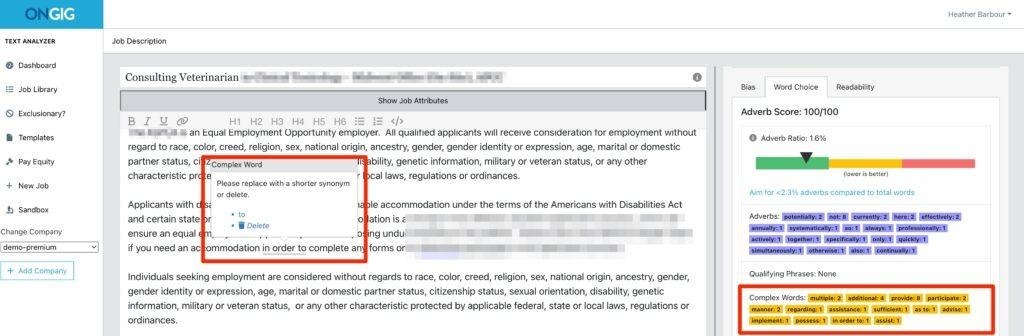
Some applicants find it challenging to read words that contain multiple syllables. The use of multiple syllables creates a complex word. So instead of using a word such as “is responsible for”, use “handles”.
And Ongig flags all these complex words in your JD.
For instance, the JD below uses the complex phrase “in order to”; Ongig flags “in order to” as a complex phrase and provides a replacement.
- Flags Adverbs In Your JDs
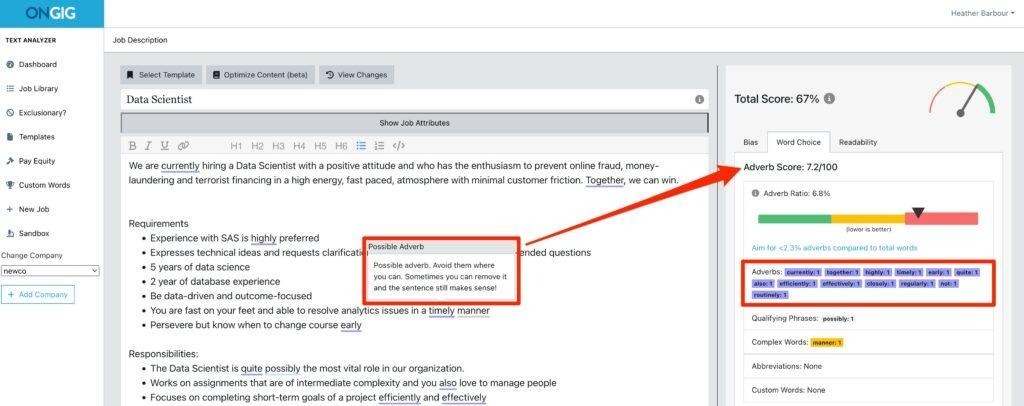
Adverbs take up space in your JDs and make it long without adding any meaning. Examples of commonly used adverbs in JDs are potentially, closely, accordingly, and properly.
For example, the job ad below for a Data Scientist contains adverbs (the underlined words).
Ongig shows that 6.8% of the words in the JD below are adverbs. Ongig then gives the JD a low adverb score (7.2/100) because the adverbs don’t add meaning to the JD.
Read also: How to Write the Most Readable Job Descriptions (8 Tips)
8. Ineffective Job Description SEO
At the end of the day, a well-written job description is ineffective if the right applicants can’t find it.
Candidates search for open roles using keywords that match their skills, the job opening, and the industry.
So if your JD isn’t well optimized, they won’t find it. Ineffective job description SEO shows in different areas such as:
- Creating Creative and Vague Job Titles: A job title should match the skill you’re hiring for. It’s the starting point at any search engine the candidate will use. So don’t use internal jargon terms or try creative titles such as “Superstar Software Engineer”. Instead, use a widely accepted title such as “software engineer”.
- Missing Keywords: Any role has important keywords the candidate will use when searching for a job. For instance, if you’re hiring for a JavaScript developer role, ensure you’re using JavaScript terms in the job description.
- Ignoring Page Structure and Metadata: If you host your JDs on your careers page and fail to optimize meta descriptions, page titles, URL structures, and headers, your job ads will struggle to rank.
- Keyword Stuffing: Even when trying to optimize your job descriptions for SEO, don’t stuff the JD with keywords because search engines will penalize your job descriptions.
Lastly, if the JDs aren’t optimized for mobile, you’ll miss out on many candidates because more applicants search for jobs using their phones.
HOW ONGIG IS HELPING WITH JOB DESCRIPTION SEO
Here’s how Ongig helps boost your JD SEO:
- SEO-Optimized Career Pages: Ongig provides a career site builder that helps you create a fast, branded, and easy-to-find career site. The career site you get to build is also synced with your ATS.
- Job Title Optimization: The platform helps you write a clear, searchable job title. And if you use a creative title or one that’s filled with jargon, Ongig will flag it.
- Keywords Guidance: Ongig Text Analyzer guides you as you write the JD and recommends phrases and words to use. The tool also helps you understand which words to eliminate from your job description.
- Mobile Optimization: Ongig helps you build JDs with mobile optimization in mind. So you’re sure your potential candidates can easily read your JD regardless of the device they’ll use to apply for the job.
9. One Size Fits All Generic Templates
Templates help you save valuable time in your job description process.
But when every job description you create is forced to use the same generic templates, you create bland JDs that don’t capture each specific job opening well.
The disadvantages of generic templates show up in your JDs in some ways, such as:
- Misaligned Voice and Tone: A generic JD template won’t help you tailor the tone for a specific audience. The language that might resonate with a product designer might not resonate with an executive role in the organization
- Producing a Generic JD: With an old generic template, you also produce a generic job description that doesn’t help attract specific qualified candidates but attracts everyone
In the end, you produce JDs that sound like they were written in 2015.
HOW ONGIG IS HELPING WITH EFFECTIVE JOB DESCRIPTION TEMPLATES
Here’s how Ongig helps you solve the challenge of generic templates:
- Custom Templates: The tool makes it easy to save and have templates for different roles and departments. This ensures every job description gets a template that fits the role.
- Smart Templating: The tool provides smart templates with customizable fields such as location, job families, and req IDs, helping enforce a standardized structure without limiting flexibility. This way, you can standardize all the sections your JD must include and still leave room for role-specific details.
- Locked Sections: Ongig makes it easy to lock certain sections in your templates so you don’t have to let everyone edit them. This ensures no compliance risks occur. This locking also maintains good JD consistency.
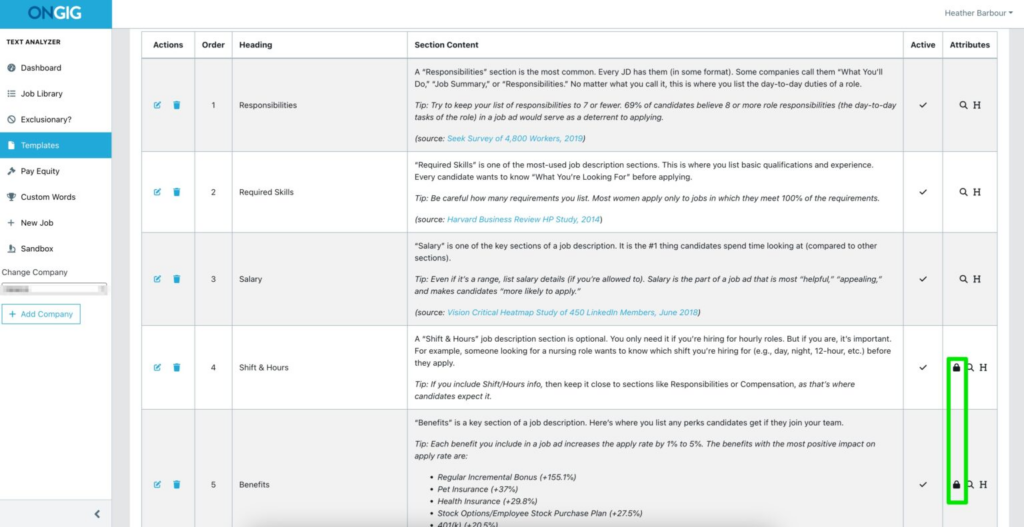
- Template Creation: The tool also makes it easy to create and store your own job description templates you can use where necessary.
10. A Poor ATS Integration
Having a disorganized JD creation process means your JD data exists in silos. And this lack of centralized storage makes it hard to easily post your JDs to your ATS automatically, so you end up going through:
- Manual Copy and paste of your JD content to your ATS from where your JD is
- Duplicate data entry chaos because of manually re-entering job description content to your ATS
- Data inconsistencies between the JD in your ATS and the one in your job description creation platform because there’s no reliable integration
- Inconsistent formatting between the JD in your JD platform, such as Google Docs, and the one in your ATS because when re-entering data manually, some structure such as headings got messed up. And what you end up having in your ATS becomes a wall of text.
In the end, this poor integration leads to you posting your job ad late.
HOW ONGIG IS HELPING WITH EFFICIENT ATS CONNECTION
Ongig creates an advanced ATS integration in these ways:
- One-Way and Two-Way ATS Integration: Ongig efficiently connects with HRIS and ATS platforms for proper integration. So when updates occur, they stay automatically aligned. So you easily publish your JDs to your ATS without manual copy and paste of content.
- API Connectivity: Ongig’s advanced integration uses AI to pull your job ads from your ATS and into Ongig to edit your JDs for any issues such as bias and readability. And once you finish editing, you can push the job ad back to your ATS.
- Templates Matching ATS Formatting: With Ongig, it’s easy to create and store templates that match your ATS formatting. This way, you don’t start formatting your JDs when pushing to your ATS.
Read also: 200+ Applicant Tracking Systems in 2026 – Big & Small
FAQs: Common Job Description Challenges Ongig is Solving in 2026
1. HOW DOES ONGIG JOB DESCRIPTION SOFTWARE HELP WITH COMPLIANCE?
Ongig uses different approaches to help you have compliant JDs. For instance, the tool flags any dismissive language that might get you on the wrong side of labor laws. And there are also built-in pay transparency checks to flag JDs if they don’t have any salary ranges.
2. HOW DOES ONGIG HELP WITH JD TEMPLATES?
Ongig provides smart templates with customizable fields so you can edit the content you want to without encountering any limits. Plus, you can also create and store your templates.
3. CAN ONGIG INTEGRATE WITH OUR ATS?
Yes, Ongig integrates with most major ATS tools to simplify your JD workflow.
4. HOW DOES ONGIG HELP WITH JD APPROVALS?
Ongig helps you build controlled approval workflows that follow specific steps. For instance, you can create an approval workflow that contains steps such as edit>Review>Approve. And the steps are automated, so no step gets skipped.
5. HOW DOES ONGIG HELP PREVENT HAVING SCATTERED JOB DESCRIPTION PROCESSES?
Ongig provides a searchable cloud library where all your JD work goes in. So you don’t have to juggle different documents when creating your JDs.
WHY I WROTE THIS:
As you’ve seen, there’s no reason you should struggle creating job descriptions in 2026 like it was in the past decades.
Challenges that used to take weeks to solve are now solved in a few days.
For instance, there’s no reason you should publish a biased JD and miss out on diverse talent because Ongig guides you as you create your JD to eliminate all types of bias. And if you try to publish a JD with biased language, the tool will automatically flag the JD.
So schedule a demo today to learn how we can solve most of your job description challenges in 2026.
