Words matter, especially in job descriptions. And exclusionary words keep diverse talent from applying. Finding these words on your own is tricky and it can also take up a lot of time. So, how do you resolve this?
One of the best ways to do it is by using a job description bias tool. These advanced tools function with the power of AI automation. That way, you can constantly track and resolve the most elusive errors in your JDs (such as subconscious biases) that have been costing you precious talent.
Here are 9 tools to save you time (and remove the human error element):
1. Ongig Job Description Bias Tool
Ongig flags biased words in your JDs based on gender, race, age, disability, mental health, and more. And the software also makes it easy for you to swap biased words with more inclusive ones.
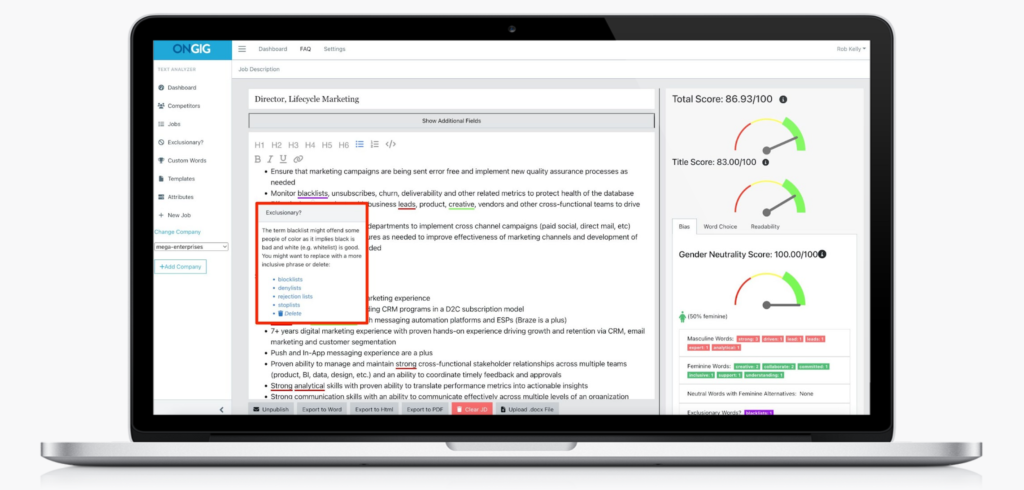
Here are some examples of words this job description bias tool might find in your JDs:
- Gender-coded words: strong, objectives, principles, leader, and competitive might deter women from applying to your job ads.
- Racial Bias: a cakewalk, blacklist, native English speaker, spirit animal, and brown bag might keep candidates from Black, Indigenous, and People of Color (BIPOC) communities from applying.
- Age Bias: recent graduates only, the elderly, and digital native might deter older people from applying to your roles.
These are just a few examples of biased language that creeps into your job descriptions (sometimes unintentionally). You’ll find loads of others in Ongig’s Inclusive Language List for Job Ads. And that’s just a sampling of the 10,000+ words flagged automatically when you use the software.
Outside of scanning for biased words, Ongig also has built-in job title suggestions, JD workflow settings, an AI-based “missing section” finder, readability tips, a complex words finder, custom JD templates, and more. The platform’s automated smart templating makes it effortless to maintain consistency, compliance, and readability across JDs at scale. That way, you can keep a highly professional employer branding throughout every candidate engagement.
2. Applied Job Description Bias Tool
Applied is an applicant tracking system (ATS) with a focus on diversity, equality, and inclusion (DEI) in hiring. Its job description bias tool checks your JDs for gender-coded words because women are less likely to apply for a job with male-coded language.
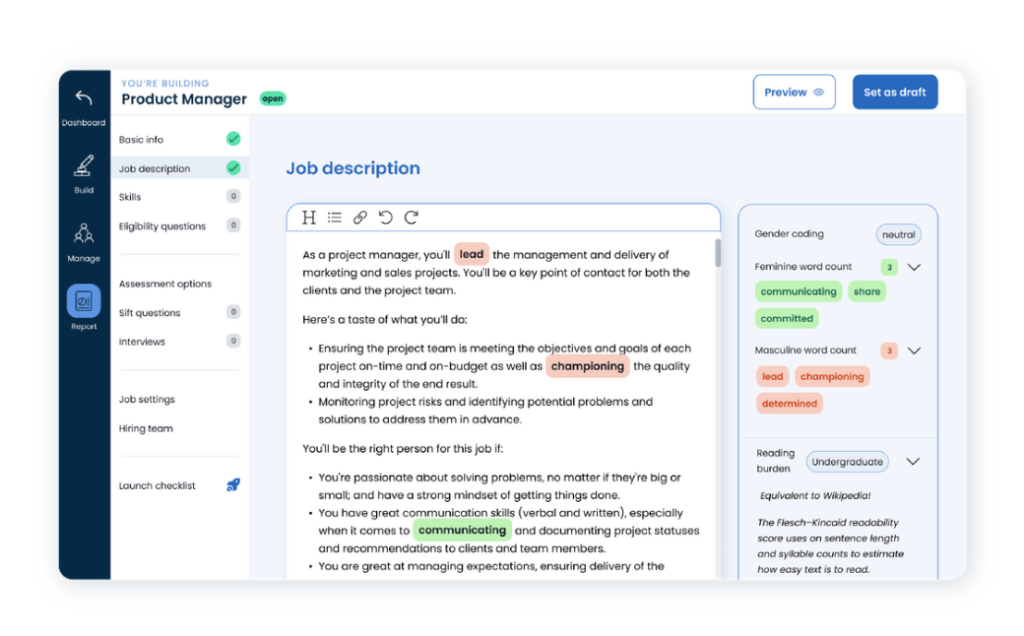
Applied also:
- Checks the length of your job requirements. Long lists of requirements prevent more women from applying because studies show women usually only apply to jobs when they know they’ll meet 100% of the requirements.
- Analyzes your JDs for ease of reading. The tool uses Flesch reading scale to tell you how easy (or difficult) it is to read. The system checks against reading burden, which affects how applicants respond to your postings.
- Hosts regular DEI events.
- Has a job board for curated DEI jobs.
3. UInclude Job Description Bias Tool
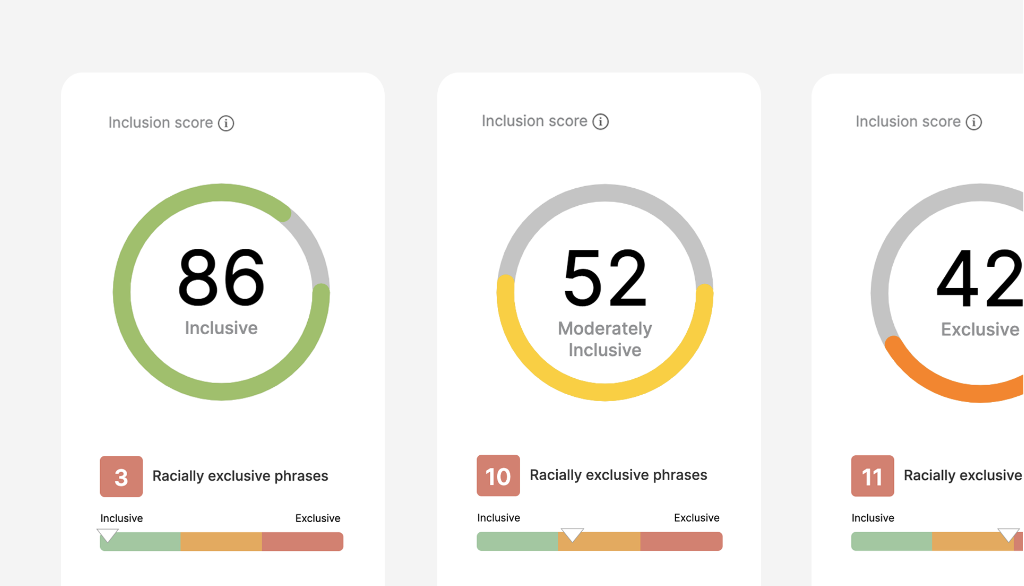
UInclude’s job description bias tool identifies gender-based and racially exclusive phrases in your JDs. It also gives you more inclusive word replacements.
A unique feature of this tool is it gives you a performance prediction score or an “inclusion score.” This score tells you the inclusion level of your job ad and how it might appeal to underrepresented candidates. It also predicts that any JDs with a score of over 85 will have a higher rate of applicants and a lower cost per application.
4. Gender Decoder Job Description Bias Tool
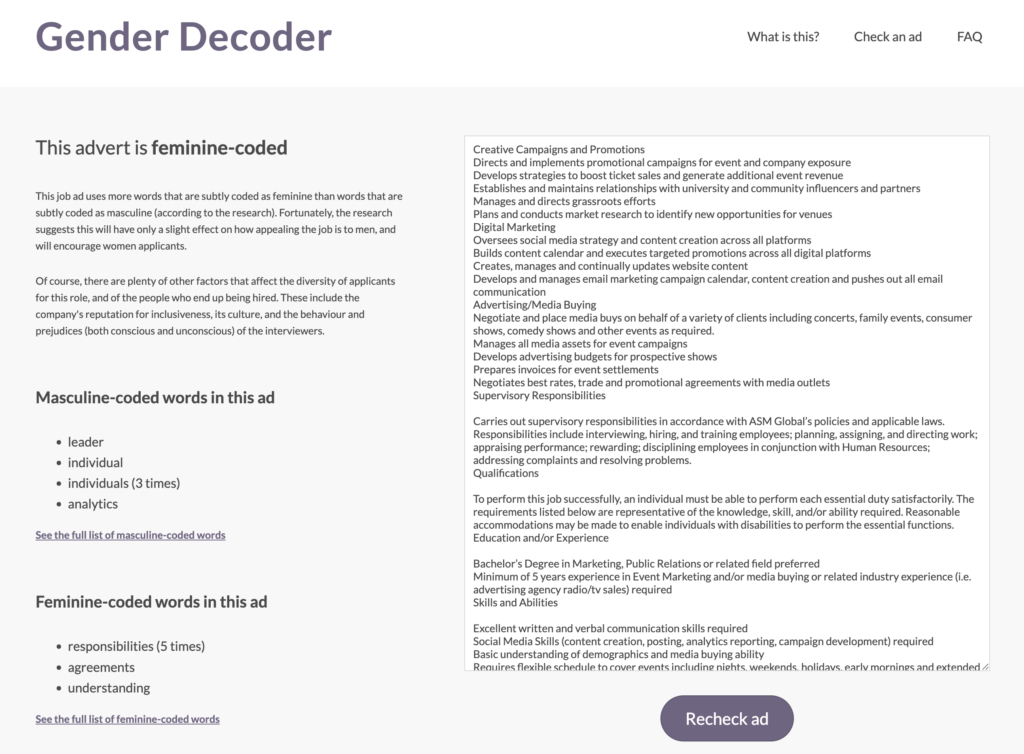
Gender decoder is a free job description bias tool focused on gender bias. It finds subtle gender-coded language in your JDs. It also tells you if these words are masculine or feminine coded words. Note: It does not offer gender-neutral replacements.
When you copy and paste your JD into the blank box and click “check this ad,” it automatically populates a list on the left grouped into male and female coded words. Another downside is that the platform doesn’t underline comments, so you’ll have to search for edits manually.
Note: Gender Decoder also allows you to make a copy (as stated in their license) as long as you include the copyright and permission notice.
5. XOPA AI’s Built-In Job Description Bias Tool
XOPA AI is an automated powerhouse in the inclusive hiring space, with a comprehensive tech stack for optimized recruitment. The platform applies some of the most advanced AI functionalities to evaluate top talent based on their soft skills, experiences, and cultural alignment. These includes a built-in AI description generator and optimizer within its recruiter module. The platform parses over 250 million profiles, mapping actual competencies behind high retention rates for benchmarking hiring requirements against leading standards.
The system implements two powerful agentic AIs, Kate and Alex, which analyze candidate qualifications and history and also simplify the information for enhancing recruitment strategies. Unlike the other tools on this list, XOPA AI offers an outcome-based approach (and less on the linguistic aspects) to removing JD bias through a more complex guided approach (explainable AI).
The platform’s systematic AI-supported approach also empowers companies in their inclusive hiring efforts by assessing the effectiveness of ATS across the talent pipeline. Users can effectively monitor the performance of various ATS integrations involving every job listing and re-engage suitable candidates without fuss.
6. Textio Job Description Bias Tool
Textio creates inclusive human resources tools. Their job description bias tool is Textio Loop, which checks the text of your job descriptions for gendered or otherwise problematic language. Textio Loop scores your job descriptions so you can evaluate their inclusiveness before pressing publish. It pinpoints which biased language and recommends neutral, inclusive substitutions. Interestingly, their tool also allows you to check how well your job description will appeal to someone of a certain group. We love how it tracks your job descriptions over time, so you can see how your inclusivity is improving and take note of where you have room for improvement.
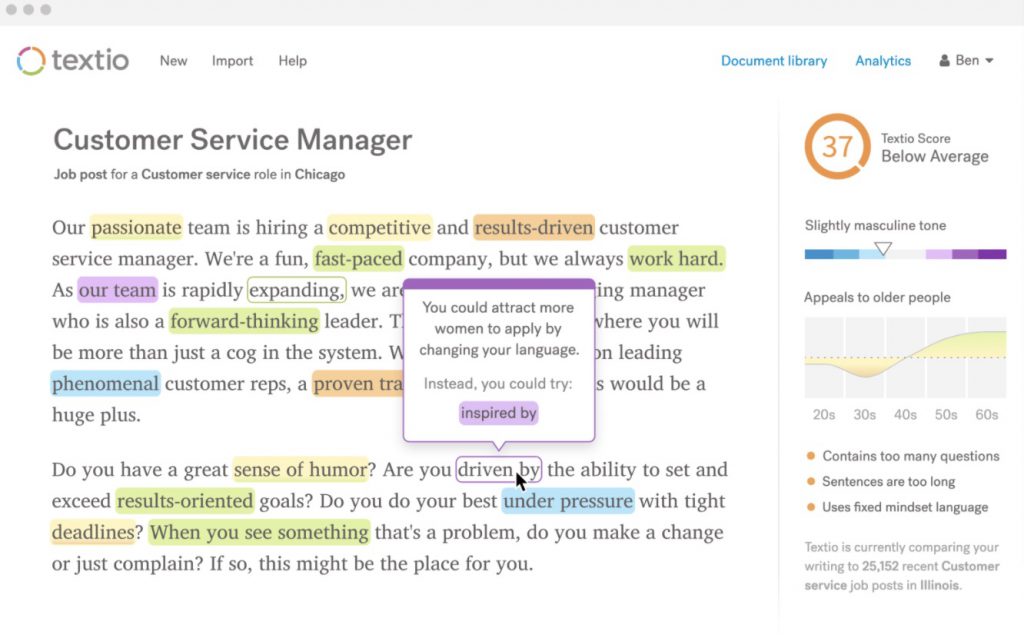
Textio users can also look forward to upcoming developments in their Lavalier project, an interview intelligence platform where TA teams can provide structured skills-based feedback in selecting the most qualified individuals for a role. As such, employers can effectively convert interview information into structured data to further skills-based hiring campaigns.
7. PowerPost Job Description Bias Tool
PowerPost’s job description bias tool provides inclusive, AI-generated job description templates. It also offers an evaluator function, so you can check your existing job descriptions for biased, gendered, and offensive language. We like its culture-fit features and its robust JD-scanning capabilities. You could practically upload a non-performing JD on the platform, and the advanced AI modernizes the language according to trending skill tags and inclusive alternatives. That way, you can constantly make the most positive impact on your target candidates.
Unlike some of the other tools on our list, PowerPost is available in over 35 languages, so you can create inclusive job descriptions for international candidates and distributed teams. PowerPost integrates with most existing HRISs, so you can add a job description tool to your repertoire without overcomplicating your HR workflow.
8. Metaview
Metaview is a revolutionary JD checking platform that uses AI to refine the impact and inclusiveness of your postings. The platform highlights sentences that contain non-compliant and exclusionary elements while recommending neutral alternatives. The user-friendly interface also allows you to run checks for other linguistic factors such as competitive language and active voice to maximize candidate engagement.
Plus, Metaview gathers insights from your recorded interviews to enhance future JDs according to your hiring priorities. For instance, Metaview can help identify exact proficiencies required for a role, replacing generic terms like “familiarity with tech” with “proven experience in Typescript and Postgres.”
9. HRizon’s Job Description Made Simple
Job Description Made Simple (JDMS) enables TA experts to manage JDs at scale via the cloud. The solution integrates with the popular HCM solution, SAP SuccessFactors (users can log on with a single sign-on feature). JDMS applies advanced automation that streamlines hiring by eliminating bias and appealing to candidates of diverse backgrounds with user-friendly features that include:
Quick JD translations – Ideal for international or distributed teams. Users can also forward the translation to local experts for further refinement so each word sparks interest at a localized level.
Systematic JD library – The system enables transparent version management. As such, TA teams can maintain data governance and consistent candidate details at every stage of the talent pipeline.
If you want to look beyond bias-specific tools, check out our list of the best diversity tools for job descriptions.
How Hiring Best Practices Are Changing in 2026
One reason we recommend working with a job description bias tool is that the HR landscape is constantly changing. As public sentiment changes, HR teams must also update their recruitment process to reflect the needs and wishes of diverse candidates and job seekers. A job description bias tool is a supportive tool that can help you recognize and address unconscious biases in yourself or your team and create job listings that truly reflect your diverse values. Here are a few changes to hiring best practices that we are seeing in 2026:
Pay transparency. Candidate advocacy has resulted in several states (such as Colorado and Connecticut) and localities (like New York City) passing laws that require all employers to provide transparent information about pay or salary to applicants. These laws vary greatly, but the general idea is that pay transparency helps to address gender and racial pay gaps, thereby creating a more diverse candidate pool. Pay transparency laws are popular with job seekers. According to research from SHRM, 82% of candidates are more likely to apply to a job with a pay range in the job listing. Tools such as OnGig’s Text Analyzer are also helping employers to remove other language that contains age-related bias from their job descriptions.
Rethinking ‘years of experience’. This common feature of job posts is changing. For years, companies have listed required or preferred years of experience that were inflated beyond what they realistically expected, discouraging younger and less-qualified applicants to enter the recruitment process. Some employers also offer a range of acceptable years of experience, which may discriminate against older people. The Age Discrimination Act prevents employers from discriminating against candidates and employees older than 40. For these reasons, many employers are switching to listing only a true minimum number of years of experience only in their job posts.
Artificial intelligence and machine learning are increasingly common in recruiting. AI is quickly growing in the human resources sector, with affordable AI-powered software within reach even for small businesses. While we believe in AI and even use it in our Text Analyzer tool, we also know the importance of keeping AI focused on DEI, transparency, and social responsibility. AI programs that incorporate the unconscious biases of their creators can have dangerous and discriminatory results. We expect that this year will bring increased scrutiny of these popular tools, both from industry and from government regulators.
The rise of explainable AI. As mentioned, AI continues to evolve, which leads to novel ways of interpreting data and the ethics involved in handling sensitive candidate information. It is therefore, necessary to go beyond using AI for automating winning JDs for inclusive hiring. Modern organizations should also rationalize why and how AI supported a hiring decision. In fact, the workforce has become increasingly aware of a company’s AI stance and the tech’s reliability as these automated solutions are used daily.
- Optimize JDs for searchability. Your JDs are ultimately only effective if they are discoverable. In a digital world saturated with data, it has become a priority to make your JDs easily reachable by your top candidates. This means inserting trending job seeker keywords, removing excess steps in the candidate journey, and ensuring that every job title clearly explains what an applicant can expect (vague and subtly biased terms like “guru” should be avoided at all costs)
- Diversifying your talent sources. Expanding your candidate outreach paves the way for a broader talent pool. So, posting JDs on niche job boards that target specific communities or specialized roles could improve engagement and retention since individuals are likely to be better equipped for the role than those in generic channels. Sourcing should also involve passive job seekers, giving you a competitive advantage since these hires possess relevant skills for thriving in the current job market. Experts recommend a hybrid strategy of hiring from generalist and niche job boards, which reportedly reduce time-to-hire by 35%.
Why I Wrote This:
Fair, effective, and inclusive job descriptions are critical for a diverse talent pipeline. Improve your hiring process with Onnig. Our job description bias tool is the most robust, flexible, and effective on the market. Contact us today for a demo and see why HR departments across many industries trust us to make their job postings more inclusive.
Shout-Outs
- Applied – Applicant Tracking Software for Small Businesses: 13 Steps to Maximise ROI
- SHRM – The Real Effects of Pay Transparency in Business
- US Department of Labor – Age Discrimination
- Business Wire – Textio Announces CEO Transition
- PwC’s Global Workforce Hopes and Fears Survey 2025 – Rewiring the future of work
- Anywork Anywhere resources – Generalist or Niche? Redefining the Recruitment Ecosystem in 2026
