
Do you find yourself experiencing these challenges in your job description journey?:
- Taking a long time to write a good JD
- Having JD version control difficulties
- Poor JD approval processes
- No defined job description, collaboration creation process
- Publishing job descriptions with compliance risks.
With all those challenges, that’s where job description management software comes in.
A good job description tool not only helps you write good JDs, but it also helps you manage the entire JD management process.
So, in this article, I’ll share the benefits you’ll experience when using Ongig Job Description software for your JD needs.
Top Challenges Hiring Teams Face When Writing Job Descriptions
Despite a strong JD being the foundation of an effective recruitment process, hiring teams still struggle to produce good, consistent JDs. This is because of:
- Resource Limitations: To create a good JD, you must invest enough resources. But unfortunately, most organizations don’t provide HR teams with enough resources. The HR budget is always lean, but with many projects to accomplish. Because of this, the team can’t invest in a good JD software or train team members on how to write a good JD. And this leaves the organization with outdated and bad job descriptions.
- Workflow Approval Delays: HR teams struggle developing good JD workflow that streamlines their job description management process. And because of this, no team member has clearly defined responsibilities. Anyone can write, edit, and approve what they want. Thus leading to frequent JD approval frustrations.
- Compliance Risks: Labor laws are always changing. This makes it difficult for HR teams to produce compliant JDs each time, especially through a manual JD writing process.
- Lack of JD Standardization Process: Many HR teams don’t have set standard processes for their job descriptions. And writing JDs manually increases this standardization challenge. They don’t know the format to follow, the language to use, or the process of updating a JD. This leads to an inconsistent JD with misleading details.
- Lack of JD Storage: HR teams have their JD documents scattered everywhere. This lack of a unified storage makes them write inconsistent JDs, take a long time to produce a JD, and easily miss adding critical JD details.
This is where a job description tool like Ongig Text Analyzer comes in to simplify your HR team’s JD creation and management journey. Here’s how:
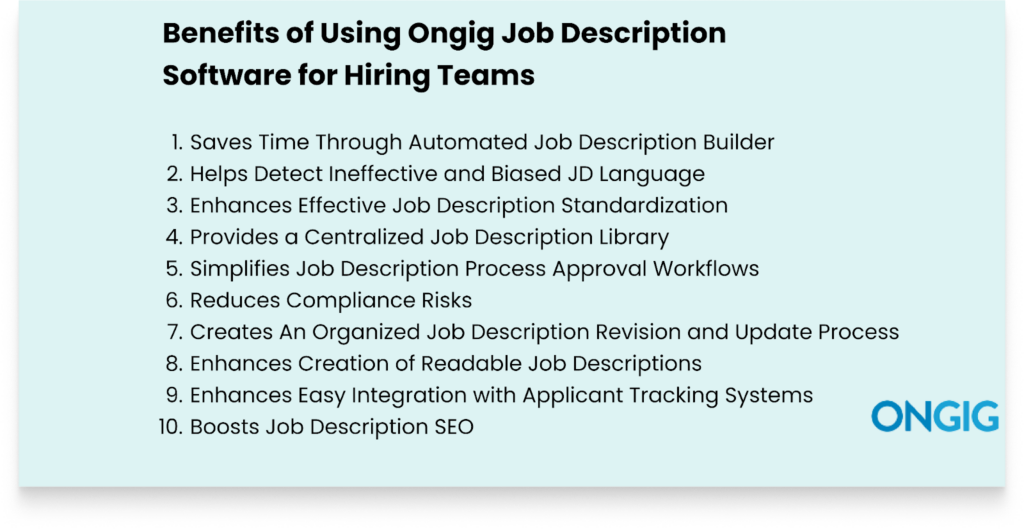
1. Saves Time Through Automated Job Description Builder
A good job description sets the foundation for your hiring process.
But if you’re still manually writing your job descriptions, you’re wasting hours you could have saved for other tasks. This manual approach wastes time because:
- You don’t have a unified space for all your JDs. So you start creating all JDs from scratch each time.
- You manually rewrite the organization information that you should already have a template for.
- Your JD collaboration process is scattered. You don’t know who’s supposed to provide what input and at what time. This leads to delays that waste time and result in late JD publishing.
- You experience version control fatigue since you and your team can’t decide on which JD document they approved, because you have many JD versions with no clear naming.
How Ongig Job Description Software Helps
Ongig speeds up your JD creation journey in these ways:
- AI-Automated Job Description Creation: Ongig’s Text Analyzer leverages AI automation to guide you through the entire JD creation journey. And the tool makes creating JDs from scratch easy. Just input the title and watch the tool use AI to generate an effective first draft.
- Tailored Templates Builder: You don’t have to start building your JD from scratch because there’s availability of pre-populated content. Ongig leverages content libraries and pre-approved templates to auto-populate certain job description sections, such as the organization’s mission field.
- Efficient User Management: The software makes it easy to manage your JD writing team by ensuring there’s permission-based access control. So everyone knows what input they’re supposed to provide. And once the time for their input reaches, they get a custom email alert with a link to the JD. Thus speeding up the JD writing process.
Job Description Optimization:
- Bias Reduction: Our job description Analyzer’s “Optimize Content” feature helps eliminate many forms of unconscious biases, such as gender bias, to build inclusive job descriptions. So you don’t waste time trying to figure out the unconscious biases in your JDs.
- JD Score Boost: You’ll automatically see your job description’s score increase as Text Analyzer’s AI perfects your JD draft. So you’re confident you’re publishing an effective JD.
- Unfair Term Removal: Ongig flags any dismissive language by omitting any identified “discriminatory phrases and words”. And provides inclusive words and phrases to replace the unjust words.
2. Helps Detect Ineffective and Biased JD Language
The language you use in your JDs determines the type of candidates you’ll attract and hire.
Unfortunately, unconscious bias often creeps in JDs. And it’s difficult to manually identify and remove all types of biases in a JD.
The examples of unconscious biases in job descriptions are numerous. For instance, you might find yourself writing that the candidate has to be “competitive”, “strong”, and “a leader” when not knowing that those phrases are offensive to female candidates.
Another common unconscious bias is stating that you want candidates who are “recent graduates” and “digital natives”, when not being aware that these phrases deter elderly applicants from applying to your job openings.
How Ongig Job Description Software Helps
Ongig helps you eliminate biased language in these ways:
- Flags Any Discriminatory Word or Phrase: The tool scans your job description to check for biased language related to former felons, LGBTQ+ status, religion, elitism, mental health, ethnicity, age, gender, race, disability, and more. For instance, in the image below Ongig flags both masculine and feminine words. Then the tool provides alternative words to boost the gender neutrality of the JD.
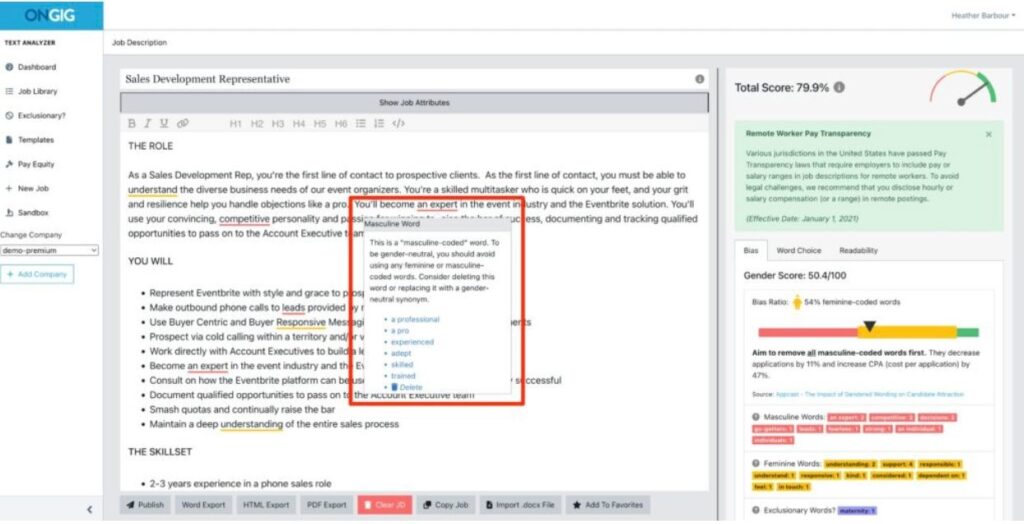
- Suggests Inclusive Phrases: Ongig doesn’t just flag the problematic words. The tool goes further to provide more inclusive alternatives to replace the biased words.
- Bias Inclusion Score: The platform provides a score to highlight the inclusiveness of your JD. This gives you more room to remove and replace any biased words and phrases you might have missed.
- Easily Create Pre-Approved Inclusive Templates: Ongig makes it easy to build bias-free approved templates. There’s also an option to lock some sections that you don’t want just anyone to edit. This locking is critical for any JD-compliant fields.
3. Enhances Effective Job Description Standardization
Job description standardization ensures clarity, consistency, and compliance. Thus streamlining the entire hiring process.
With good JD standardization, the chances of producing bad JDs with discriminatory language, unfair salary range, and misleading information are low.
But maintaining this consistency in JDs isn’t easy. Especially if you’re producing a bulk of JDs at scale, growing rapidly, or operating in regulated industries. For instance, if you’re trying to maintain this JD standardization manually, you’ll find yourself creating JDs with misleading details, wrong benefits, wrong mission description, and values.
How Ongig Job Description Software Helps
Ongig maintains the standardization of your JDs in some of these ways:
- Avails Customizable Templates: The tool provides standardized templates to help create a consistent JD containing all important components, such as job title, salary range, responsibilities, company values, and mission. Plus, you can lock any critical sections that not everyone has access to edit.
- Enables Bulk JD Updating: Doing bulk updates for many JDs takes time. For instance, let’s say you’re updating the benefits sections for your new employees. Manually, you’d have to update each JD one by one. But with Ongig, easily make those multiple changes at once. Thus ensuring consistency.
- Simplifies Building of Organized Content Libraries: You can create and maintain libraries of pre-approved JD content templates for common job description components. To do this, just look at the common elements all job descriptions must have, e.g., the benefits section, mission, and company values. Then create content libraries for that.
- Provides Permission-Based Access Control: The tool creates an administrative control for anyone writing the job description. This creates a clear ownership rule where everyone knows their output. This process ensures consistency by preventing any JD from getting published with errors, incorrect formatting, misleading information, or missing critical details.
4. Provides a Centralized Job Description Library
Simply put, the lack of a job description library is the start of many challenges you’ll experience in your job description creation and management journey.
And some of the challenges you’ll experience are:
- Wasting many hours trying to locate the right JD version
- Building duplicates of JDs
- A poor collaboration process
- Enhancing poor JD standardization
- JDs lacking important sections such as responsibilities, etc
- Poor visibility into your recruitment processes
With all these challenges, you’ll write an effective JD. And attract the wrong candidates.
How Ongig Job Description Software Helps
Ongig provides a cloud JD library that helps in:
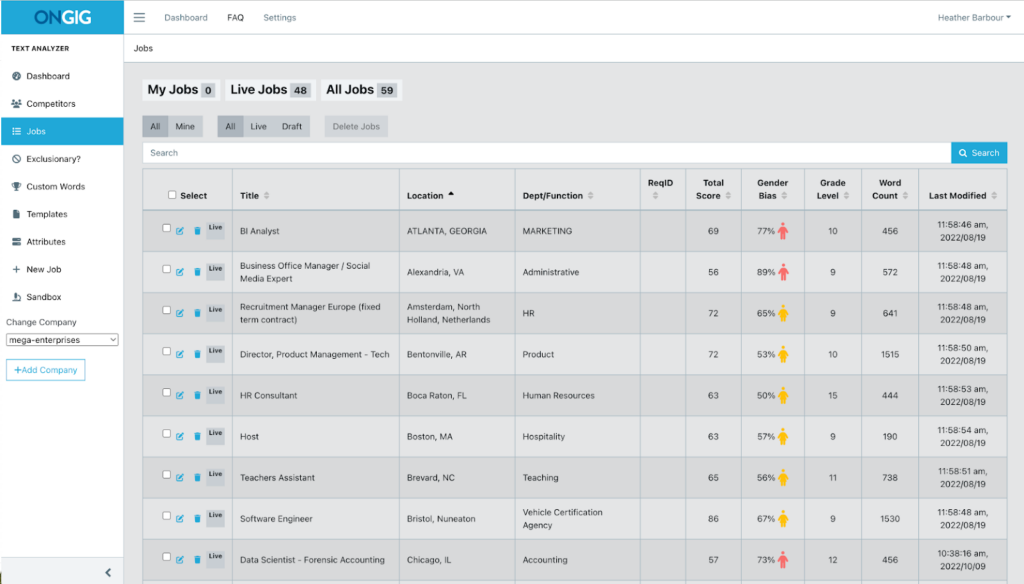
- Easy Searching and Filtering of JDS: Ongig provides advanced search and filter functionalities that help you locate your JDs through the use of relevant keywords such as job titles, skills, salary range, or specific department information. So, it’s easy to compare your JDs. Or use some JDs as templates, and analyze the requirements for different open roles in your organization.
- Quick JD Standardization: The cloud library makes it easy for your JDs to follow standardized formats, organizational branding, tone, and language through the use of customizable templates.
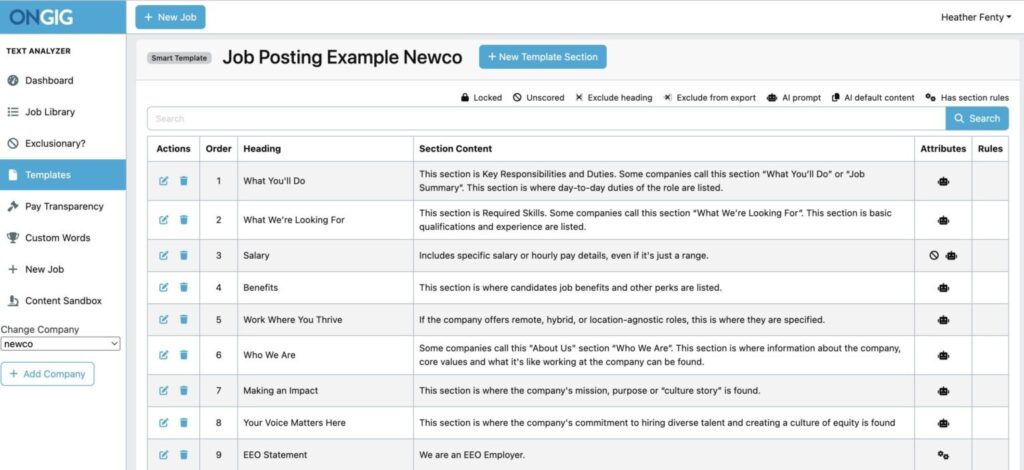
- Speeding up JD Building: With central storage, you don’t spend hours starting to write your JDs from scratch when the need arises. You easily retrieve a library of previously approved JDs for that role and use them as templates. Or for inspiration.
- Streamlined JD Collaboration: A centralized JD library creates a smooth collaboration process by defining the roles of each person writing the JD. This way, you know each person’s tasks, thus reducing back-and-forth conflicts.
Also Read: 10 Surprising Hidden Costs of Not Having a Centralized Job Description Library
5. Simplifies Job Description Process Approval Workflows
Picture this: The job posting publish deadline is approaching, but you keep checking your email, wondering what’s holding up the JD. So, you’re wondering what’s going on since you’re sure everyone made their specific edits. Only to discover that it’s the legal team that’s stalling the JD because they forgot about it.
In the end, this delay in JD approvals leads to missing the posting deadline for the JD.
And this occurs because you have a disorganized manual JD building process. So you don’t know who’s supposed to do what and at what time. Plus, since your team relies on email threads, verbal nudges, and shared docs, information gets scattered.
How Ongig Job Description Software Helps
Ongig lets everyone get involved in the JD building by defining clear approval steps. The tool gives you robust user control features that:
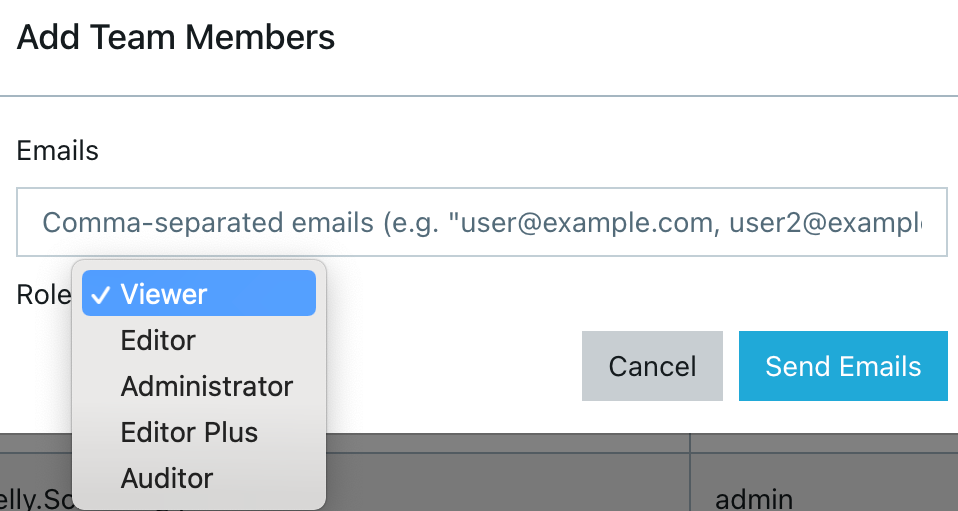
- Define Role-Based Access Permissions
Ongig makes it easy for everyone involved in writing the JD to have specific permissions. For instance, HR heads might have access to write the first JD drafts. And hiring managers might review the responsibilities. And the legal team gets involved only when necessary. This arrangement ensures everyone knows when their input turn reaches.
- Enable Creation of a Smart Workflow
Instead of sending JDs to everyone writing the JD at once, you create an automated, smart sequential JD workflow with the help of Ongig. So each person gets notified only when it’s their time to work on their input.
This makes it easy to track each person’s input. Ongig also makes it easy to build any type of conditional JD workflow logic you want. For instance, you could build a conditional workflow that states the compliance team is only involved when we’re writing a role in a regulated industry, or the DEI team only reviews roles for these specific job titles.
- Custom Email Alerts
You don’t have to bury yourself in constant email overloads for JD approvals. With Ongig’s system, you can create automated email alerts that are sent to the right person when their input turn arrives. And you can send these email alerts with a direct link to the JD, a text explaining their task, and define the deadline. Plus, no one gets CC’d on tasks that don’t concern them since the email alerts are tied to user roles.
- Dashboard for Tracking Progress
Visibility is crucial in any JD approval process. So Ongig provides a dashboard showing the JDs in review, who’s signed off already, who’s delaying approval, and the timeframe for each step.
Plus, you can get reports on your team’s average approval time and any steps that are causing delays. This is crucial data for boosting your JD approval internal process.
Lastly, the tool automatically logs any changes made to the JD. This version control system eliminates any confusion. So your team can compare different JD versions, track edits, and restore any older JD version if there’s a need.
Read also: 9 Steps for Creating a Job Description Workflow
6. Reduces Compliance Risks
Compliant job descriptions not only help you avoid legal issues, but they also attract and help hire qualified candidates. But employment regulations and laws are always subject to change.
So each year or month, you have to keep up with these changes. But manually ensuring all your JDs are compliant becomes tiresome and time-consuming in the end. And any misleading detail could land your organization in legal issues.
How Ongig Job Description Software Helps
Here’s how Ongig Text Analyzer helps you create and maintain compliant JDs:
- Salary Transparency Compliance: The software automatically flags any missing salary ranges. This is critical for states that may require your job ad to have a salary range indicated. Plus, candidates also love JDs that list the salary range.
- Inclusive Language Optimization: The software scans and highlights any biased language that might get you on the wrong side of labour laws. Then it suggests inclusive terms to use. Currently, Ongig flags over 12 types of bias, including race, age, disability, religion, gender, and more.
- OFCCP and EEO Alignment: The tool automatically scans and identifies any missing critical sections, such as the EEO statements in your JDs.
- Comprehensive JD Audits: Any JD change gets tracked with a timestamp and the person responsible for the specific edit. This comprehensive audit trail becomes part of your evidence during any labour-related legal issues your organization might face.
- Provides Customizable Templates: Ongig provides easy-to-use templates you can implement to create any important compliance-required sections in your JD. And you can use these templates across different job descriptions. Plus, you have the ability to lock in templates that not everyone must have access to.
Also Read: Job Posting Compliance: The Hidden Trap That Nearly Cost One Employer Big
7. Creates An Organized Job Description Revision and Update Process
Picture this: Your HR team has a bulk of JDs to revise and update. And they are on a tight deadline to finish the edits.
Unfortunately, you have a manual process for job description revisions. So, this JD revision process takes longer than you expected because of disorganized feedback loops, version control challenges, and clashing edits.
How Ongig Job Description Software Helps
Ongig Text Analyzer organizes your JD revision process in some of these ways:
- Provides Bulk Editing Capabilities: The software makes it easy to perform large-scale job description changes, for instance, editing of organizational mission and values across thousands of JD documents. This also helps maintain consistency across all your organizational JDs.
- Provides a JD Central Library: Ongig provides a centralized library for all your JDs. This way, your JDs aren’t scattered everywhere. So, this makes it easy for your team to build an organized JD revision and edit process.
- Providing Version Comparisons: The software allows you to view the differences between two versions of a JD. This makes it easy to choose the document you want to publish.
- Rollback Capabilities: If you do any unintended changes, the software allows you to return and restore the previous version of a JD.
- Provides Audit Trails: Every JD change gets tracked automatically. You can see who made what changes, when, and what they did. This minimizes back-and-forth conflicts on any specific edits.
This comprehensive revision process frees your team of hours for other strategic HR tasks.
8. Improves Creation of Readable Job Descriptions
Readable job descriptions increase your chances of attracting and hiring qualified candidates. Ideally, a comprehensive job description should be between 300 and 650 words. And read around the 8th-grade level.
But manually enhancing the readability of all your JDs is a time-consuming and tiresome process. So this is where Ongig’s Text Analyzer comes in to improve the readability of the JDs in some of these ways:
Detecting irrelevant phrases and words in your job descriptions
Ongig Text Analyzer uses a few ways to measure readability in a job description:
- It highlights the correct length of the job description
- Recommends the right length of sentences
- The software also highlights the right length of words
- The tool highlights any use of complex words so you can replace them
- The platform also shows the use of adverbs, so you can delete them.
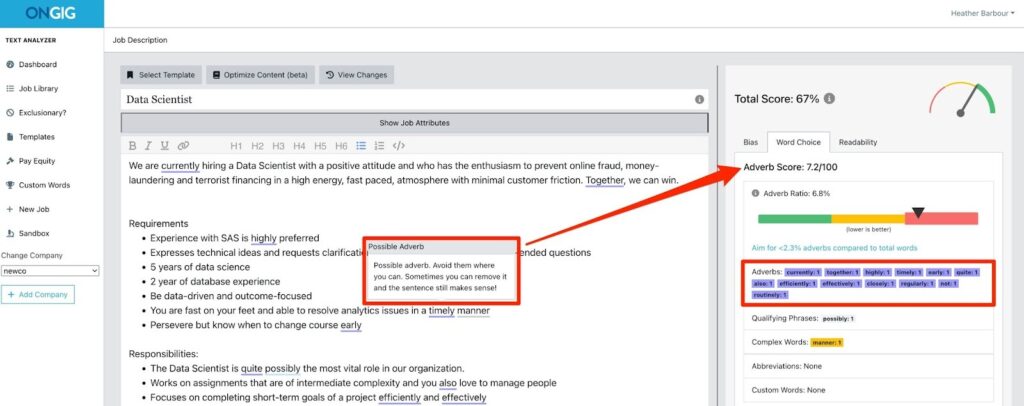
For instance, the job description below for a Data Scientist contains adverbs (the underlined words).
Ongig Text Analyzer shows that 6.8% of the words in the JD below are adverbs. The tool gives the job description a low adverb score (7.2/100) since adverbs don’t add value to the JD. You can always delete adverbs in your job descriptions and no meaning gets lost.
Ongig also has a built-in readability checker, giving you “readability scores” (e.g., 0 to 100). This way, you’re sure of the readability level of all your JDs.
Read Also: Why I Write my Job Postings at the 8th Grade Reading Level (or Lower!)
9. Enhances Easy Integration with Applicant Tracking Systems
An easy ATS integration process streamlines your JD workflow. And speeds up the recruitment process. So, a proper integration with your ATS is a crucial feature that a good job description tool should provide. After all, once your JD gets internal approval, you’ll directly publish it to your ATS.
How Ongig Job Description Software Helps
Ongig provides a smooth integration with your ATS that simplifies your hiring process in some of these ways:
- One Click Publishing: With Ongig ATS integration, you don’t have to input the JD details manually. You publish the details directly into your ATS from Ongig. Thus, building consistency in your published job ads.
- Building Positive Candidate Experience: This integration boosts candidate search functionality for the jobs they need. So they don’t struggle to find the exact job they need from your organization.
- Provision of Efficient Data Analytics: The integration of the two systems makes it easy to get hiring data that helps you know where to improve. For instance, with this combination, you can track the efficiency of your job posts by examining recruitment metrics such as application rates and application completion rates.
10. Boosts Job Description SEO
SEO-friendly JDs benefit both the organization and the job seeker.
For an organization, this increases the visibility of your JDs in search engines and job boards. And for the job seeker, it helps them find a suitable role for themselves with clear information.
And this now helps you find qualified candidates for your job openings quickly. So you don’t spend huge recruitment budgets looking for the right candidates.
How Ongig Job Description Software Helps
Here’s how Ongig boosts your JD SEO:
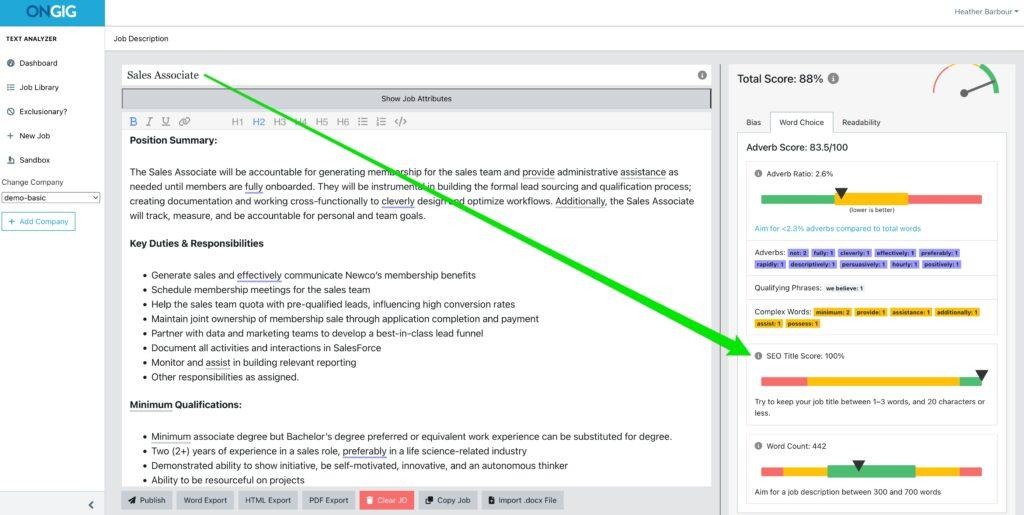
- Job Title Optimization: The tool scans your job titles and compares them to what potential applicants search for. And then provides suggestions on strategies to improve the job title SEO. For instance, in the screenshot below, the software suggests, “Try to keep your job title between 1 and 3 words and 20 characters or less.”
- Improves JD Readability: Ongig flags any unnecessary or complex words from your JD. These include replacing jargon, obscure acronyms, and biased wording. Then it suggests replacements for those words.
- Smart Templating: Ongig provides customizable smart templates to apply compliance and SEO best procedures across all your JDs.
With good JD SEO, you make it easy for qualified candidates to find your JDs without struggle.
Also Read: 10 Helpful Optimization Tips for SEO Friendly Job Descriptions
FAQ: Benefits of Using Ongig JD Software
1. What makes Ongig Different from other Popular Text Text editors, such as Excel and Microsoft Word?
Text Editors such as Excel and Microsoft Word aren’t specialized job description software like Ongig. Ongig stands out with up-to-date AI JD editing, bulk job updates, simplified JD approval workflows, comprehensive ATS integrations, and bias detection.
2. Does Ongig provide a job description library?
Yes. Ongig provides a cloud repository to store, search, revise, and manage all your job descriptions.
3. How Does Ongig Help with Outdated and Inconsistent Job Descriptions?
Ongig identifies technical language and jargon, and recommends simple alternatives. Thus, improving job description clarity.
4. How does Ongig solve the JD approval Challenges?
Ongig provides role-based permission approvals, version control, and workflow automation to simplify the approval process.
5. How does Ongig Minimize Job Description Bias?
Ongig flags different 12+ types of biases and complex phrasing. Then the tool suggests inclusive phrases to replace the biased ones.
6. Does Ongig Integrate with my Applicant Tracking System (ATS)?
Yes, you can integrate Ongig with any ATS you use. And we also integrate with popular ATS such as Workday, Greenhouse, iCIMS, SAP SuccessFactors, and more.
WHY I WROTE THIS:
There’s no way your recruitment efforts can succeed if you don’t have good job descriptions. You’ll continue hiring unqualified people. And waste company resources to hire other candidates.
An effective JD is the foundation of a successful hiring process. And our mission at Ongig is to simplify your job description journey by helping you write good job descriptions.
Schedule a demo today to learn how we can help you write good JDs, simplify the JD approval process, provide a unified storage for your JDs, and more.
