Let’s be honest, writing a good job description isn’t easy. Especially if you’re creating the JD manually.
The sight of a blank JD document just makes you tired because you know creating a comprehensive job description is tiresome and time-consuming.
Good news, this is where AI agents come in to reduce the JD writing tasks. With a few good prompts, you get a good draft in a few minutes. Read on to understand how AI can help with some of your JD writing tasks, such as creating the first draft.
Why Manual Job Description Writing Processes are a Headache
The manual approach to writing job descriptions is a paper-based, time-consuming process.
JD writing teams start writing JDs from scratch, relying on their knowledge of the open position. And with this process, it becomes easy to miss out on including important JD information.
Plus, this strategy complicates the feedback and collaboration process. The job description has to be manually circulated for everyone to review and leave their suggestions. This creates a backlog of work and conflicting edits.
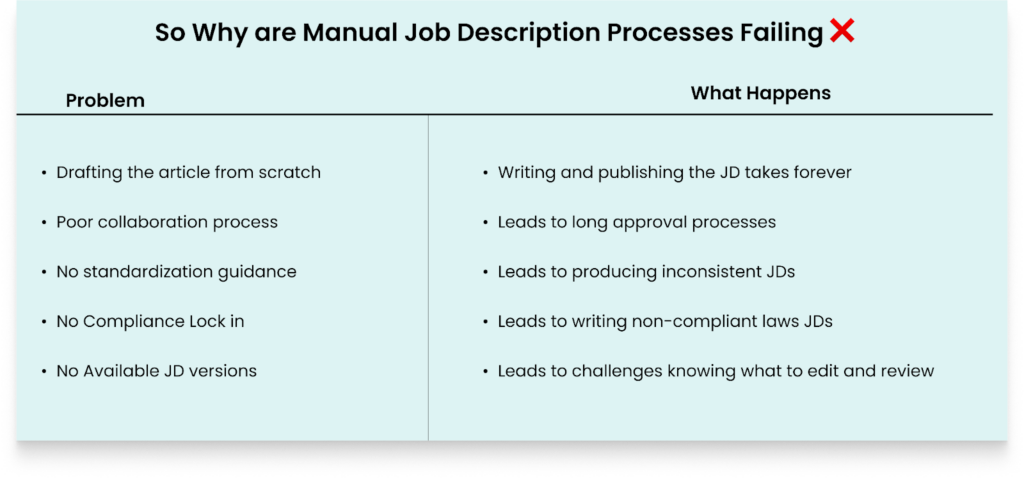
In the end, your team produces JDS that are:
- Inconsistent with your brand and other JDs
- Biased towards different types of candidates
- Missing some important, overlooked sections, such as a salary range
- Not optimized for search engines
- Using confusing language full of buzzwords and jargon
So read on to understand how AI Agents for job descriptions solve these challenges. And also learn how to maintain a human touch when using AI to write your JDs.
What are AI Agents for Job Descriptions?
Simply put, AI agents for job descriptions are tools built for specific job description tasks.
These tools are trained and preloaded with your tone, voice, compliance needs, and DEI best practices to implement. With a few prompts, you get your desired job description.
And depending on the tool you select, you also get to use your voice and state the kind of JD you need, and the AI job description agent will produce that draft in a few minutes.
In the end, these tools minimize 80% of your job description work. Thus, leaving you to handle the rest of the tasks because they aren’t a replacement for writing JDs, but a tool.
How TA Teams are Using AI to Write JDs
AI is helping speed up most recruitment processes, including writing job descriptions. But you might be wondering how TA teams are using AI to write job descriptions.

So here are some JD tasks that JD writing teams are turning to AI for help:
- Automating 80% of the JD draft: JD writing teams are handing over the tedious work of writing the first JD draft to AI. This process saves any recruiter many hours they would have spent brainstorming the first JD draft.
- Reducing JD approval time by 60%: Since AI does the first tedious part of writing a job description, the remaining work isn’t so taxing. So the editing, reviewing, and approval process doesn’t take long.
- JD Editing: Different JD writing teams are using AI tools to edit their job descriptions to improve tone, clarity, and even inclusiveness.
- JD A/B Testing: JD creation teams are using AI to produce different versions of the same JD to identify the better version that can attract qualified candidates. For instance, they are testing different JD titles to identify the perfect one.
- Job Description SEO Optimization: With AI, it’s easy to paste your JD and let the tool identify the right keywords to implement for your job description’s SEO.
- JD Competitor analysis: Teams are using AI to identify the factors that make their competitors’ job descriptions good.
So, implement some of the strategies above to identify the parts of your JD creation journey to speed up.
Read also: The Real Reasons TA Teams Are Not Using AI (Even When They Want To)
Step-by-Step Guide to Using AI Agents To Write Job Descriptions
To succeed in using AI for your JD creation, you need to understand the steps to achieve the best results. If you don’t have laid out strategies in place, you’ll get a generic JD. I’ll share the steps to implement to get started.
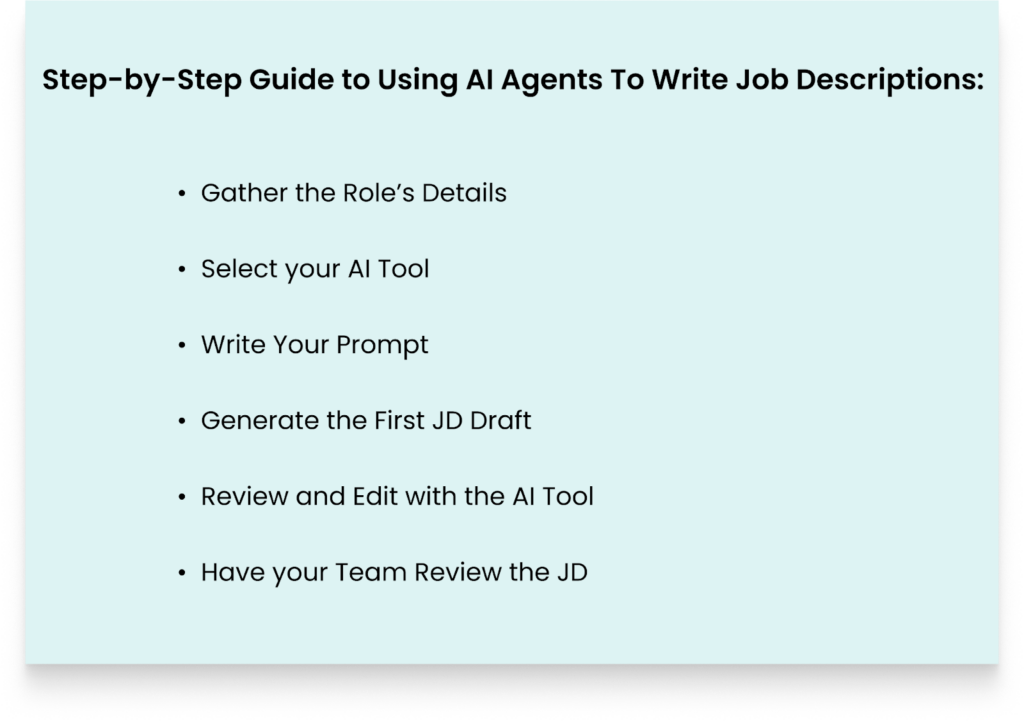
Here are some of the steps:
Gather the Role’s Details
Before you jump straight to your AI tool, have all the information for the role in one place. For instance, this includes the role title, qualifications, responsibilities, salary range, skills, and company culture. Doing this reduces the high chances of the AI tool hallucinating and producing a confusing JD.
Select your AI Tool
This step also determines if you’ll get a good or generic job description. So select a tool you’ve seen that can handle any JD challenges you have. For instance, if your biggest challenge is knowing how to produce an unbiased JD, look for a tool that can solve that specific challenge.
You can either select a standalone AI agent tool for your job description or a specialised JD-writing tool with AI-powered capabilities.
Write Your Prompt
The more comprehensive and detailed your prompt is, the better your JD will be. To craft an effective prompt, include role-specific details such as job title, key responsibilities, salary, your company information, and the must-have and required qualifications.
And lastly, highlight any unique selling points of the open role.
TIP: Here’s a prompt you can copy and paste to your preferred tool to get a good JD draft:
PROMPT
Write a comprehensive job description for the role of:
Job Title: {Open position’s Name}
Location: {State/Remote, Hybrid, City}
Position Type: {Part-time, Contract/ Full-Time}
Salary Range: {State yearly salary range}
ORGANIZATION OVERVIEW
{Organization name} is a { company type description} our work involves { main products and services}. At {organization name}, we value..
Job Description Summary
Our company is seeking a {job title} to {open position’s objective}. A qualified applicant will {a brief description of the candidate profile}
Key Responsibilities
- First critical responsibility
- Second critical responsibility
- Third critical responsibility
- {Add more important responsibilities. But no more than 7}
Requirements
-Education: {Write the required degree and certifications}
-Experience: {Highlight the years of experience, unless the open position doesn’t need it}
-Technical Skills: {Specify any technical needs}
Preferred Qualifications
- Minor additional skills to stand out
- Any industry experience for the open position
- Certifications related to the job
Compensation and Benefits
- Salary: {Outline the annual salary range}
- Benefits: {Specify the benefits your company offers}
- Culture: {Outline how your company environment contributes to a good working experience}
- Career Growth: Highlight how your organization helps applicants grow their careers.
How to Apply:
{Highlight all the application steps of your organization}
EEO Statement
{Your company name} is an Equal Opportunity Employer. We’re committed to creating an inclusive working environment for everyone.
With this prompt, you’ll get a good JD draft.
Generate the First JD Draft
At this step, run your prompt to get at least three different versions of your JD. Then compare the three drafts to identify the one that’s of a good standard. And can attract any qualified candidate.
Review and Edit with the AI Tool
Now, if you identify any problematic or generic sections, prompt your AI tool again to improve those sections. For instance, use prompts such as, “suggest ideas to make this section inclusive”.
Have your Team Review the JD
Share the JD with your team so they can review, analyze, and decide if the JD is good. At this stage, you’ll also do a lot of personalization to the JD. And delete any problematic sections or biased words.
With this step-by-step guidance, you’ll manage to finish at least 70% of the stressful JD tasks.
Read also: How to Use AI to Write the Best Job Descriptions and Job Postings
Why Human Touch Still Matters and How To Maintain It
AI is a tool; it’s not a replacement for any of your team members.
Yes, AI helps with efficiency by producing a good draft in minutes. But AI still hallucinates and produces confusing context. The language is also robotic, and candidates can spot that your organization didn’t put any effort into writing the job description.
Plus, AI biases in hiring still exist. A notable case of AI-driven hiring bias occurred when Amazon used a new AI hiring tool that was biased towards female applicants across all technical roles. And this is because the tool was trained on past resumes of men. Then Amazon stopped using the tool.
So, a good approach when writing JDs is a combination of AI and humans.
Human beings add authenticity, creativity, and empathetic tone in the JDs.

Here are some tips to do this:
Let Your Team Write the Company Culture and Values
No one knows your organization’s culture better than your team members, so let them handle this aspect. Your team will understand how to infuse real organizational traditions, the collaboration processes, and the unique challenges. Plus, they know how to include any appropriate jokes they use the organization.
Use Conversational Personal Language
Sometimes, no matter how you edit your prompt, AI still uses formal language for your job descriptions. So let someone edit the JD to sound like your workplace is. If you value casual language, let someone edit for that tone.
Don’t Hide the Challenges of the Job Opening
AI tends to lean towards the positive side of things. So let your team highlight any unique challenges that come with the job. For instance, if the job requires working long hours in some months because of a specific reason, state that.
Include Real Voice Videos of Current Employees
Add one or two videos of your employees sharing their experiences working for your organization. This authenticity motivates prospective qualified employees to apply for the job opening. Plus, this starts building a connection with a prospective candidate with your organization. Because they now start picturing themselves working there.
Let a Human Being Handle the Final Decision
Let a human on your team, possibly the hiring manager, review the job description one last time. And give the decision to proceed with the JD publishing or edit the JD.
And before the JD goes live, test it with your current employees. Let them tell you if the JD feels like it was written with the help of AI or if a human wrote it.
Tips to Measure the Success of AI-Produced JDs
It’s important to set key performance indicators (KPIs) to guide you to continuously boost your AI-written job descriptions’ effectiveness. Tracking these KPIs helps you pinpoint the key JD challenges. And hence guide your decision-making.
So consider tracking some of the following metrics:
- Time to fill: Analyze how quickly open positions are filled using the AI-created JDs as compared to your manually written job descriptions.
- Application rate: Track the number of applications each job posting receives. This will let you know if the JD is good enough to attract a wide range of qualified candidates.
- Applicants’ feedback: Run an anonymous survey by asking your candidates to give you insights on the quality of the job description. For instance, you can ask questions such as, “Do you think this job description has described the role’s details effectively.”
- JD completion rates: Monitor the number of candidates who read your JD and end up applying for the job. If you see that the number of applicants who read your job description and drop halfway is high, that means your JD is unclear.
- Demographic diversity: Monitor if the JDs are attracting candidates from various backgrounds. Because if you’re not attracting a diverse range of applicants, then your JDs aren’t inclusive.
By examining these metrics, you’ll spot areas for improvement. And you can refine the AI JD creation process.
Read also: 10 Best Ways to Rewrite Job Description Content with AI
Questions to Ask Before Using an AI JD Tool
Before investing in any AI tool, ask yourself some of these critical questions:
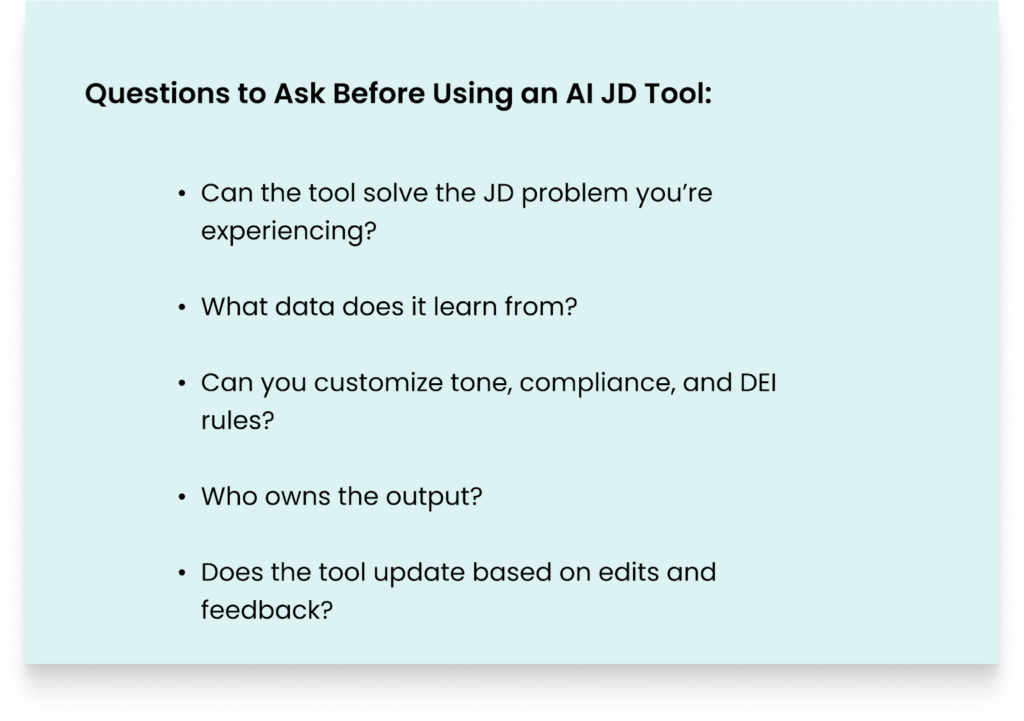
- Can the tool solve the JD problem you’re experiencing? Before you invest in an AI tool, understand your main JD creation challenges. Is it poor JDs, confusing JD version control, slow JD creation, or writing biased JDs? If you can’t understand your JD problems, then you’ll invest in the wrong AI tool.
- What data does it learn from? It’s critical to understand the data the AI tool learns from. And a tool that learns from company-specific data will provide a good JD. This is because it studies your organization’s data to generate an authentic job description. But an AI tool that studies only generic data generates a generic JD.
- Can you customize tone, compliance, and DEI rules? Check whether the tool can align with your company’s diversity, tone, and legal standards. For example, can it let you define whether the JD’s tone is casual or formal? And does it enable you to upload your organization’s JDs style guide?
- Who owns the output? You need to understand if the AI tool allows you full ownership of the JD, as this is important for legal and security considerations. Plus, ask if they use the data to train their AI tool.
- Does the tool update based on edits and feedback? This question addresses whether that particular tool learns how you’re writing the JD. And whether it can update to how you want some sections of the JD to be. For instance, let’s say the tool keeps writing buzzwords such as “talented ninja,” and you keep deleting them. Can it stop suggesting and using those buzzwords?
Asking these questions ensures your organization doesn’t invest in a tool that brings no results.
What is the Future of AI in Job Description Writing: Trends to Watch in 2026
AI technology is changing the way organizations build job descriptions. Here are some 3 likely trends to watch out for in 2026:
High Personalized Job Descriptions
AI tools are increasing each month with advanced technology. And this means better algorithms to produce highly personalized JDs. The tools can examine different types of data to write a personalized JD.
The platforms can suggest phrases to use, words to eliminate, and sections to add to boost the personalization of JDs.
Plus, AI tools are advancing to optimize JDs content to work seamlessly across all your preferred job boards and social channels. This improves your reach of more qualified applicants.
High-Quality Job Descriptions Creation at Scale
Most AI tools still produce generic job descriptions that require more manual edits. But month in, month out, the tools are advancing and producing consistent JDs at scale. This removes the many hours wasted to produce high-quality JDs at scale.
Dynamic Job Description Content Optimization
In 2026, AI tools will continue to advance to automatically adjust JDs based on current market insights, such as:
- Suggesting current benefits that applicants are looking for to boost competitiveness
- Optimizing work skills based on current labor needs
- Suggesting the correct salary ranges to use to match market demands
Staying on top of these trends means you’re aware of what AI tools can actually help you achieve when it comes to simplifying your JD creation journey.
Ongig’s Take on AI and JDs
Ongig has been helping organizations manage and create good JDs for over a decade. Multiple organizations have collaborated with Ongig to:
- Automate JD Workflows
- Generate good JDs with AI in a few minutes
- Build JD standardization at Scale
- Help attain Diverse Goals
- Increase application rates
- Improve the JD collaboration process
And our platform integration with AI helps you create high-quality, inclusive job descriptions in a few minutes.
Here’s how:
Creating new job descriptions from scratch with an automated job description builder, Ongig Text Analyzer
You can create job descriptions from scratch by typing a job title into the Text Analyzer. Here’s how it works.
In Text Analyzer, open a new job, click the “Write Sample” button, and write in a title, “Web Developer,” for instance:

Choose the sections you want to include (based on your custom templates or a template ongig recommends based on research). Then click the “Generate Now” button:
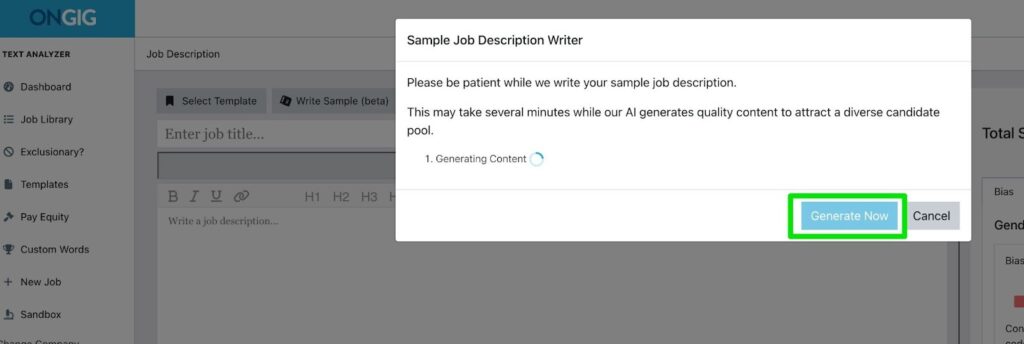
Text Analyzer then leverages AI to build a Web Developer job description you can use. If any content or sections you want to include are missing, you can edit the draft to fit the position:

Then, to minimize masculine bias and reduce long sentences in the JD draft, you’ll click “Optimize Content” and the “Rewrite Now” button:
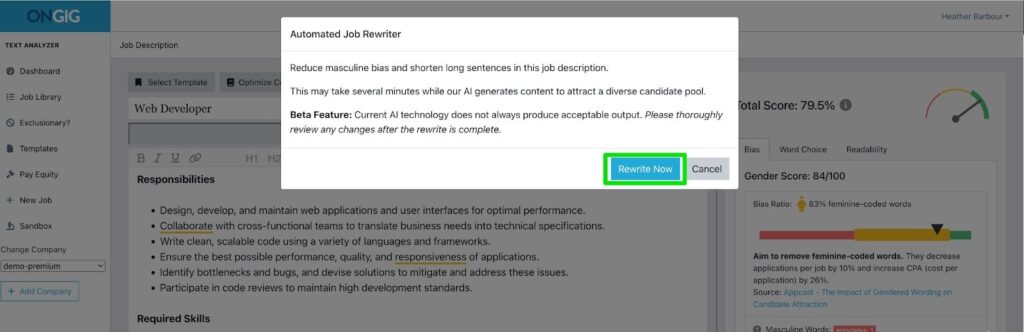
After that, the software uses AI to boost your JD draft, and you’ll notice a score increase. The total score for this job description rose from 79.5% to 83.3%.
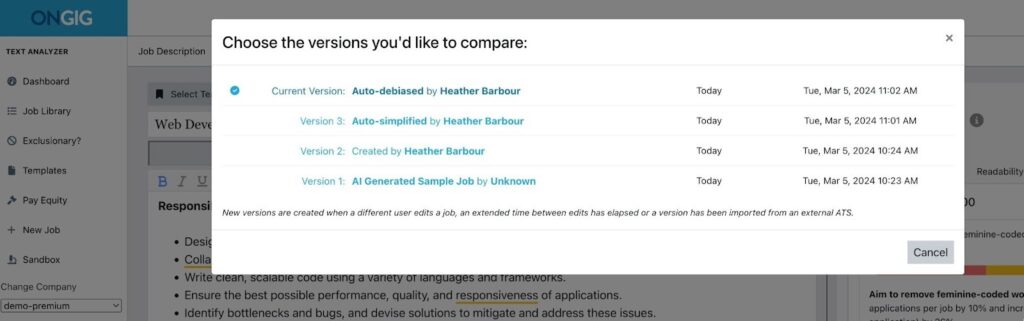
To further boost the JD’s draft inclusivity, click to replace any feminine phrases with gender neutral terms. You can also click “View Changes” to see a comprehensive comparison of your JD versions.
Once you’re done with your JD edits, easily export a copy of the job description to Word, PDF, or HTML. There’s also an option to push your job posting directly to your ATS through API integration for our professional and premium plans.
Tip: Learn more about the process above in the video below, if you prefer video learning. Ongig’s head of content and strategy, Heather Fenty, shows you how you can use Ongig to:
- Build a job description from scratch
- Optimize the JD content for inclusivity
- Review and edit the draft to reduce bias and increase readability
Streamlining Job Description Creation with Ongig’s Text Analyzer
Lastly, at Ongig, we encourage a hybrid approach of using AI and humans to create JDs. AI still makes mistakes. So AI is a tool, not a replacement for your team.
Why I Wrote This
At Ongig, we’ve helped hundreds of TA teams write good JDs faster. We’re not a standalone AI agent like most AI Job description generators, but a comprehensive AI-powered JD software that can help you build good JDs in a few minutes. Request a demo today to see how Ongig can help you write job descriptions that are compliant, inclusive, and never boring.
FAQs:
- What is an AI agent for writing job descriptions?
A trained, task-specific AI tool that helps generate job descriptions using your tone, templates, and DEI goals. This means you can customize it to generate any type of JD you want.
- Can AI replace human writers for job descriptions?
No, yes, AI can draft a good job description in minutes. But there’s still a need for a human to review, edit, and approve the JD for publishing.
- How do I know the AI is using inclusive language?
Good JD AI tools like Ongig Text Analyzer flag biased phrases and highlight inclusive alternatives automatically.
- Is using AI for job descriptions legal?
Yes, but ensure it supports compliance with employment laws and regulations such as OFCCP, ADA, and pay transparency rules.
- What’s the biggest mistake people make with AI JD tools?
Assuming the tools are perfect plug and play, that doesn’t make mistakes. This assumption makes people ignore guiding the tool on what it should produce. So you get a biased and incorrect JD.
