A good job description determines how successful your entire recruitment strategy will be.
Yet most organizations still don’t put much effort into organizing their JD processes.
The JDs are either written manually or using general writing tools such as Google Docs.
This disorganized process makes JDs lack a central library; they live in Shared Drives, Outdated folders, and email threads. And this leads to a messier JD process. For instance, approval becomes chaotic, collaboration becomes painful, and getting feedback becomes tiresome.
So in this article, I’ll help you understand the different ways Ongig can help you streamline inefficient job description processes.
Let’s dive in.
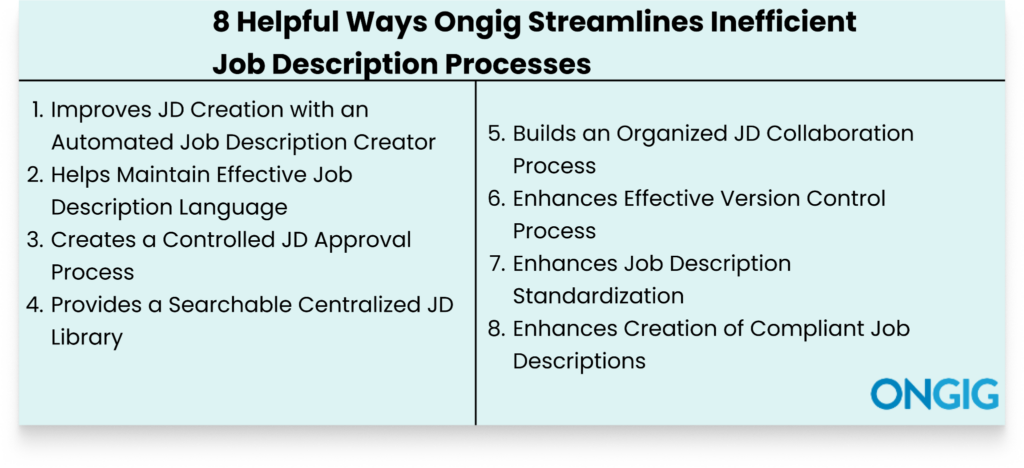
1. Improves JD Creation with an Automated Job Description Creator
If you’re still managing your job description creation process manually, I’m sure you’re encountering these challenges:
- The creation process takes longer than you’ve expected
- Each time you start the creation process from scratch, because you don’t have templates to use as leverage
- The collaboration process with your team is a mess. And the approval process takes longer than planned
- Your job descriptions aren’t inclusive of all candidates
The truth is, there’s no way to build an organized job description process manually. For instance, if you create your JDs in Word Documents or Google Docs, there’s no content guidance from the tools. You only get grammar guidance, whilst your JD is full of discriminatory language that the two tools can’t spot. So you spend hours trying to create a good JD.
In the end, you produce JDs that don’t attract any qualified candidates. Instead, you write JDs that only attract the wrong candidates.
HOW ONGIG JOB DESCRIPTION SOFTWARE HELPS IMPROVE JD CREATION
Here’s a step-by-step process on how Ongig’s Text Analyzer boosts your job description process:
- Simplified User Management: Ongig’s Text Analyzer lets you add as many users as you want, each with different user privileges for writing your company’s job descriptions (such as Editor, Administrator, Auditor, and Editor+). This forms the foundation of how you’ll collaborate to create your JDs.
- AI-Assisted Job Description Creation: Writing your job description using Ongig is easy. Input your job title, and the tool will leverage AI to produce a good draft. The AI creator monitors important factors such as industry standards and the role requirements. This way, the generated JD content is relevant and comprehensive.
- Customized Template Creation: Select templates that Ongig recommends to quicken the creation process. Or leverage templates you’ve already created.
Optimizing JD Content:
Once the AI has built your draft, use Ongig’s optimization features to improve different sections of your JD.
So, click “Optimize Content” to minimize bias based on gender, race, age, and more.
Plus, you’ll also get intelligent recommendations to improve the readability of the JD. For instance, you might see suggestions on sentences to shorten, hard-to-read words to delete, and a correct job title to use.
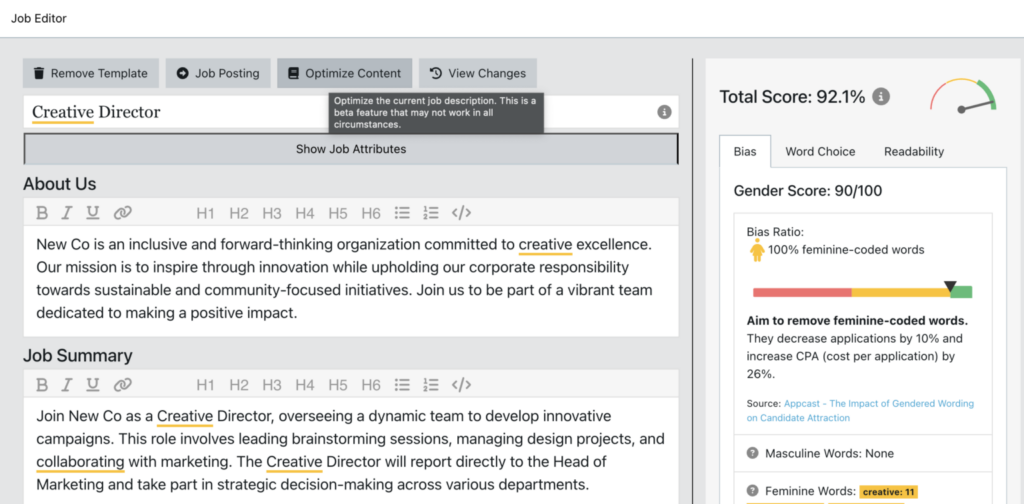
Plus, you’ll also see your JD score improve as the tool polishes your JD draft.
⚡Pro Tip: This short 4-minute video will help you learn more about this process:
2. Helps Maintain Effective Job Description Language
“We’re looking for a rockstar software engineer who hits the ground running.” Now, imagine applying for a software engineer role, and coming across phrases such as “rockstar” and “hitting the ground running”. You’ll get confused trying to understand the kind of experience you should have to apply for that role.
That’s why every word and phrase in a JD must have a meaningful meaning.
There are many factors you should consider to maintain effective JD language that makes it easy for your candidates to follow through with the document. For instance:
- Avoid internal jargon that only you and current employees understand.
- Use inclusive language that appeals to all candidates irrespective of their age, gender, race, nationality, and felony status.
- Use action verbs when describing your responsibilities so candidates can clearly understand their day-to-day tasks. For instance, use action verbs such as negotiate, develop, and oversee.
- Use standard job titles, avoid jargon such as “rockstar designer,” just use “product designer.”
This way, you increase your candidate pool. And avoid issues of candidates leaving your JD halfway because they can’t understand the kind of candidate you’re looking for.
HOW ONGIG JOB DESCRIPTION SOFTWARE HELPS WITH JD LANGUAGE
Here’s how Ongig helps you remove any guesswork when trying to understand the effectiveness of your JD language:
- Biased Language Flagging: Currently, Ongig flags 12+ types of bias in JDs, including age, gender, race, nationality, and more. Then the tool recommends inclusive phrases you can use.
- Flags Complex Words and Adverbs: Some words make it difficult for candidates to read the JD to the end. So Ongig highlights those complex words. And then provides synonyms to replace the difficult words. Also, adverbs don’t add any meaning to a sentence. For instance, you can remove an adverb such as “extremely” and your sentence won’t lose any meaning. So, Ongig also recommends deleting adverbs and provides synonyms to replace them.
- Readability Recommendations: The tool provides additional suggestions to improve your JD readability. For instance, it highlights areas where to use bullet points. Then, at the end, it provides a readability score to help you understand how readable the JD is.
3. Creates a Controlled JD Approval Process
JD approval is a critical stage in the job description creation process.
And the process involves many stakeholders, such as recruiters, the DEI team, the compliance team, hiring managers, department leads, and more.
And all these teams have their own edits, inputs, and review requirements.
So without an organized approval workflow, it becomes challenging to understand who’s supposed to approve, who hasn’t approved, who hasn’t provided their input, and who has the final say. And now this brings more issues, such as:
- Everyone is doing endless reviews
- Endless email chains of approvals because there’s no organized feedback structure
- Manually informing all team members that their approval and review time has reached
In the end, this lack of visibility in the approval process leads to time wastage. And your JD gets published late.
HOW ONGIG JOB DESCRIPTION SOFTWARE HELPS WITH JD APPROVAL
Here’s how Ongig simplifies your JD approval process:
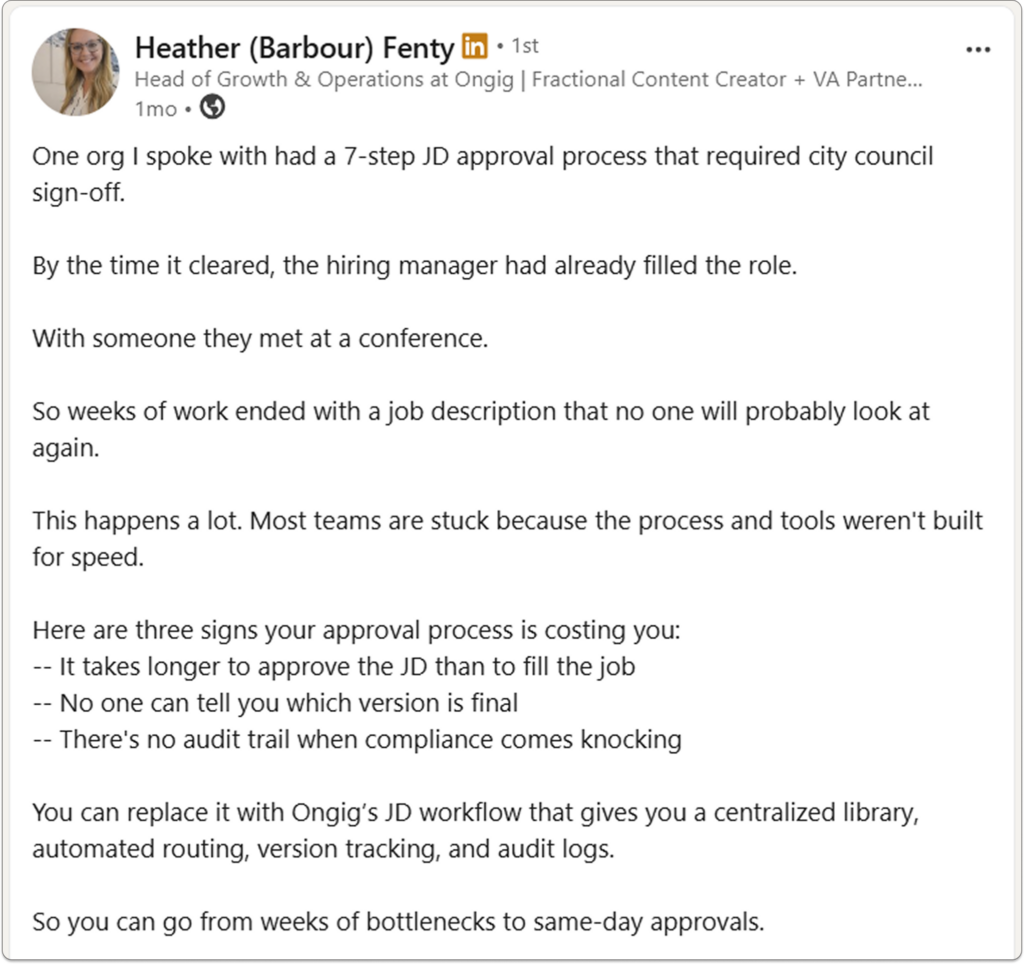
- Establish Roles and Permissions: Ongig helps you define clear ownership. This way, you can know who’s responsible for what and at what time. For instance, you can assign permissions based on role and create a structure that states that recruiters suggest edits, hiring managers review the responsibilities, HR maintains good formatting, and compliance checks the JD before it’s published.
- Build a Smart JD Workflow: With Ongig, it’s easy to create an automated JD workflow that guides your approval steps. For instance, you can build a smart JD workflow that includes steps such as the recruiter submits the JD draft, the hiring manager provides input, the HR team reviews formatting, and final signoff goes to the hiring manager.
- Trigger Personalized Email Alerts: Ongig eliminates the tiresome work of your team digging through endless email threads for approvals. The tool makes it easy for you to build an automated email notification. And when the time arrives, the right person receives an email trigger that contains the link to the JD and the deadline.
- Real-Time Approval Visibility: JD approval visibility helps you understand what’s working and what’s not working. So Ongig provides a live dashboard that helps you understand JDs in review, who has signed off, who’s holding up the process, and how long each step takes.
4. Provides a Searchable Centralized JD Library
If you’re still managing your JD process across Microsoft Word, Google Docs, spreadsheets, and shared drives, then you’re slowly creating a costly, inefficient JD process. And your JD information is scattered across folders and documents.
This lack of a central library for your JDs creates challenges such as:
- Creating a JD from scratch each time
- Having standardization issues with your JDs
- Having duplicate work
- Poor version control of your JDs
- Poor collaboration process
But a JD library centralizes all your JD work in one place. So you don’t have to do guesswork on a lot of issues. For instance, if you want to understand which team is currently dragging the creation process, you log in and see.
HOW ONGIG JOB DESCRIPTION SOFTWARE HELPS WITH JD LIBRARY
Ongig provides a searchable cloud library for your JDs that simplifies your job description process in these ways:
- Easy Search and Filtering of JDs: The JD central repository makes it easy to filter and search your JDs by keywords, job title, and department. So you don’t have to search different folders and documents to get the JD information you want.
- Quick JD Creation: With the library, you easily access all your previously approved and published JDs. So you use the JDs as templates instead of starting the whole creation from scratch.
- Centralized Communication: Anyone creating the JD can leave their inputs in one central location. Thus reducing the challenges of scattered information that wastes time.
- Efficient Template Process: The job description library provides templates that ensure all your JDs follow the same standardization guidelines. Plus, you can also create your templates and store them in your JD library.
5. Builds an Organized JD Collaboration Process
“Why are these edits conflicting with what’s needed?” “Why can’t I locate the latest feedback on this JD document?” “Who’s working on this draft now”?
The above are some frequent questions you’ll always ask yourself when writing JDs using a scattered JD collaboration process.
Job description creation isn’t a one-person process; it’s a team effort. Different people in different teams have to provide their edits and feedback.

Image Source: Unsplash
So you need a central place for building your JDs. This ensures all communication stays in one place. This way, you can easily see all comments, suggestions, and edits without digging through endless email chains.
HOW ONGIG JOB DESCRIPTION SOFTWARE HELPS WITH JD COLLABORATION
Ongig eliminates the painful process of disorganized collaboration in these ways:
- Provides Centralized JD Creation Location: With Ongig, all JD creation happens in one place. So there’s no scattered feedback details. You can see all edits and suggestions related to the JD without having to read many different email threads.
- Role-Based Access: Everyone writing the JD does only what they’re supposed to do because Ongig makes it easy to provide everyone with specific access. For example, if the recruiter’s tasks are to edit the JD content, that’s the only work they can do. This job description process reduces conflicting edits that happen when creating JDs.
- Automated JD Approval Routing: Ongig eliminates any approval delays by helping you build an automated JD approval process. Once a specific person has completed their approval and review, the JD automatically moves to the next team or individual.
- JD Audit Trail: The tool logs all changes made in the JD. You get visibility into everybody’s work.
6. Enhances Effective Version Control Process
Good JD version control doesn’t usually seem like a critical issue until you spend hours trying to find the right job description document, understand who made which changes, and try to reconcile conflicting edits.
Job description version control doesn’t only affect locating documents. It’s what guides the creation of your job description process from drafting to publishing.
Without an effective JD version control process, there’s always confusion, for instance:
- You can’t understand the current document for edits
- Everyone uses their own formatting guidelines
- Overlapping edits occur because there’s no proper editing process
- Compliance risks occur because there’s no one to oversee the process
In the end, you write a job description with unclear requirements. And waste time you could have used for more HR work.
HOW ONGIG JOB DESCRIPTION SOFTWARE HELPS WITH VERSION CONTROL
Here’s how Ongig simplifies your version control process:
- JD Version Comparisons: Easily compare your JD documents to understand the one to proceed with.
- Provides Audit Trail: See the entire creation process of the document. You can see who worked on what, the time they worked, and the reasons for the changes.
- Centralized Cloud Library: Your JDs stay in a single place. So you can easily manage them and get the information you want quickly.
- Rollback Capabilities: With Ongig, you can restore the JD version document you intend to proceed with if you had deleted it by mistake. So you don’t start the process from scratch simply because of a slight error.
7. Boosts Job Description Standardization
Consistency is key to ensuring clarity in your job descriptions.
But if your job descriptions have standardization issues, there’s no clarity. And this leads to different challenges in your hiring journey, for instance:
- Compliance Risks: Non-standardized JDs don’t factor in any legal risks that might creep into the JD. For example, you might find yourself producing a JD biased against candidates of a different race.
- Time Wastage: With poor JD standardization, you’re always reconciling details and updating changes from scratch.
- Pay Inequity: The lack of consistency makes it difficult to benchmark your open roles to understand the correct salary range to include.
- Recruitment Delays: An inconsistent JD attracts the wrong candidates. And this means you won’t hire any qualified candidates at the time you had set. So you will keep hiring and hiring until you find the right fit.
How Ongig Job Description Software Helps with JD Standardization
- Provides Smart JD Templates: Ongig allows you to use pre-approved templates to create your JDs. It also makes it easy for you to build your own JD templates. The tool also allows you to “lock in” some sections that you don’t want everyone to edit.
- Creates Efficient Role-Based Workflows: The tool helps you build a standard workflow that guides all your job description stages by ensuring everyone does only their assigned tasks.
- Efficient Version Control: Ongig helps you track every change in your JD. So there’s no chance of producing duplicate work or some team members working on the wrong JD document version.
8. Enhances Creation of Compliant Job Descriptions
The lack of a centralized job description process makes it easy for compliance issues to slip into JDs.
With a disorganized JD process, JDs are created in Microsoft Word or Google Docs. And the JDs are also manually passed to different team members.
With this disorganized creation process, it’s how you later find compliance risks in your JDs, such as:
- Discriminatory language
- Outdated EEO statements
- No salary range included
- Different types of bias, such as bias against age, gender, race, nationality, and more
- Vague OFCCP language
Non-compliant JDs don’t just get you on the wrong side of employment laws. But they also make you lose out on qualified candidates applying to your JDs.
For instance, a qualified female candidate might read your job description and find offensive words. And because of that, she stops reading your JD.
To make it worse, job boards may sometimes start pulling out your JDs if they are non-compliant.
HOW ONGIG JOB DESCRIPTION SOFTWARE HELPS WITH JD COMPLIANCE
Ongig helps you create compliant JDs in these ways:
- Pay Transparency: Ongig helps job creation teams include the salary range in their JDs. If you try to publish a JD without the salary range, the tool will notify you.
- Discriminatory Language Flagging: The tool highlights all discriminatory words and phrases in your JDs. Then recommends inclusive synonyms to include.
- Organized JD Approval Process: The platform helps you create a step-by-step JD approval process that ensures no one approves work in the JD they aren’t allowed to approve.
- Mandatory Section Inclusion: The tool ensures important compliance sections, such as EEO statements, aren’t left out of the job description.
- JD Audit Trails: The tool shows the whole JD creation process. You can see all the changes that happened. So if you find yourself in any labour legal challenge, you can provide the audit as part of your evidence.
Hidden Ways Inefficient Job Description Processes Negatively Impact Your Recruitment Process
There are some hidden challenges that an inefficient job description process leads to, such as:
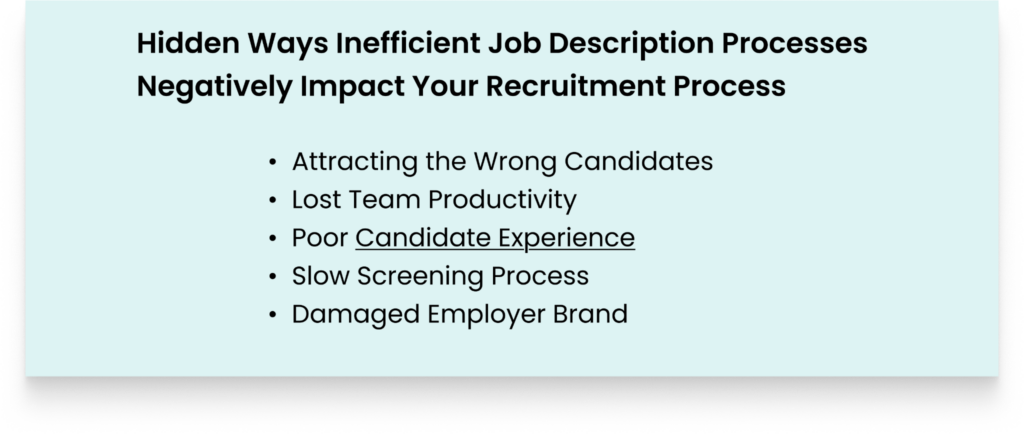
- Attracting the Wrong Candidates: Bad JDs don’t clearly state what the responsibilities of the candidate will be. So any candidate ends up applying to your job opening, and yet they aren’t what you’re looking for.
- Lost Team Productivity: An inefficient JD process takes away the time your team has to do other HR tasks because each time you’re fixing issues such as JD approval and reconciling edits.
- Poor Candidate Experience: A poor JD creates the wrong expectations for candidates because the information inside is incorrect. So they get disappointed once they are at the interview stage and discover that their main tasks aren’t what was listed in the job description.
- Slow Screening Process: When the hiring team doesn’t have objectives for the skills they want candidates to have, they struggle to review resumes to get the qualified applicants. So they spend a lot of time guessing what they need.
- Damaged Employer Brand: Any qualified applicant can spot a poorly written job description. And once candidates spot that, they don’t apply to your job openings, and this damages your chances of attracting qualified candidates
FAQs: Helpful Ways Ongig Streamlines Inefficient Job Description Processes
1. WHAT APPROACH DOES ONGIG USE TO SIMPLIFY JOB DESCRIPTION PROCESSES?
Ongig centralizes your entire job description process. So everything happens from one place, and there’s no confusion about anything from the drafting stage to publishing.
2. HOW DOES ONGIG HELP WHEN OUR JOB DESCRIPTIONS ARE OUTDATED, AND WE WANT TO UPDATE THEM?
With Ongig, you can bulk update your JDs at scale. And even apply standardized templates to all the JDs.
3. CAN ONGIG INTEGRATE WITH OUR ATS?
Yes, Ongig integrates with most major ATS tools to simplify your JD workflow.
4. HOW MUCH TIME DOES ONGIG HELP US SAVE WHEN WE STOP WRITING JDS MANUALLY?
Ongig eliminates confusion in your job description journey. So you don’t have to do guesswork. And this can save you 3 to hours per week, and reduce your JD creation timeframes from months and weeks to a few days.
WHY I WROTE THIS:
A messy job description process leads to creating messy job descriptions. Plus, a disorganized process continually wastes your organization’s resources.
So that’s where a job description software that can help you organize your JD creation comes in. The software helps with JD approval, collaboration workflow, enhancing compliance, and more.
So schedule a demo today to learn how we can organize your inefficient job description process.
