When creating job descriptions manually, can you remember the last time you had a smooth experience from drafting the job description to publishing it?
I’m sure the answer is no.
Because manual job description creation workflows never fail to introduce challenges. Each time you’re dealing with collaboration chaos, version control issues, uncontrolled approval, and compliance risks.
So read on to learn why you need to stop creating your JDs manually this year.
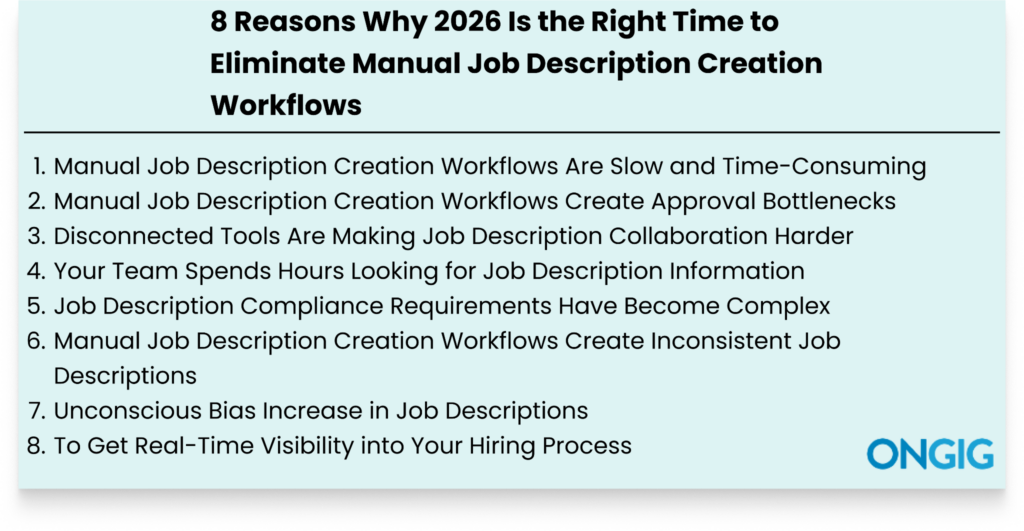
1. Manual Job Description Creation Workflows Are Slow and Time-Consuming
Do these issues sound familiar when you’re creating a single job description manually?:
- You always start creating the JD from scratch
- You never have templates to use as inspiration
- Your approval and collaboration process becomes uncontrolled each time
- You always miss deadlines due to lack of visibility into your JD creation process
- Errors and rework become a common thing
These challenges become common with a manual JD workflow because of the lack of structure.
Since everything gets scattered, creating a JD from drafting to publishing becomes a painfully long process. Because each time, you’re looking for information.
And trying to understand why you’re not moving forward. So a process that should take a week ends up taking a month because of the disorganization.
HOW JOB DESCRIPTION SOFTWARE HELPS WITH SPEED AND EFFICIENCY
Here’s how JD tools such as Ongig Text Analyzer improve your JD creation speed:
- Structured User Management: With Ongig, forget collaboration chaos. The tool lets you build a collaborative process where everyone has permission-based access. This means everyone knows their defined tasks. So the JD creation process moves efficiently without any conflicting edits or missed deadlines.
- AI-Powered JD Creation: Ongig leverages AI to guide you when creating your JD. This makes creating the JD from scratch easy. Just enter your job title and the tool produces a good JD draft in seconds.
- Personalized Templates: Ongig Text Analyzer uses content libraries and pre-approved templates to auto-populate certain job descriptions, so you don’t start from scratch. You can also build your own templates and save them to use where appropriate.
Job Description Content Optimization:
- JD Bias Reduction: Ongig flags different types of dismissive unconscious biases as you create your JD. Then the tool provides synonyms to replace biased words.
- JD Score Improvement: In the end, the tool provides a score that shows how effective your JD is, from 1 to 100. Then you get suggestions to help you understand what you need to eliminate to boost the JD score.
- Boosting JD Readability: The tool highlights sentences and words that make your JD hard to read. Then provides suggestions on what to do to boost the readability. For instance, your JD might contain complex words such as “in order to”, and since these words make a JD hard to read, you’ll see a suggestion to eliminate the word.
Read also: The Best Automated Job Description Builder (2026)
2. Manual Job Description Creation Workflows Create Approval Bottlenecks
A job description document that needs two signatures to move forward shouldn’t take three weeks.
But with a manual JD workflow, delays often become common because the process lacks structure. So you frequently experience issues such as:
- Lack of Ownership: Blame game becomes common because no one wants to admit they are responsible for job description approval.
- Unclear Approval Steps: No one on your team’s sure who should sign off first for the document to move to the next step.
- Slow Email Approvals: The process gets stuck because the person to sign off missed their email. And there’s no automated way to send reminders.
- Lack of Approval Visibility: Your approval process operates blindly. You can’t pinpoint where delays happen. And you can’t understand why the delays happen.
So approval work that takes less than a week ends up taking more than three weeks, just waiting for a few signatures.
And this approval delay ends up negatively affecting how you hire candidates. For instance, your open roles take longer to fill than they should.
HOW JOB DESCRIPTION SOFTWARE HELPS STRUCTURE APPROVAL
Job description platforms simplify approvals in these ways:
- Builds Approvals Workflows: The tool lets you create an approval workflow that defines who’s supposed to approve what and in what order. This eliminates ownership confusion and the blame game of who’s supposed to approve the JD.
- Automated Notifications: The software removes follow-up chaos and automatically informs the next person that it’s their turn to approve the JD.
- Centralized Feedback: All approval work happens in one place, including any suggestions and comments. This reduces conflicting approval feedback that arises with a manual process.
- Live Approval Visibility: Quickly see where your approval journey is at. So no more guesswork in trying to understand where approval got stuck and why it got stuck.
3. Disconnected Tools Are Making Job Description Collaboration Harder
Writing a job description requires input from multiple stakeholders, for instance, hiring managers, TA leaders, DEI team, compensation team, and compliance team.
But when this collaboration happens in different tools, the process becomes chaotic.

For instance, conflicting feedback arises, quick reviews take days, and errors become frequent.
Here’s how this chaotic collaboration looks:
- Writing Done in Google Docs: You create your JD in either a Word Document or Google Docs, then email that document to the person responsible for edits. This process ends up introducing version confusion challenges later.
- Doing Approvals Manually: Letting your team do JD approval in a different tool other than the one used to create the JD leads to approval chaos because someone might unknowingly start editing already approved documents.
- Manual Reconcile of Feedback: If there’s no central place for everyone to provide feedback, conflicting feedback arises, thus delaying the JD creation process.
In the end, this lack of a central tool continually slows your JD process because most time gets spent reconciling information and edits.
HOW REPLACING DIFFERENT TOOLS WITH JOB DESCRIPTION SOFTWARE HELPS
Job description tools boost JD collaboration in these ways:
- A Central Platform: All JD work happens on one platform. So if anyone needs information about their JDs, they know they don’t have to look through different platforms.
- Simplifies Feedback: Feedback isn’t scattered across different tools such as Google Docs and Email. It happens in the JD platform itself. So if anyone on the team wants to provide or see feedback concerning the document they’re working on, they know where to go.
- Creates Structured Workflows: JD software automates most of the review cycles, so when one team finishes their tasks, the document automatically moves to the next team. This way, no one can say they didn’t know it was their turn.
4. Your Team Spends Hours Looking for Job Description Information
Without centralized storage for your job descriptions, your entire job description process becomes a mess because your team spends most of the time looking for information to help create the JD instead of starting the creation process on the go.
So you frequently encounter questions such as, “Who has the document?”, “Where should I look for a document to use as a template?”, and “Where’s the latest version of this document?”
And a process that takes a few days ends up taking weeks. Here’s what this looks like in practice:
- Your team isn’t sure how to start searching for information because there’s no structure
- Instead of your team members searching for what they want in a single platform, they have to go through different emails, Google Docs, and shared Drives to get the details they’re looking for
In the end, you spend productive hours that could have gone into creating the actual JD.
HOW JOB DESCRIPTION SOFTWARE HELPS WITH JD ORGANIZATION
Job description software provides a centralized cloud library that helps in these ways when it comes to looking for JD information:
- One Central Working Platform: Every team member works on the same system. So when anyone wants to understand information concerning their JDs, they know they don’t have to go through different platforms.
- Searchable Library: The centralized cloud library is searchable. This means anyone on your team can search and filter JDs by keywords, title, location, department, and any specific keywords they want to use to retrieve the information they want.
- Control Different JD Versions: Job description software documents all versions of your JDs. So there’s no confusion about which JD document to proceed with. You can see all changes, including the time the changes happened.
Read also: 9 Benefits of Job Description Repository Software
5. Job Description Compliance Requirements Have Become Complex
Creating a JD manually in 2026 exposes your organization to different compliance risks.
Recently, compliance requirements in JDs have increased. You have to consider new pay transparency laws and shifting global, local, and state regulations.
For instance, if you create a JD manually today, you’ll struggle with:
- Outdated Legal Language: Employment regulations change frequently. And with a manual process, you’ll probably still find yourself using an old template you saved years ago. So you’ll find yourself publishing a JD with the wrong ADA and EEO Language.
- Salary Transparency Laws: Some states in the United States, such as New York, Washington, Colorado, and California, have enacted their legal requirements for organizations to disclose salary ranges for their job openings. And more states are likely to do the same.
- Lack of an Audit Trail: With a manual process, you can’t prove your JD creation process or whether you involved the legal team.
So, in the end, you don’t only attract legal risks, but you also miss out on some qualified candidates. For instance, posting a JD with the wrong salary range will prevent candidates from applying to your job openings.
HOW JOB DESCRIPTION SOFTWARE HELPS CREATE COMPLIANT JDS
Job description tools help you maintain JD compliance in these ways:
- Highlights Pay Transparency: If you publish your JD without a salary range, especially for states that require pay transparency, the platform flags the JD.
- Automatic Legal Updates: You don’t have to rely on someone on your team to keep up with employment regulations because the tool’s legal language library updates as regulations occur.
- Flags Discriminatory Language: The software highlights any discriminatory terms in your JD. You also get synonyms to replace the biased words.
- Helps Build an Approval Process: The platform helps you create a step-by-step JD approval process that defines everyone’s work. So before you publish the JD, it passes through teams responsible for compliance.
- Provides Detailed Audit Trail: See the creation of your JD, including the time and the people responsible for any changes. So if you encounter a legal challenge, you can provide your audit trail to help the auditor understand your JD creation process.
6. Manual Job Description Creation Workflows Create Inconsistent Job Descriptions
Does this process sound familiar? You write your JDs manually from scratch each time. You have no centralized tool to enforce JD standards.
You also don’t have a central place to provide and receive feedback.
With this manual process, creating and publishing a JD with many consistency issues is inevitable because you haven’t built a proper system to guide your job description creation process.
So you’ll always find yourself having JDs with:
- Different brand voice
- Conflicting salary ranges
- Wrong formatting and structure
- Confusing legal compliance
- Confusing titles for your JDs
These standardization issues aren’t insignificant factors. They are important factors to get right when creating your JD.
For instance, JDs with confusing legal compliance expose your organization to legal issues. And JDs with confusing titles confuse potential candidates. As a result, your organization misses out on top talent.
HOW JOB DESCRIPTION SOFTWARE HELPS CREATE CONSISTENT JOB DESCRIPTIONS
Job description platforms help maintain standardization across your JDs in some of these ways:
- Provides Standardized Templates: With JD software, you don’t start writing your JDs from scratch; the tool provides templates to use. And these templates allow you to lock in the consistent structure of some sections of your JD. For instance, if you want to lock in your organization messaging to maintain consistency, it’s easy to do that.
- Centralized Content Library: With JD software, you easily create content libraries for your brand tone, benefits, organizational culture messaging, and your employer value proposition. You can also create content libraries for any sections that you want to remain the same in all your JDs.
- Guided Language Rules: The tool flags any content language that you don’t want to appear in your JD.
- Approval Workflows: The software ensures no JD passes to the next stage without the proper approval. So you won’t find yourself asking questions such as “who approved this JD because it contains the wrong messaging?”
7. Unconscious Bias Increase in Job Descriptions
“We’re looking for applicants who have graduated recently”.
Now, imagine applying for a job description with such a phrase, and you graduated 5 years ago, and you’re qualified for the job.
You obviously won’t apply, even though you’re qualified, because the organization said they’re looking for recent graduates.
Unfortunately, different types of unconscious bias in JDs, such as the age bias above, have risen in recent years, even in 2026.
And most of these biases occur unknowingly in JDs, and they are tricky to spot. For instance, you have to ensure that your job description doesn’t include:
- Unconscious racial bias
- Unconscious gender bias
- Bias against people of different nationalities
- Disability bias
- LGBTQ+ unconscious bias
- Elitism bias
- Religion bias
And these aren’t the only unconscious biases to keep in mind when creating your JD. There are many others.
So, if you try to eliminate all these types of unconscious bias through a manual JD creation process, it will take you many hours.
HOW JOB DESCRIPTION SOFTWARE HELPS MAINTAIN JD INCLUSIVITY
Job description software helps create inclusive JDs in these ways:
- Live Flagging of Discriminatory Language: Job description tools guide you as you write your JD by flagging any dismissive words that might affect different candidates.
- Provides Inclusive Terms: After flagging problematic words, the tool provides synonyms to replace them.
- Removes Unnecessary Requirements: The software flags any extra requirements that might prevent some candidates from applying to your JDs.
- Flags Complex Phrases: Some complex words such as “in order to” make it difficult for some candidates to read a job description. Job description tools highlight these complex words and provide alternative phrases to use to improve the readability of the job description.
8. To Get Real-Time Visibility into Your Hiring Process
With a manual job description creation workflow, your hiring process operates blindly.
With this manual process, it becomes challenging to provide evidence of how the recruitment process has helped your organization achieve its business goals.
And with no hiring data, you’ll struggle answering questions such as:
- What critical roles do we need to fill immediately?
- How long do our job openings stay before we can hire anyone?
- Which job description task takes the longest to finish?
- Are we achieving our diversity hiring goals?
In the end, your job description process becomes more challenging because issues that you could have noticed earlier get noticed late.
HOW JOB DESCRIPTION SOFTWARE HELPS WITH HIRING VISIBILITY
Job description software centralizes your job description creation process.
There’s no issue of disconnected tools. Anything you want to understand about your JD, you check the tool and get answers. For instance:
- If you want to understand how long it takes to write most of your JDs, you check and get answers
- If you want to understand how you can improve your JD approval process, you check the data and identify the bottlenecks
- To understand any critical roles open, you check your data and get answers
- To know the number of JDs you’ve written in a year, the tool provides the data
With this comprehensive centralization of your job description data, you’re aware of every detail about your job description process.
Tip For When You Decide To Move from a Manual Job Description Creation Workflow Process
Once you’re ready to stop managing your job description process manually, audit your process to understand where most issues happen.
For instance, you might assume your biggest job description challenge is version control. But from your audit, you identify it’s the approval process slowing your progress.
Once you’ve audited your manual process, look for a JD platform that centralizes your JD creation process from scratch.
This way, you don’t just get a platform that helps you create JDs only. But you get a platform like Ongig Text Analyzer that:
- Ensures all your JDs are in one searchable place
- Simplifies your JD approval process
- Helps you build an efficient collaboration process
- Integrates with your ATS or HRIS
- Helps you automate repetitive JD updates
- Provides live suggestions to help you create an inclusive JD
- Protects your approved JD language
Keeping these tips in mind gives you clarity when you start looking for a job description software platform to invest in.
Read also: Benefits of Using Ongig Job Description Software for Hiring Teams
FAQs: Reasons Why 2026 Is the Right Time to Eliminate Manual Job Description Creation Workflows
1. WHAT DO I RISK IF I CONTINUE OPERATING MY JOB DESCRIPTION PROCESS MANUALLY?
There are different risks involved. For instance, you’ll create non-compliant JDs, have pay equity issues, and miss out on top talent because you don’t have effective JDs.
2. WE’RE NOT A LARGE ORGANIZATION, DOES IT MAKE SENSE TO INVEST IN JOB DESCRIPTION SOFTWARE?
It’s not only enterprise teams that benefit from using job description software. As a small team, you’ll free your time to do more work instead of spending many hours writing just a few JDs manually.
3. WILL MOVING FROM A MANUAL PROCESS DISRUPT OUR CURRENT RECRUITMENT PROCESS?
Different job description tools integrate with most major existing ATS and HRIS systems. A JD tool doesn’t replace what’s working for you. The tool comes in to simplify your inefficient processes.
4. WHAT ARE SOME IMMEDIATE BENEFITS I’LL EXPERIENCE IF I MOVE FROM A MANUAL JOB DESCRIPTION PROCESS?
You’ll see yourself and your team create effective JDs quickly with no approval chaos.
WHY I WROTE THIS:
There’s no benefit in creating your JDs manually. The creation process never lacks issues.
And these issues lead you and your team to create ineffective job descriptions.
And if your JDs are ineffective, then nothing will work in your hiring process. You’ll continue hiring the wrong candidates by chasing away the qualified ones with a bad JD.
So schedule a demo today to learn how we can help you move from a manual JD process to a more effective one.
