Struggling to know which job descriptions attract qualified candidates and which ones flop? You’re not alone. Most recruiters post jobs and hope for the best.
Recruitment analytics changes this. You track real data and make smarter decisions. No more guessing.
In this article, you’ll learn how to measure job description performance, spot what drives applications, and optimize for better candidates. Let’s dig in.
What Is Recruitment Analytics?
Recruitment analytics uses data to measure and improve hiring. It’s the difference between posting a job based on gut feeling versus knowing exactly what language, format, and benefits attract top talent.
It’s different than old-school recruiting, which relies on experience and intuition. Analytics-driven recruiting uses hard numbers. You see which job titles get more clicks. You track how long candidates spend reading your posts. You measure which channels bring quality applicants.
Analytics are part of what makes talent acquisition vs recruitment strategic. Because with analytics, you get insights. You’re not just filling seats anymore. You’re building a data-driven talent pipeline that gets stronger with every hire.
Why Job Description Performance Matters
Poor job description performance costs you in three ways.
First, you get fewer applications. Second, you attract the wrong candidates. Third, your time-to-fill stretches out while positions stay open.
Good descriptions optimize your team’s efforts, too. A job description that attracts 50 applicants instead of 200 cuts your talent pool by 75%. That saves your recruiting team time.
For candidates, job descriptions are equally crucial. Job seekers scan job descriptions in about a minute before deciding to apply. That’s not enough time to grab attention, share value, and inspire action. Poor descriptions fail this test every time.
The link between job description quality and candidate experience is direct. When candidates struggle to understand a role or feel put off by jargon, they bounce. Research by SecondTalent shows 81% of HR leaders say analytics is essential. They use it for strategic planning. Many organizations are planning to increase their investment in HR analytics tools to streamline hiring.
Because here’s what analytics shows. By tracking job description performance, you find what works fast. You reduce time-to-hire by cutting out bad posts. You improve hiring ROI by spending recruitment budgets on channels that deliver. You attract better candidates by understanding what language works.
Cost-per-hire matters too. According to SHRM benchmarks, the average cost per hire in the United States is around $4,129. Bad job descriptions cost even more. You face long vacancies. You repeat the recruiting process. Analytics helps you invest wisely.
Key Metrics to Track for Job Description Performance
Let’s break down the metrics that matter for your job descriptions.
APPLICATION METRICS
Start with the basics. How many applications does each job description generate? Track applications per posting across all your roles. Then compare similar positions to spot outliers.
Application completion rate tells you if candidates start but don’t finish applying. If 100 people click “apply” but only 20 submit, something’s broken. Maybe your application is too long. Or maybe the form crashes on mobile.
Time from view to apply matters too. Candidates who apply within 24 hours are more engaged than those who wait a week. Track this to understand urgency.
ENGAGEMENT METRICS
Click-through rate (CTR) from job boards shows if your job title and preview text work. Average benchmarks depend on your niche and the role. But if the CTR is too low, your title might be too generic. Or your company brand needs work.
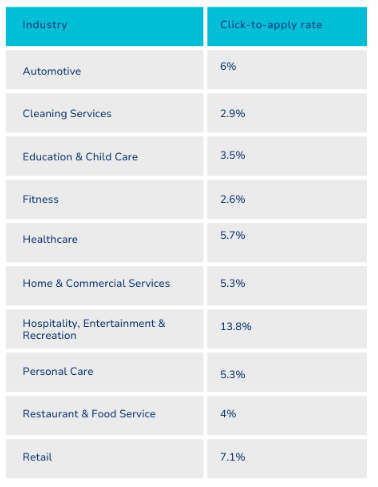
Average click-through rate (or click-to-apply) for various industries
Image Source
Time spent on a job description page shows engagement depth. If candidates spend 30 seconds and leave, they’re not finding what they need. If they spend three minutes, you’ve got their attention.
Bounce rate signals confusion or a mismatch. High bounce means candidates click in but leave right away. This happens when the job title says one thing. Then the description says something else.
QUALITY METRICS
Applicant-to-interview ratio separates noise from signal.
According to CareerPlug, the 2024 applicant-to-interview ratio was 3% This means that for every 100 applicants, three were invited to interview. If you’re interviewing 10% of applicants, you might not be filtering enough. If it’s 0.5%, your job description attracted the wrong people.
The source of hire shows which channels bring the best candidates. Maybe LinkedIn delivers senior talent while Indeed brings entry-level talent. Maybe employee referrals outperform everything. Or maybe Facebook is a better channel for top marketing freelance roles.
Quality-of-hire scores measure performance after the fact. Did candidates from specific job descriptions become top performers? Did they stick around? This closes the loop.
CANDIDATE EXPERIENCE METRICS
The candidate net promoter score (cNPS) asks one question. Would you recommend this hiring process to a friend? Track scores by role and over time.
You can also run candidate feedback surveys and dig deeper. Ask about clarity, application ease, and communication speed. The insights help you spot friction points.
Application drop-off points show exactly where candidates quit. Most abandon at the resume upload step or when asked for references. Knowing this helps you fix the leak.
How to Collect and Analyze Job Description Data
Getting the data is half the battle. Here’s where to find it.
USE YOUR APPLICANT TRACKING SYSTEM (ATS)
Most ATSs have built-in analytics. Greenhouse, Lever, and others track source, time-to-fill, and funnel conversion.
Key reports to run monthly include source tracking (where applicants come from), time-to-hire by role, and conversion rates at each stage. Your ATS shows how many people viewed the job, clicked apply, submitted an application, and moved forward.
But here’s the catch: ATS DATA starts when someone clicks “apply.” It misses what happens before that. For example, how many people saw your post on LinkedIn but never clicked?
LEVERAGING JOB BOARD ANALYTICS
Job boards like Indeed and LinkedIn give you performance data directly. Log in to your employer dashboard. You’ll see impressions, clicks, and applications for each posting.
Track the ratio. If a post gets 1,000 views but only 20 clicks, your title or brand needs work. If it gets 100 clicks but only five applications, something in the description turns candidates away.
Compare performance across different boards. You might find that tech roles perform better on LinkedIn. Hourly positions might do better on Indeed. This guides your job description workflow and budget.
THIRD-PARTY ANALYTICS TOOLS [OPTIONAL]
Special recruitment analytics software brings data from multiple sources into one place. These platforms pull information from your ATS, job boards, and career site. They create unified dashboards.
For example, Google Analytics can track career page traffic. Set it up to watch which pages candidates visit. See how long they stay and where they come from. Create custom events to track “apply” button clicks. Then use UTM tracking to connect recruitment marketing campaigns to actual applications.
Recruitment dashboards show everything in one place. You see which roles need attention. You see which recruiters hit their targets and which strategies work. This beats digging through five different systems for the same info.
Recruitment dashboard example
Image Source
For optimization, try job description builder tools like Ongig Text Analyzer to flag biased language and improve readability. Ongig makes your descriptions consistent and compliant by using AI and automation.
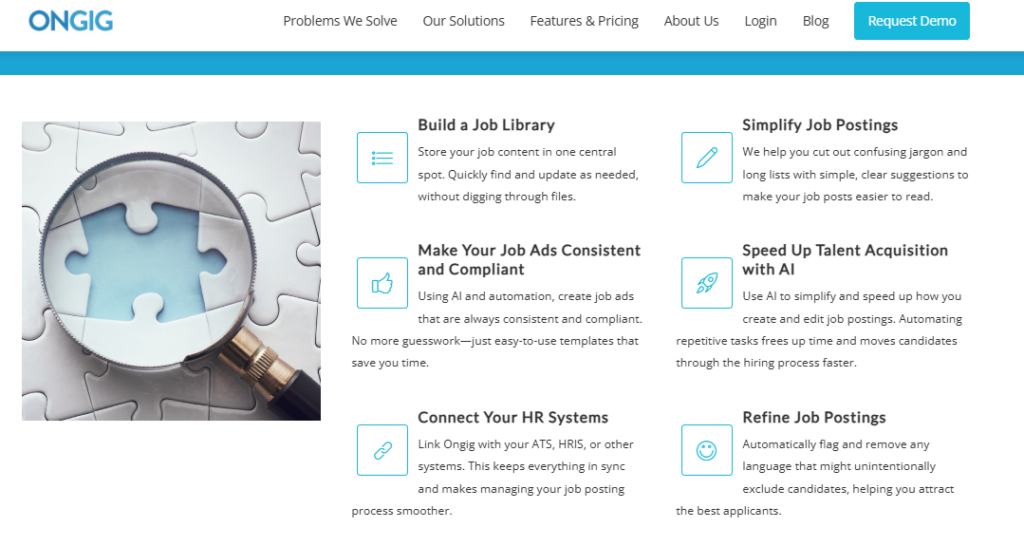
Ongig
Image Source
Using Analytics to Optimize Your Job Descriptions
Now let’s put that data to work so you can optimize your job description performance.
A/B TESTING JOB TITLES AND DESCRIPTIONS
Test everything. Run two versions of a job title at the same time. “Marketing Manager” versus “Digital Marketing Lead.” Track which gets more clicks and better candidates.
Compare the performance of different description lengths, too. Maybe your 300-word posts outperform 800-word posts. Or maybe detailed descriptions attract more qualified applicants. You won’t know until you test.
Test benefit-focused versus responsibility-focused language. One version highlights career growth and flexible work. Another emphasizes daily tasks and team structure. Then see what works.
For example, a financial services company like SoFi might analyze candidate engagement data for roles related to its California car insurance division. The hiring team uses analytics tools to identify which keywords, benefits, or job titles attract more qualified applicants. They might test “insurance operations specialist” versus “policy support associate.”
Run tests for at least two weeks to gather enough data, as small samples are misleading. Wait for statistical significance before declaring a winner.
IDENTIFYING AND REMOVING BIAS
Analytics shows demographic gaps in applicant pools.
If you’re attracting 90% male candidates, your language might be too masculine. If entry-level positions get zero applications, you’re probably listing too many requirements.
Use data to spot gendered or exclusionary language patterns. Words like “rockstar,” “ninja,” and “aggressive” skew male. Terms like “nurturing” and “support” skew female.
AI-driven tools can also help you reduce bias and optimize your hiring process. For example, Hilton used AI recruiting tools to reduce the time to fill positions by 90%.
Here are a few examples of bias to avoid:
- Age bias, ex, “digital native,” or “recent graduate”
- Ability bias that’s out of place, ex, “must be able to lift 50 pounds” for desk jobs
- Cultural bias, ex, requiring “cultural fit” without defining what that means
Track diversity metrics before and after language changes. Did removing gendered words increase applications from underrepresented groups? That’s actionable insight.
REFINING FOR CLARITY AND ENGAGEMENT
Job description performance isn’t just about numbers. Clear and engaging language matters too. A paraphrase tool can help HR teams rewrite weak postings to improve readability, tone, and inclusivity.
For example, if a “Sales Executive” ad gets low clicks, swap the jargon for simpler, action-focused wording. Even small changes like this can lift response rates.
When you pair performance insights with smart rewording, good things happen. Every role description connects better with the right audience. You attract better-fit candidates.
Focus on readability scores. Aim for grades 6–8. Use short sentences, active voice, and clear bullets. A job description review tool can flag complex language automatically.
Plain language wins because candidates appreciate clarity, and so do search engines. In fact, using the same words your candidates use can bring you more applications.
This data-driven approach reflects broader trends in recruiting. Companies now prioritize candidate experience and inclusive hiring practices.
Common Mistakes to Avoid When Using Analytics
Even with good data, people make predictable errors.
The biggest mistake is tracking metrics in isolation without connecting them to business outcomes. Your click-through rate might look great. But do those clicks become quality hires? If not, the metric doesn’t matter. Additionally, many recruiters compare their numbers to the wrong benchmarks; for example, tech roles, especially in mobile app development companies in Poland, shouldn’t be measured against design roles in the UK. Industry and role level matter.
Also, many recruiters compare their numbers to the wrong benchmarks. Tech roles shouldn’t be measured against retail roles. Industry and role level matter.
Another common error is ignoring seasons. Hiring patterns shift throughout the year. December always sees fewer applications. Back-to-school periods affect certain industries differently. Without accounting for seasonality, you might panic over normal fluctuations.
Don’t forget about candidate drop-off timing either. Do applicants quit on weekends? You might be sending assessment links at the wrong time.
Finally, avoid paralysis by analysis. Perfect data doesn’t exist. Start improving with what you have rather than waiting for complete information. Utilizing data enrichment API might help simplify the process.
WHY I WROTE THIS
Recruitment analytics turns job descriptions from guesswork into strategy. Do this by tracking click-throughs, completions, and candidate quality.
Data-driven hiring isn’t optional anymore. Companies that measure and refine win the talent war, while those that ignore it get left behind.
Ready to optimize your job descriptions and attract top talent? Request a demo to see how Ongig can consistently help you write better job descriptions with data-driven insights.
FAQs
WHAT IS THE AVERAGE APPLICANT-TO-INTERVIEW RATIO?
According to recent research, only 3 out of every 100 applicants get invited to interview.
HOW MUCH DOES A BAD JOB DESCRIPTION COST?
The average cost per hire is $4,129. Poor job descriptions multiply this through extended vacancies and repeated recruiting cycles.
WHAT METRICS SHOULD I TRACK FIRST?
Start with three core metrics: Click-through-rate, application completion rate, and applicant-to-interview ratio.
HOW LONG SHOULD I RUN AN A/B TEST?
Run A/B tests for at least two weeks to gather enough data for statistical significance. Small sample sizes can give misleading results, so wait until you have sufficient applications before declaring a winner.
DO I NEED EXPENSIVE TOOLS TO START USING RECRUITMENT ANALYTICS?
No. Start with free tools like Google Analytics for your career page. Then use a tool like OnGig to make job ads consistent, compliant, and effective.
Author bio

Kelly Moster
Kelly Moser is the co-founder and editor at Home & Jet, a digital magazine for the modern era. She’s also the content manager at Login Lockdown, covering the latest trends in tech, business and security. Kelly is an expert in freelance writing and content marketing for SaaS, Fintech, and ecommerce startups.
