When responsibilities move between departments, job descriptions must change too. Otherwise, recruiters advertise outdated requirements, managers work with conflicting expectations, and employees remain unclear about who owns what.
Updating one description isn’t enough. HR must identify every affected role, revise responsibilities across departments, and ensure everyone works from the same approved version.
This is more direct, removes the unnecessary scene-setting, and establishes exactly what the article will address.
Why Departmental Changes Create Problems for Job Descriptions
A change in one department can affect several roles elsewhere.
Consider a company moving customer onboarding from sales to customer success. Customer success takes ownership of onboarding, but sales still needs to qualify prospects and manage the handoff. Both departments need revised descriptions.
If HR updates only the customer success roles, sales descriptions may continue listing onboarding as a responsibility. Recruiters then hire against an outdated division of work.
The same problem occurs during reorganizations, technology changes, and team expansions. Responsibilities move, but job descriptions remain unchanged.
Eos Choi, Marketing Lead at LDPlayer, oversees marketing for an Android emulator that lets people run mobile games and apps on a desktop.
She says, “When we ship features fast, work moves between product, marketing, and support before anyone touches the role docs. We started rewriting the description the same week the work changes hands. Wait a month and two people each assume the other owns it.”
Three issues typically follow:
- Responsibilities overlap: Two departments claim ownership of the same task, or neither recognizes that it has been reassigned.
- Role requirements drift: Similar positions develop different skill requirements because managers update descriptions independently.
- Reporting information becomes outdated: Job descriptions refer to managers or departments that no longer oversee the work.
These inconsistencies affect recruitment, performance reviews, and how employees understand their responsibilities.
Establish Who Owns Each Update
HR should maintain the job description library, but department managers must verify the accuracy of their teams’ responsibilities. Both roles are necessary to keep descriptions current.
Define who reviews and approves each type of change.
| Stakeholder | Responsibility |
| HR | Maintains approved descriptions and checks consistency |
| Department heads | Confirm changes to team responsibilities and reporting structures |
| Hiring managers | Identify changes to day-to-day work and required skills |
| Compensation team | Reviews changes affecting job level or pay |
| Legal or compliance | Reviews relevant employment and regulatory requirements |
Not every revision needs everyone’s approval. Replacing an outdated software requirement may only need confirmation from the hiring manager and HR.
Adding budget ownership or supervisory responsibilities requires a broader review. These changes can affect job level and compensation, so involve the compensation team before approving the revision.
Distinguish between minor edits and changes to the scope of a role. They shouldn’t follow the same approval process.
Build a Review Process Around the Change
Start with the organizational change. Identify every job description it affects before making revisions.
1. Identify the responsibility that moved.
Suppose marketing takes ownership of lead-quality reporting from sales. Establish who prepares the reports, who interprets the findings, and who acts on them.
These are separate responsibilities. HR needs to know where each one belongs before updating either department’s descriptions.
2. Identify every affected position.
Include employees performing the work, their managers, and roles responsible for supporting or overseeing the function.
Updating only the position that triggered the request leaves other descriptions outdated. Check related positions across both departments.
3. Determine whether the change affects the role’s scope.
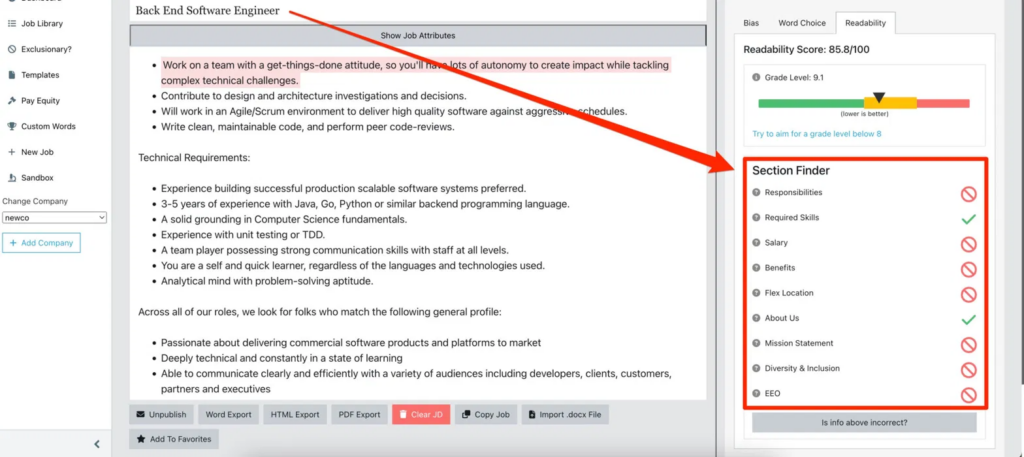
Adding a reporting duty isn’t the same as making someone accountable for an entire business function.
Review changes to decision-making authority, supervisory duties, budget ownership, and required expertise. Involve compensation if these changes could affect job classification or pay.
4. Get approval from the relevant stakeholders.
Department heads and hiring managers must agree on the revised responsibilities. HR should check the language, structure, and consistency before approving the final version.
A manager’s request isn’t sufficient approval when responsibilities move between departments. Both sides need to agree on the new division of work.
5. Publish the approved versions.
Replace outdated copies in the central library and update the versions used by recruiters and managers.
Notify affected employees about the changes. An approved description is of little use if people continue working from an older version.
Keep One Approved Version Across Departments
Multiple versions of the same job description create unnecessary confusion. HR may approve a revision while recruiters continue using an older copy from a shared drive or email attachment.
Maintain one approved version for each role in a centralized library. Record its department, reporting structure, revision date, and approval history.
Version history also matters when responsibilities are disputed. HR should be able to establish what changed, when it changed, and who approved it.
Consider a company with business analysts in finance, operations, and product. All three roles may share core analytical skills, but their responsibilities aren’t interchangeable. The library should preserve these differences while maintaining consistent writing standards.
Platforms such as Ongig support centralized job description management. Its job description software and Text Analyzer help HR teams manage descriptions and check content for clarity, consistency, and inclusive language.
Use Automation to Find Descriptions That Need Attention
Finding every description affected by an organizational change is harder than editing the documents themselves. HR shouldn’t have to rely on managers remembering which roles need revisions.
Automated review tools can flag:
- Conflicting responsibilities: Similar descriptions that assign ownership of the same task to different teams.
- Outdated requirements: Skills or software listed in descriptions that no longer reflect how the department operates.
- Inconsistent language: Different wording and standards across descriptions for related positions.
- Missing information: Outdated reporting details or incomplete role requirements.
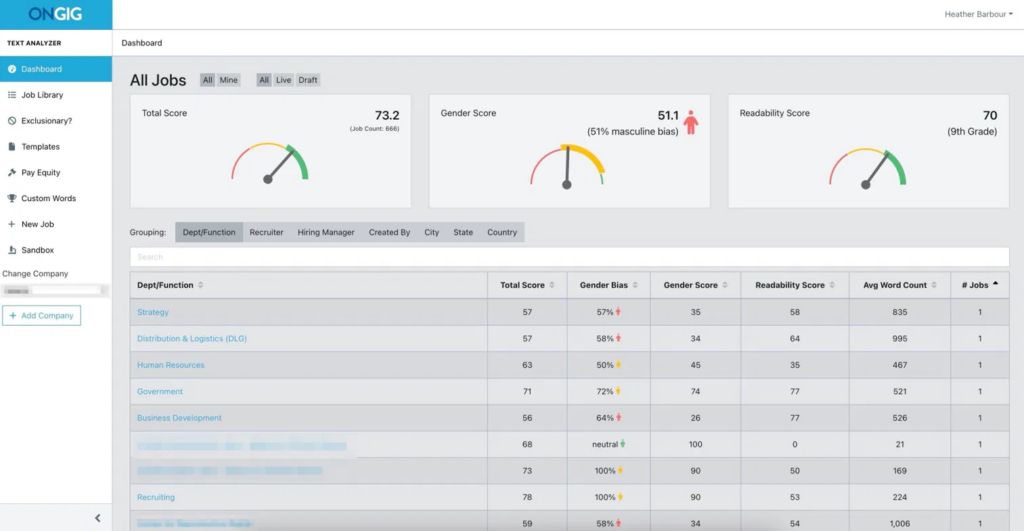
For example, if finance replaces its reporting platform, automated checks can identify descriptions that still list the previous software as a required skill.
Integration with an applicant tracking system (ATS) or human resource information system (HRIS) also helps keep approved descriptions consistent across recruitment and HR workflows.
Automation can flag outdated information, but it cannot decide whether finance or operations should own a responsibility. Department managers must resolve those decisions.
Don’t Wait for the Annual Review
Annual reviews cannot keep pace with every organizational change.
A responsibility might move between teams in February, while the next scheduled review isn’t until November. During that time, recruiters and managers may continue using outdated descriptions.
Jeffrey Zhou, CEO and Founder of Fig Loans, runs a fintech lender that provides affordable credit-building loans to borrowers underserved by banks.
He says, “A role can change the same quarter a new regulation lands, and the description still lists work from a year ago. We attach the review to the event that forced the change rather than the annual cycle. That way, the person is measured against what the job became rather than what it used to be.”
Certain changes should trigger an immediate review:
- A department is restructured or merged with another team.
- Responsibilities move between departments.
- A new manager takes ownership of an existing function.
- New technology changes how a role operates.
- A position gains supervisory or budgetary responsibilities.
Quarterly reviews can catch changes that weren’t formally reported. But significant changes to responsibilities should trigger an immediate update.
HR should also require department heads to report organizational changes that affect existing roles. Otherwise, the review process depends on HR finding out about changes after they happen.
Make Sure Employees Know What Changed
An updated job description should reflect a conversation that has already happened, not introduce new expectations without explanation.
Managers must explain what has changed, which responsibilities employees now own, and whether their reporting or decision-making authority has shifted.
Nick Wiese, Regional Vice President at Balance Point Heating, Cooling & Plumbing, oversees operations for a home-services company that handles heating, cooling, and plumbing.
He says, “Our field teams don’t read memos. When a lead tech picks up scheduling duties, that has to be a conversation on site, and the written description just confirms what we already agreed. If the paperwork is the first time someone hears about a change, it’s already gone wrong.”
When a role takes on substantially more responsibility, review its performance expectations and compensation alongside the revised description.
Give employees and managers access to the same approved version. Recruiters should use it when advertising vacancies.
An accurate job description is only useful if people actually work from it.
Getting Started
Start with the departments where responsibilities have changed most frequently. Compare existing descriptions with the work employees actually perform. Identify overlapping responsibilities and establish who approves revisions.
Once the process works for those teams, extend it across the organization.
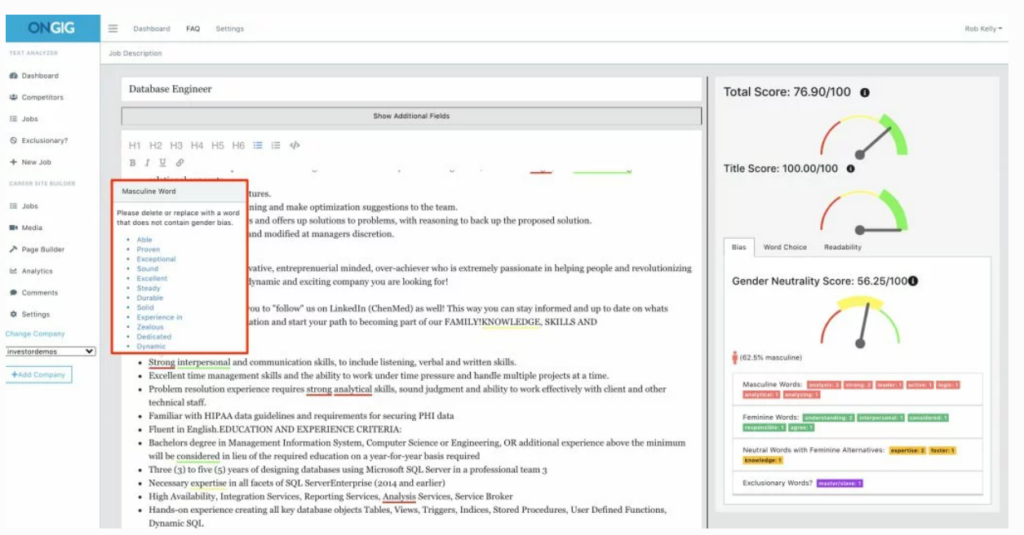
Ongig’s job description software supports centralized description management, while its Text Analyzer helps HR teams review content for clarity, inclusion, and consistency.
