
- Is ChatGPT for Job Descriptions the Right Choice? (2026 Update) - March 11, 2026
- How to Write a Job Description — Best Practices & Examples (2026 Update) - February 26, 2026
- 10+ Examples of Top Companies with Autistic Hiring Programs (2026) - February 23, 2026
Our client used to live in email h*ll. Hundreds of job descriptions, scattered statuses, and no way to know who owed what. That chaos? It’s officially canceled.
We worked with them (a large insurance org), who had a common but painful problem: tracking the job description workflow across a ton of people. Their admin was the air traffic controller for 1,200+ JDs a year. Her team needed to know exactly where every JD stood—editing, reviewing, or approving—without the guesswork or the inbox ping-pong.
They weren’t just looking for clarity. They were looking to:
- Spend less time manually tracking who needs to do what
- Stay compliant with internal processes and regulatory steps
- Avoid skipped approvals that could cost real money
- Take control of the overall job description management process
The Problem: JDs Were Getting Lost in the Shuffle
The old process relied on spreadsheets, shared docs, and a LOT of back-and-forth emails. Sound familiar?
Recruiters were constantly asking, “Has this been approved yet?” Approvers were overwhelmed or skipped entirely. And if someone did reply to an email, it might get buried—or worse, replied to the wrong person.
Priority JDs (like an urgent hire) weren’t getting the attention they needed fast enough. Everyone was in reactive mode.
The Solution: Custom JD Workflow, Built for Real Humans
We stepped in with a customizable, role-based status workflow. This workflow was tailor-made for how their team actually works.
Here’s what we did:
- Created a custom status list: Editing → Reviewing → Approval, with clear hand-offs
- Added role-based controls: Only reviewers could move to “Approved.” No jumping steps.
- Triggered auto-emails based on status: When a JD hit “Review,” the right people got pinged. When approved, a summary went to stakeholders.
- Replies routed back to the admin: So she stayed the hub, but didn’t have to chase people
- Used priority tags + filters: They could quickly sort by “Urgent,” “Needs Review,” etc.
- Built a dashboard view: Everyone saw the pipeline in one place, no guessing
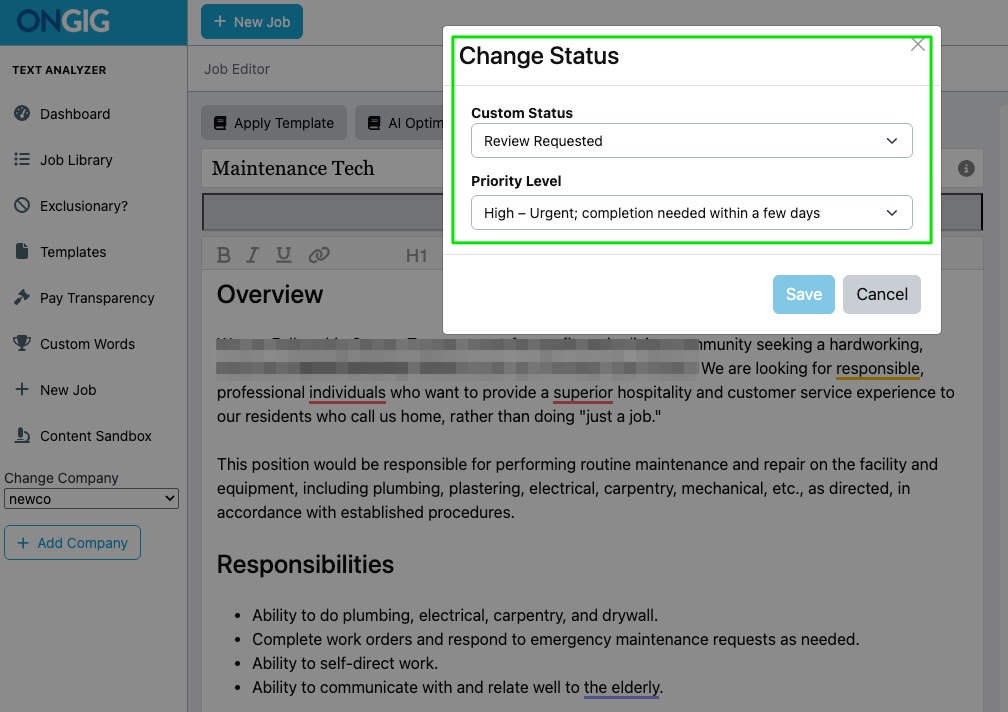
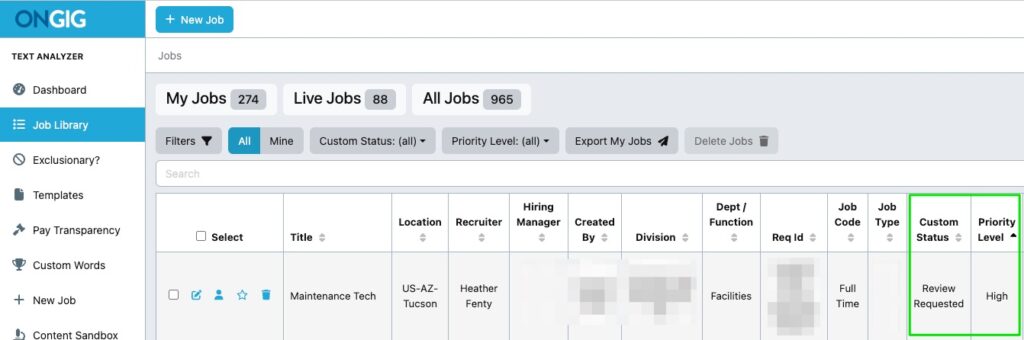
Bonus: If someone tried to skip a step, Ongig’s permissions said, “Nope.” That meant clean audit trails and zero compliance headaches.
The Impact: 1,200 JDs, Zero Chaos
This workflow is saving serious time and money.
- Admins weren’t manually chasing statuses or sending emails
- Recruiters could triage faster and focus on filling roles
- Approvals were locked down, tracked, and compliant
Our client went from being the JD traffic cop to the command center. Everything moved faster—with fewer mistakes and less stress.
And all of that? It’s built into Ongig.
Why I Wrote This
We’ve seen too many teams lose hours (and candidates) to JD chaos. This client’s story shows it doesn’t have to be that way. With Ongig, you get control, automation, and peace of mind—without sacrificing flexibility. Request a demo to see how we can streamline your JD process, too.
FAQs
Can I create my own workflow steps in Ongig?
Yes. You can customize every step (like “Editing,” “Reviewing,” “Legal Approval”) and control who can move a JD forward.
Can Ongig send automatic email notifications?
Absolutely. You can set up custom email triggers based on status changes, including routing replies to a central admin.
Does this help with compliance?
Yes. Role-based permissions and audit trails make sure no step is skipped—and everything’s logged for easy reporting.
Can I prioritize urgent JDs?
Yes. Add priority tags and use filters or dashboard views to see what needs attention fast.
Will this work if I have 1,000+ JDs a year?
Definitely. This solution was made for high-volume teams who need control and speed at scale.
