Finding the best job description software can feel overwhelming, especially when most tools sound like they were built for robots, not recruiters.
Plus, if you’re on a small talent team or juggling multiple HR roles, having the right job description software can be a lifesaver.
Unfortunately, most sound like they were written by robots. So if you’re wondering:
- “What’s the best job description software for my team?”
- “Is there a tool that helps with bias and formatting?”
- “Can I just use ChatGPT, or is there something better?”
You’re in the right place.
I’ve put together a comparison of tools that recruiters and HR teams are actually using in 2026. No fluff, just practical info to help you decide.
Quick Summary: Best Job Description Software for 2026
- Best overall: Ongig Text Analyzer
- Top pick for small teams: ChatGPT + JD Prompts
- Strongest for compliance: Ongig, RoleMapper
- Ideal for comp-focused teams: JobArchitect, Mosh JD
- Best free trial: Applied (7 days), Workable (15 days)
Why Use Job Description Software?
Job description software helps recruiters write, update, and manage job postings at scale. It scans your JD for biased words and flags them. The software also arranges content into a scannable format. It checks that key sections (salary ranges, EEO statements, compliance disclosures) aren’t missing before a posting goes live.
More advanced platforms also support bulk editing across hundreds of postings. They often include approval workflows and ATS integrations, keeping job descriptions accurate from creation through publishing.
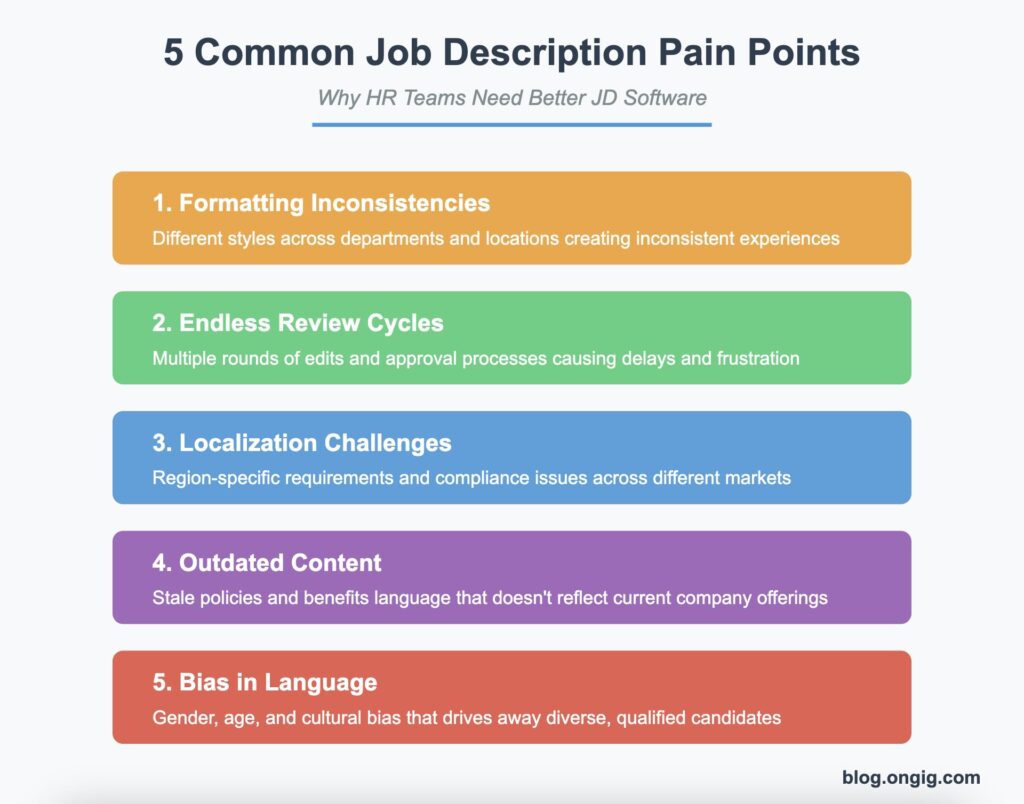
In short, here’s what good JD software helps with:
- Fixing messy formatting across all your locations
- Keeping your job posts fresh and consistent
- Working with hiring managers without endless email chains
- Making big updates when your benefits or policies change
- Catching biased words that turn great candidates away
- Staying compliant with pay transparency laws now active in 14+ US states and the EU.
In other words, the right tool takes the busywork off your plate.
Remember, the software is just there to streamline your JD writing process. You still need to write the job description based on your company and hiring manager requirements. For foundational JD writing guidance, read our job description best practices blog.
How We Chose the Best Job Description Software for 2026
We’ve chosen the job description software below based on features, pricing, transparency, compliance support, and free trial availability. Specifically, we looked at how transparent each vendor is about pricing and features.
In addition to features and pricing, we also considered how well each tool scales. Does it work for a solo recruiter posting a handful of roles? Or for an enterprise TA team managing hundreds of postings across multiple locations? Each tool serves a different use case. That’s why we’ve noted who each one is best for so you can match the right platform to your team’s needs.
10 Best Job Description Software Tools
1. Ongig’s Text Analyzer
Best for: Talent acquisition teams seeking scalable, inclusive, and on-brand job descriptions
- AI-powered rewriting in your company’s tone
- Smart templates and bulk editing
- Central JD library with approvals and version control
- Integrates with ATS platforms like Workday, iCIMS, Greenhouse, TeamTailor, and more
- Bias detection for gender, race, age, disability, and more
- Pay transparency monitoring with tools to ensure JDs comply with salary disclosure laws, including current EU Directives
- SEO title scoring feature that evaluates job titles based on Google for Jobs performance
Pricing: Starts at $13,900/year (discounts available for nonprofits and small orgs)
Free trial? Yes – 7-day trial and custom demo available
Website: https://www.ongig.com
Overall, Ongig stands out for combining bias detection and pay transparency compliance on a single platform.
2. Textio
Best for: Teams focused on writing inclusive, brand-aligned job postings
- Real-time bias and tone feedback
- Writing suggestions for clarity and neutrality
- Integrates with ATS platforms like Greenhouse and Workday
- Analytics dashboard for tone across departments
- More recently, Textio launched “Lavalier,” an interview intelligence product that covers candidate feedback and assessment.
Pricing: Custom enterprise pricing
Free trial? No free trial, but demos available
Website: https://textio.com
3. Datapeople
Best for: Companies with distributed teams looking for JD consistency and insights
- Readability and clarity scoring
- Role/location-based JD performance analytics
- Template enforcement across departments
- Integration with your ATS for seamless publishing
Pricing: Custom quote based on company size
Free trial? No free trial, but demos available
Website: https://datapeople.io
Additionally, its analytics dashboard helps teams catch tone inconsistencies early.
4. JobArchitect (by Salary.com)
Best for: Comp and HR teams aligning job content with pay structure and leveling
- Access to Salary.com market data
- Built-in leveling and FLSA/EEO compliance tools
- Role benchmarking and internal comparison tools
- Secure permissions and audit trails
Pricing: Starts around $5,000/year (based on company size/features)
Free trial? No free trial, but demos available
Website: https://www.salary.com/solutions/jobarchitect
For comp teams specifically, this makes JobArchitect especially useful for benchmarking.
5. ChatGPT + JD Prompts
Best for: Small teams or solo recruiters creating or editing JDs quickly
- Instant JD drafting or rewriting with prompts
- Customizable tone, clarity, and content
- No seat restrictions or special training required
- The Plus plan does have message limits that reset roughly every 3 hours rather than daily, which can create workflow interruptions for heavy users.
- That said, Claude, Gemini, and Perplexity are viable alternatives to ChatGPT
Pricing: $20/month for GPT-4 (free GPT-3.5 version available)
Free trial? Yes – free tier available
Try it: chat.openai.com/
6. JDXpert
Best for: HR teams that need approval workflows, auditing, and version history
- Central JD library with structured templates
- Approval chains and permission controls
- Built-in audit trails and change logs
- HRIS and HCM system integrations
Pricing: Starts at ~$10,000/year (based on seats and number of JDs)
Free trial? No free trial, but demos available
Website: https://www.jdxpert.com
As a result, JDXpert works well for highly regulated industries.
7. Applied
Best for: Organizations prioritizing unbiased hiring throughout the funnel
- Inclusive JD builder with de-biased language suggestions
- Structured templates and tone coaching
- Includes hiring assessments and data insights
Pricing: Starts at £3,500/year (~$4,300 USD); nonprofit pricing available
Free trial? Yes – 7-day free trial available
Website: https://www.beapplied.com
Furthermore, its hiring assessments extend bias reduction beyond the job description itself.
8. RoleMapper
Best for: Large enterprises and public sector organizations needing governed, audit-ready job descriptions within a broader job architecture
- Supports building and maintaining structured job libraries
- Automate JD creation and updates
- Map roles to skills and competencies
- Well-suited for larger orgs with workforce planning needs.
Pricing: Custom quote based on company size
Free trial? No free trial, but demos available
Website: https://www.rolemapper.tech/
Similarly, RoleMapper fits into a larger workforce planning framework.
9. MoshJD
Best for: Compensation and HR teams needing a centralized job description inventory with built-in templates and pay benchmarking
- Positions itself as a centralized, governance-focused alternative to legacy JD tools
- Uses structured job records and workflow-driven collaboration to keep job data accurate across hiring, compensation, and compliance.
Pricing: Starts at $0.00/month
Free trial? No free trial, but demos are available
Website: https://www.moshjd.com/
In contrast to legacy tools, MoshJD focuses on governance and accuracy across job records.
10. Workable
Best for: Growing teams that want JD writing and ATS capabilities in one platform
- AI-powered job description generation alongside salary insights, candidate sourcing, and resume parsing
- Library of customizable templates with AI suggestions for skills, phrasing, and diversity-conscious language
- Posts directly to over 100 job boards and social channels from one workflow
- Full ATS included: no separate tool needed for pipeline management
Pricing: Starts at $299/month
Free trial? Yes
Website: https://www.workable.com/
Overall, Workable suits teams that want writing and ATS functionality combined.
10 Best Job Description Software Comparison Table
| Tool | Bias Detection | Tone Help | Templates | Bulk Editing | Pay Transparency | Pricing | Free Trial |
|---|---|---|---|---|---|---|---|
| Ongig | ✅ | ✅ | ✅ | ✅ | ✅ | From $13,900/yr | Demo available |
| Textio | ✅ | ✅ | ❌ | ❌ | ❌ | Custom | No |
| Datapeople | ✅ | ✅ | ✅ | ✅ | Partial | Custom | No |
| JobArchitect | ❌ | ❌ | ✅ | ✅ | Partial | From $5K/yr | No |
| ChatGPT | ❌ (unless prompted) | ✅ | ❌ | ❌ | ❌ | $20/mo (or free) | ✅ |
| JDXpert | ❌ | ❌ | ✅ | ✅ | Partial | From ~$10K/yr | No |
| Applied | ✅ | ✅ | ✅ | ❌ | ❌ | From $4,300/yr | ✅ |
| RoleMapper | ✅ | ✅ | ✅ | ✅ | Partial | Custom | Demo only |
| MoshJD | ✅ | ✅ | ✅ | ✅ | Partial | Custom | 30-day money back |
| Workable | Partial | ✅ | ✅ | ❌ | ❌ | Starts at $299/month | ✅ |
Final Takeaways on Choosing Job Description Software
Realistically, you don’t need to be a writer, inclusion expert, and compensation specialist all rolled into one to create great job descriptions. The right software can handle the heavy lifting.
Whether you need to:
- Work faster with hiring managers
- Update all your job posts at once
- Fix your tone and make content more inclusive
These platforms can help you get it done. In the end, the right software does the heavy lifting so you can focus on hiring.”
Ready to make your job descriptions work harder for you?
We’ve helped companies like Supplemental Healthcare, Harris Computer, and Chevron transform their job posts from “meh” to “wow.”
Book a quick walkthrough today →
We’ll show you exactly how Ongig can work to meet your specific needs.
FAQs about the Best Job Description Software
1. What is job description software used for?
Job description software helps HR teams create, edit, and manage job posts more easily. It finds biased language and helps you write in a friendlier tone. Additionally, it keeps formatting consistent and can update all your job posts at once when things change.
2. How do I choose the best job description software for my team?
Start with your biggest pain points. If bias is your concern, look at Ongig, Textio, or Applied. For consistent formatting across lots of jobs, Datapeople or JDXpert might work better. For comp-focused teams, JobArchitect is great. And if you just need quick drafts, ChatGPT is an affordable starting point.
3. Can AI write my job descriptions for me?
AI tools like ChatGPT can create solid first drafts or help rewrite existing job posts. But you’ll still need a human to review everything, especially for accuracy and tone. Tools like Ongig combine AI with specific guardrails built for recruiting.
4. Is job description software worth it for small teams?
Generally speaking, if you post fewer than 10 jobs a month, you might be fine with basic tools or ChatGPT. But if you’re growing, managing many jobs, or hiring across locations, good JD software saves time, reduces legal risks, and improves candidate experience. That makes it worth the investment.
5. What’s the difference between a job description and a job posting?
A job description is an internal document used for comp, leveling, and HR. A job posting is what candidates see and should be clear, engaging, and marketing-focused. For example, many companies accidentally publish internal docs as external ads—job description software helps fix this problem.
6. Does job description software help with pay transparency compliance?
Yes. Tools like Ongig now include salary range prompts and compliance flagging. For teams in states with active laws, this is becoming a must-have feature, not a nice-to-have.
