As an enterprise team, I’m sure you know you don’t need another JD tool that only helps with writing JDs.
You need a system that can manage your JD management process.
A job description tool that provides a live, searchable cloud library, manages JDs at scale, supports JD approvals, creates governed templates, automates repetitive updates, and integrates with your ATS system.
In this article, I’ll discuss 8 job description tools to help you decide which to proceed with for your job description needs.
What Features Should You Look for in Job Description Software for Enterprise Teams
As an enterprise team, you need job description software that controls your job description management process from writing to publishing. So, here are the core capabilities you should look out for:
- Centralized JD Library: Check whether the tool centralizes the job description management process in one place through a live cloud library.
- AI-Assisted JD Creation: Does the tool leverage AI to help you build your JDs quickly?
- Streamlined Approval Workflow: Check whether the platform makes it easy to build a comprehensive JD approval process.
- Bias and Compliance Checks: Evaluate whether the platform flags biased language and different regulatory risks in JDs.
- Content Libraries and Templates: Ensure the tool offers pre-built templates so you don’t always have to start your creation from scratch.
- HR Systems Integrations: To avoid manual copy-and-paste of JD content into systems, the tool should integrate with different ATS and HRIS systems.
- Live JD Content Guidance: The software should flag issues in your JD, such as readability challenges, highlight missing sections, and provide guidance to minimize the issues in the JD.
- Version Control: The platform should make it easy to track edits, view the history of all changes, and revert to previous JD content when you make mistakes.
- Role-Based Permissions: The tool should make it easy to provide access to team members depending on their tasks. This way, each person knows what they’re supposed to edit and approve.
Having these tips in mind will help you get the right job description software.
So I searched, read reviews, and found these 8 job description software tools for enterprise teams that can help you manage your job description process.
1. Ongig Text Analyzer
WHY I PICKED ONGIG TEXT ANALYZER
Yes, we’re opening with our own Text Analyzer because, as an enterprise organization, you need one system that takes control of your job content from drafting to publishing. And Ongig excels in this area.
By using Ongig, you get one system that helps you build inclusive job descriptions, provide a searchable cloud library, manage your approval workflow, standardize your JDs, and sync with your ATS and HRIS systems.
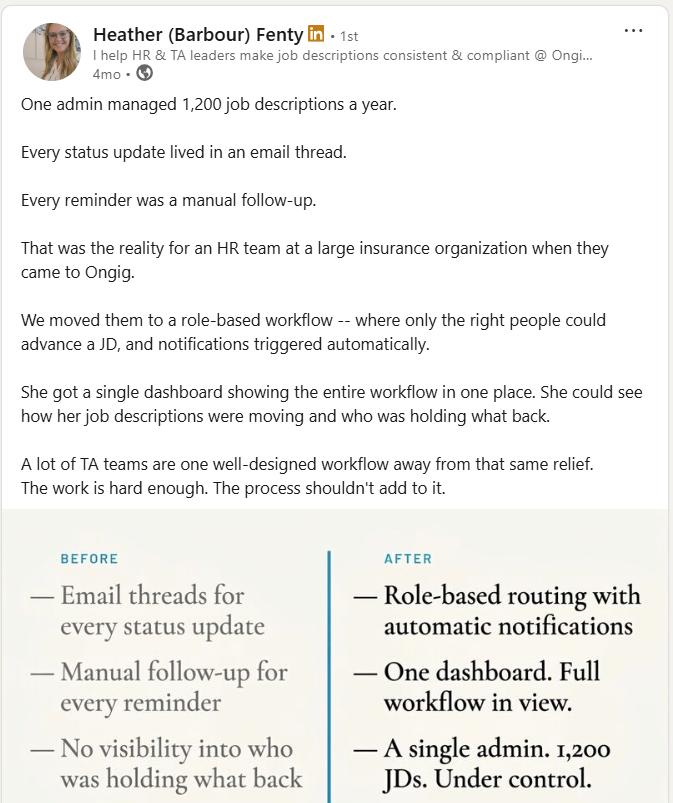
This way you minimize manual JD management time, eliminate audit gaps, and keep your job content aligned across systems and tools.
Key Job Description Features for Enterprise Teams
- Organized User Management: First things first, as an enterprise organization, the last thing you need is collaboration chaos when creating JDs because things get chaotic quickly. Ongig lets you build a collaborative working process that ensures everyone has permission-based access. With everyone knowing their tasks, you avoid conflicting edits and missed deadlines.
- Searchable Cloud Library: No more drowning in scattered tools. You get one library to manage everything concerning your JDs.
- Streamlined Approval Process: Ongig simplifies your approval process in many ways, such as providing dashboards for visibility and letting you build a smart, structured approval process that follows structured steps from review to publishing.
- AI-Powered JD Building: Enter your job title, and the tool produces a strong JD draft in seconds.
- Template Creator with “Smart Fields”: Use 4-step templates that auto-populate JD details based on location or job category.
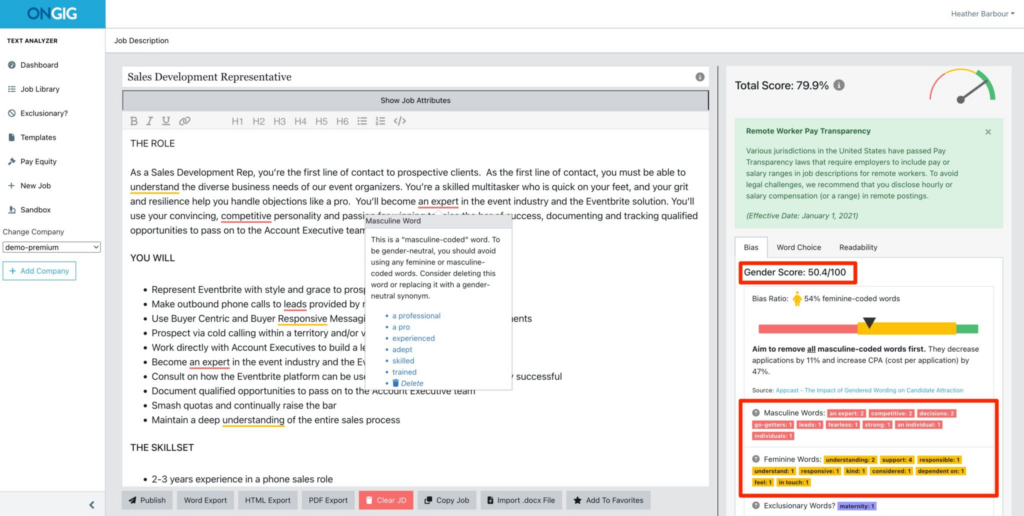
- JD Bias Flagging: Currently, Ongig identifies 13+ types of bias, including gender, age, race, and more. The tool guides you as you write the JD, flags biased words, and provides synonyms to replace the biased words.
- Pay Transparency: The tool flags your JD if it’s missing a salary range. It also guides you on salary laws according to the location you’re writing your JD for.
- Boosting JD Readability: Ongig highlights sentences and words that make your JD hard to read, then gives suggestions to boost readability.
- Version History: Ongig makes it easy to track edits, keep a history of all changes, and revert when you want to return to a previous version of your JD.
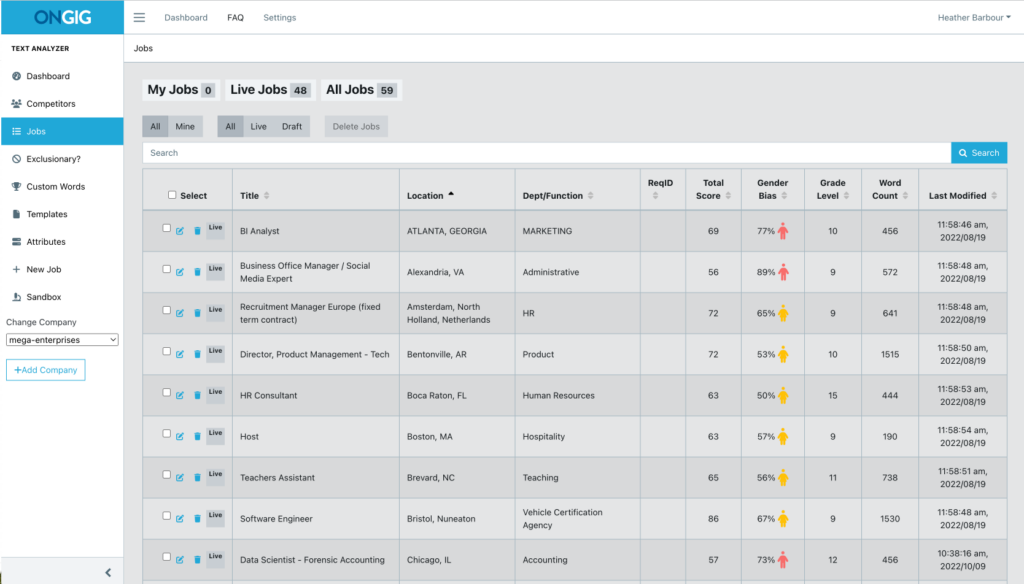
- JD Content Dashboard: Provides analytics visibility highlighting the “health” of your JD library. For instance, easily view hard-to-read JDs, biased JDs, and the ones missing critical compliance components.
- Easily Publish to ATS: No more copy-paste of JD content. Ongig efficiently connects with HRIS and ATS platforms for proper integration.
Ongig Job Description Software Pricing
Ongig provides a tiered model that includes:
- Lite Tier ($4,900/year): For small teams. The benefits include the Job Library (up to 100 jobs), SEO scoring, readability suggestions, and copy-paste/word import.
- Professional Tier (starts at $14,900/year): Includes unlimited jobs/users, multi-format job exports, AI writing tools, pay transparency compliance, templates, and 1-Way ATS import.
- Enterprise Tier ($39,900+/year): And now the enterprise tier includes the full suite with 2-Way ATS integration, SSO, automated language translation, and custom workflow automation.
See how Ongig can simplify your job description management process. Request a demo today:
2. Job Description Management by Payscale
WHY I PICKED JOB DESCRIPTION MANAGEMENT BY PAYSCALE
Payscale offers a job description management solution that eliminates your job data chaos. Many companies in 2026 still lack mature, organized job architecture practices. This results in confusing roles, levels, and compensation. Payscale comes in to keep job architecture, job descriptions, and leveling in a single system.
Key Job Description Features for Enterprise Teams
- The platform leverages AI to help you create job descriptions.
- The tool ensures the job descriptions you create automatically align with job architecture and leveling. This eliminates the creation of JDs with unfair salary ranges or wrong titles.
- You don’t collaborate manually. The tool provides built-in approval workflows and version control.
- Easily export your approved JDs to your ATS(Applicant Tracking System).
Payscale Pricing
Visit their website for detailed pricing depending on the features you want to use.
3. JDMS by Hrizons
WHY I PICKED JDMS
JDMS’s core goal is to make job description management easy. For instance, they help you create an organized job description library that makes it easy to filter and sort your JDs. Plus, they integrate your job data into your preferred HRIS and ATS systems.
Key Job Description Features for Enterprise Teams
- Quickly develop and standardize your JDs.
- The tool lets you build job description workflows that make it easy to create, approve, and publish the JD. Plus, this reduces the chances of creating JDs with compliance issues.
- You can translate your JDs into multiple different languages if you’re hiring globally.
- Eliminates the burden of maintaining your job description manually.
- The platform lets you compare different versions of your JDs.
JDMS Pricing
JDMS pricing starts at $ 21,000 a year.
4. JDXpert
WHY I PICKED JDXpert
JDXpert is a job information management tool. It does more than just write a job description. The platform helps you build, organize, approve, and save your job descriptions without using scattered tools.
Key Job Description Features for Enterprise Teams
- Helps organizations build organized job architecture that defines job families, grades, and functions. This way, all your job data lives in an organized manner. So, you can quickly find what you want.
- The platform leverages AI to help you build JDs quickly. Plus, its “Similarity Scoring” algorithm recommends appropriate job titles and levels to use for your JD.
- Organizes your job description approval process.
- The platform allows you to easily sync your job description data across your preferred ATS, HRIS, and compensation tools.
- The tool makes it easy to view your job description creation lifecycle. You can see any change you want and easily identify the reasons for the changes.
JDXpert Pricing
For JDXpert pricing details, book a demo.
5. Quinto by HRSG
WHY I PICKED QUINTO
Organizations manage jobs using scattered tools, formats, and documents. Without a shared, consistent structure, inconsistency spreads from your job descriptions to promotion and even succession planning. Quinto comes in to maintain consistency across your data in a single platform.
Key Job Description Features for Enterprise Teams
- The tool helps you create JDs with skill taxonomies and built-in competency frameworks informed with the help of AI and HR experts.
- The platform gives you access to a library of 1600+ job description templates, 14,000+ skills, responsibilities, and competencies.
- Helps maintain a consistent job architecture of levels and families. So you won’t experience any role overlaps or inconsistent pay ranges.
- Flags your JD if it fails to include important compliance requirements.
Quinto Pricing
Request a demo to get the pricing for the plan you need.
6. JobArchitect by Salary.com
WHY I PICKED JOBARCHITECT
JobArchitect® by Salary.com is designed to create, approve, and maintain job description content at scale. The tool helps recruitment teams replace scattered tools with one system for all job content. And you don’t have to second-guess compensation for your job descriptions, because the tool is part of the broader Salary.com platform.
Key Job Description Features for Enterprise Teams
- The platform speeds up your job description process using AI. Plus, you also get access to a library of over 5000 pre-created JDs.
- Helps build organized job architecture that defines job families, grades, competencies, and pay.
- No more approval chaos. The tool helps you build automated approval workflows. And if a JD gets stuck, you get visibility into what’s stalling the process.
- The software provides bias checks to help you identify any issues with your JD.
JobArchitect Pricing
Request a demo to get the pricing details
7. RoleCreate by Role Mapper
WHY I PICKED ROLE MAPPER
RoleCreate helps you build inclusive, consistent, and compensation-ready JDs in a single platform. The tool recognizes that a job description isn’t just a document, so it helps you maintain your job descriptions as your company and the market evolves.
Key Job Description Features for Enterprise Teams
- Leverages AI to build level-aligned, skills-based job descriptions in minutes. This way, there are no role overlaps or wrong salaries.
- Create your JDs in a single platform with a governed workspace that has a searchable library. So your job descriptions aren’t scattered everywhere.
- Easily apply standard templates and preferred language when creating your JD.
- Makes it easy to build a governed automated JD approval workflow.
- Role Mapper integrates with different ATS and HRIS systems, thus reducing copy-paste chaos.
Role Mapper Pricing
For Role Mapper pricing details, visit their website.
8. Datapeople (now payscale company)
WHY I PICKED DATAPEOPLE
Datapeople’s main goal is to assist organizations in improving and managing JD content through data-driven guidance. The tool shows you how your job description will perform based on the real-world hiring data it’s trained on. The platform doesn’t just check your job description for grammar. It goes deeper than that. For instance, it flags your JD if it’s not inclusive and if it’s missing benefits.
Key Job Description Features for Enterprise Teams
- Helps you build a good JD by leveraging AI that’s trained on recruitment data and not general internet data.
- The platform helps organizations ensure all JDs follow a uniform tone, structure, and compliance.
- Provides a job description library, so there’s no need for many tools.
- Makes it easy to maintain compliance across all your job descriptions by highlighting missing legal sections in your document. The tool also detects your JD’s location and provides the specific legal requirements for that location.
- Datapeople integrates with popular ATS systems such as Greenhouse to improve one-click syncing and maintain easier collaboration.
Datapeople Pricing
For Datapeople pricing details, visit their website.
General Factors to Consider When Selecting Job Description Software for Enterprise Teams
Most organizations just look out for the features the job description software offers, but there are more tips to keep in mind, such as:
| FACTOR | WHAT TO CONSIDER |
| Ease of Use | Will the JD creation team have an easy time when using the tool? |
| Implementation | How long does it take before you get started? And does the vendor provide resources? |
| Cost | Does the vendor have clear pricing plans that align with your usage? |
| Content Migration Services | Does the vendor provide support when you’re migrating from previous tools such as SharePoint? |
| Support Availability | Check online for reviews to know if they provide effective support once users encounter challenges |
FAQs: Best Job Description Software for Enterprise Teams
1. WHY DO LARGE TEAMS NEED SPECIALIZED JOB DESCRIPTION SOFTWARE?
Enterprise teams handle thousands of JDs, and managing this process manually faces many challenges. Job description software comes in to simplify the entire job description management process.
2. WHAT JOB DESCRIPTION FEATURES MATTER MORE FOR ENTERPRISE TEAMS?
Different features each have specific benefits. To know which feature will benefit your large organization, write down your challenges, then look for JD software that solves the challenges you’ve seen with your JD process.
3. WHY CAN’T SHAREPOINT AND GOOGLE DOCS WORK FOR MY ENTERPRISE NEEDS?
These tools aren’t built for the comprehensive JD needs of an enterprise team. For instance, they can’t handle the process of writing a JD from scratch to publishing without breaking.
4. CAN JOB DESCRIPTION SOFTWARE HANDLE JOB DESCRIPTION APPROVALS FOR ENTERPRISE TEAMS
Absolutely. Job description software helps enterprise teams build an automated approval workflow that routes the JD to the right reviewer. Plus, you get a comprehensive view of your approval process. You can see where the process stalls and understand why it stalls.
5. CAN JOB DESCRIPTION SOFTWARE HANDLE COMPLIANCE FOR ENTERPRISE TEAMS?
Yes, JD software uses different methods to help with compliance. For instance, you get live regulatory guidance when creating your JD. The tool also shows you when your JD has biased language and misses critical regulatory requirements.
Why I wrote this?
As an enterprise team, the last thing you need is a scattered JD process.
You need your job description process centralized in one system. Ongig comes in to provide one system to manage your JD lifecycle. So you get to centralize the JD process, have governed JD templates, build a controlled JD approval process, analyze your JDs, and integrate with your HRIS and ATS systems.
So, whichever job description challenges you’re experiencing, request a demo to see how Ongig can help.
