
Using Microsoft Word and Google Docs tricks you into thinking you’re creating the best job descriptions.
After all, the two tools provide grammar guidance, formatting, and a simple version history for your JDs.
But with time, you realize that the two tools are hurting your JD process. You realize there’s no live JD content guidance, the collaboration process is a mess, and there’s no way to build JD approval stages.
So in this article, I’ll help you understand the signs that you’ve outgrown Microsoft Word and Google Docs. And help you see how JD software solves all those challenges.
Common Reasons Organizations Turn to Microsoft Word and Google Docs for Job Description Creation
These are some of the common reasons HR teams use Microsoft Word and Google Docs instead of JD software:
- Familiarity: Almost every employee knows Google Docs and Microsoft Word since their school days. So instead of the HR team investing in new JD tools, they decide to use what’s available and familiar.
- JD Document Storage: The two platforms integrate with major storage services, including Google Drive and SharePoint. So HR teams see this as an easy way to store their JDs.
- Google Docs and Microsoft Word are perceived as Cheap: Major organizations use the two tools. And most of times, they don’t pay a monthly or annual fee. So they opt for the two tools without considering any hidden costs.
But the benefits of the two tools are surface-level, as they aren’t designed to simplify the comprehensive JD management process. So here are signs you’ve actually outgrown the two tools:
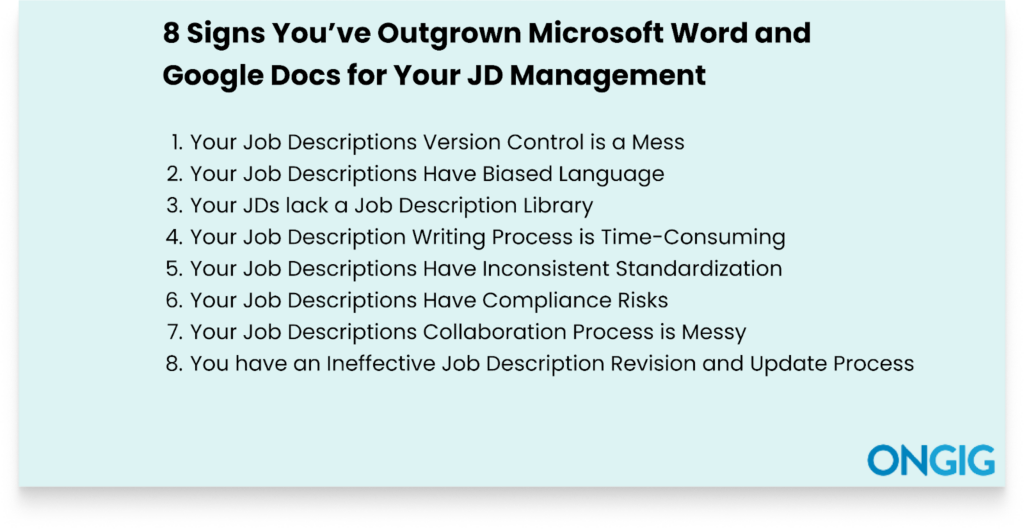
1. Your Job Descriptions Version Control is a Mess
You’ve probably found yourself in challenging situations, wondering which JD document from your shared folders you’re supposed to work on.
For instance, let’s say you want to locate the last JD document for a marketing director role you’re working on. And you’re met with more than 6 different documents with confusing names, such as marketing director JD_final. docx, marketing, director_JD_revised_final_.dcs2, marketing director_JD_final_edited.docs, e.t.c.
This problematic naming isn’t only a version control issue. It creates more challenges for your recruitment efforts.
For instance, you’ll find yourself publishing a JD with missing important elements, publishing the JD with the wrong information, and missing the publishing deadline. Not forgetting that you’ll have a chaotic JD collaboration process since Microsoft Word and Google Docs don’t help create a good collaboration process.
In the end, the HR team wastes productive time they could have used for other tasks.
How Job Description Management Software Helps
Job description tools provide effective Version Control capabilities to write, track, and revise all JD versions in one centralized place. For instance, the tool provides:
- JD Version Comparisons: The tool provides a detailed overview of your different JD version documents. So you only get to work on the current document.
- Provides a Structured Audit Trail: The platform shows who worked on which task, who made which edits, and the reasons for the edits. And it creates a central approval workflow that ensures only the current and approved JD document is in circulation.
- Centralized Storage: All JD documents have a unified space. You don’t have to start going through different files because you know what to search for and where to find it. And this also ensures every team member works on the same real-time JD document.
- Restoration Capabilities: Easily restore the JD version document you want if you or your team members have made any accidental changes. So you won’t begin creating your JD from scratch each time document information gets lost.
2. Your Job Descriptions Have Inconsistent Standardization
Microsoft Word and Google Docs don’t have the capabilities to boost standardization across your JDs.
For instance, they can’t help you lock in mandatory fields to ensure consistency for all JDs, like EEO statements.
Try it for yourself if you’re using Google Docs and Microsoft Word for your JDs. Retrieve around 15 JDs from your company and evaluate them side by side. You’ll discover a huge difference in consistency. You’ll find that the JDs have:
- Different formats
- Confusing information
- Different salary ranges for similar roles
- Mixed up tone and language
- Compliance risks
- Readability issues
- Outdated details.
In the end, this poor JD standardization leads your organization to attract the wrong candidates.
How Job Description Management Software Helps
Here’s how a job description tool enhances the standardization of JDs:
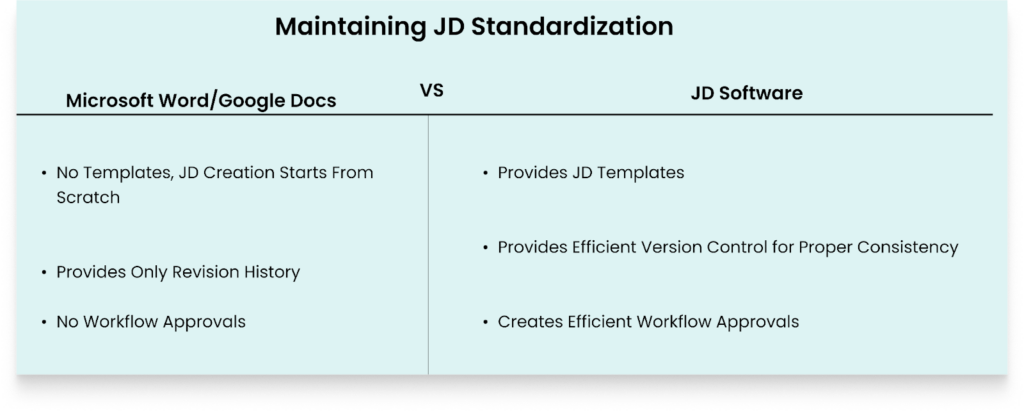
- Provides Efficient Version Control: The tool provides a comprehensive version control that shows all the changes in a JD. Plus, it shows when and who made the changes. So this prevents any inconsistencies in the JD that arise from disorganized JD approval workflows.
- Use of Templates: The tools provide customizable templates with all important JD sections, such as job title, benefits, responsibilities, salary range, organization values, and mission. Plus, you can lock in templates that only authorized people have access to.
- Creates Efficient Workflow Approvals: The software streamlines JD approval by automatically routing JDs to the authorized person. This creates a proper workflow for your organization that ensures, for instance, if a JD gets reviewed by HR, the next team is compliance, and the next is compensation. So no job description gets published without the proper approval.
3. Your Job Descriptions Have Biased Language
A job description that contains biased language silently disqualifies and filters out qualified applicants at scale.
But unfortunately, JD bias isn’t something the person writing the JD immediately notices. There are a lot of unconscious biases that creep in JDs.
And using tools such as Microsoft Word and Google Docs increases the chances of biases creeping in. Because the two tools aren’t built to help you create an inclusive JD. So, you write and publish a JD that’s biased to different types of candidates.
For instance, in your job description, you might write that you’re looking for recent graduates. And the two tools won’t help you understand that this is a bias towards older candidates.
And before you notice these issues, you would have already lost the chance to recruit qualified candidates from different backgrounds.
How Job Description Management Software Helps
Job description tools eliminate biased language in your JDs in these ways:
- Live Flagging of Biased Language: As you’re creating your JD, the platform flags any problematic and biased words or phrases. The platform scans biased language related to elitism, age, race, mental health, gender, and disability, and more. For instance, in the JD below, Ongig Text Analyzer flags the word “an expert” as masculine. And provides 6 synonyms to replace it
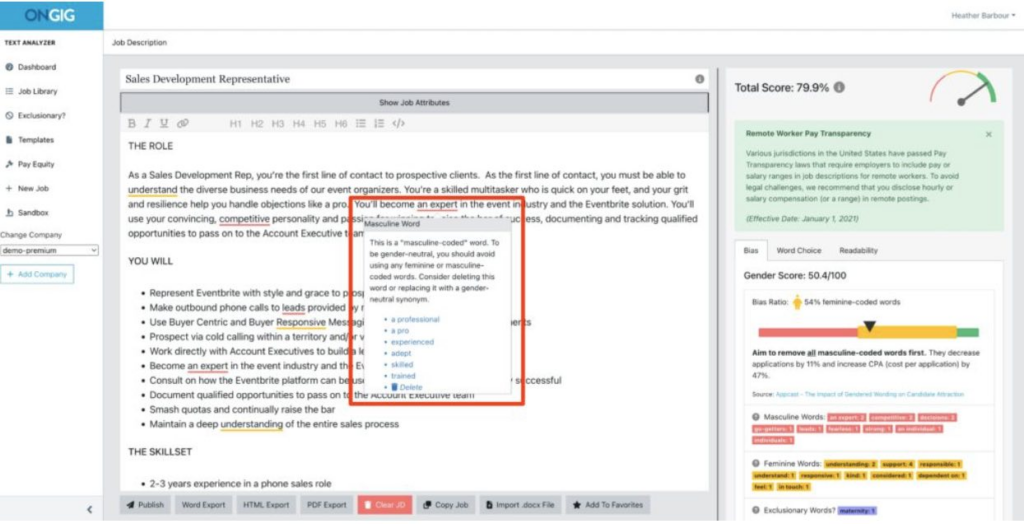
- Highlights Inclusive Suggestions: The tools don’t flag biased language in your JD. They also provide inclusive words for replacement.
- Creating Structured Diversity Templates: Easily create templates approved for inclusive language. And you can use these templates across different JDs, not just one.
- Provision of DEI Analytics: Some tools provide a score to help you understand the level of inclusivity in your JD. And some tools provide a DEI report to help you understand where and what type of biased language is mostly occurring across your JDs.
4. Your JDs lack a Job Description Library
If each time a job description need arises, you have to start the writing process from scratch. Or you have to dig through files in different folders on the Shared Drive, then you’ve outgrown Microsoft Word and Google Docs.
And this is a serious sign that you need a centralized job description library.
An effective job description library is a live and searchable database. It’s a centralized knowledge that guides you on your hiring journey. This library also helps create an effective collaboration process that leads to standardized job descriptions.
For instance, you won’t find yourself and your team producing a JD with confusing details because you’re all working in one centralized location.
But now if your JDs live in different folders, no one on your team can learn from them. And everyone ends up writing JDs for the same titles with conflicting information. So, in the end, you can’t know what to improve with your job descriptions.
How Job Description Management Software Helps
Job description tools help create a unified space for your JDs that help in these ways:
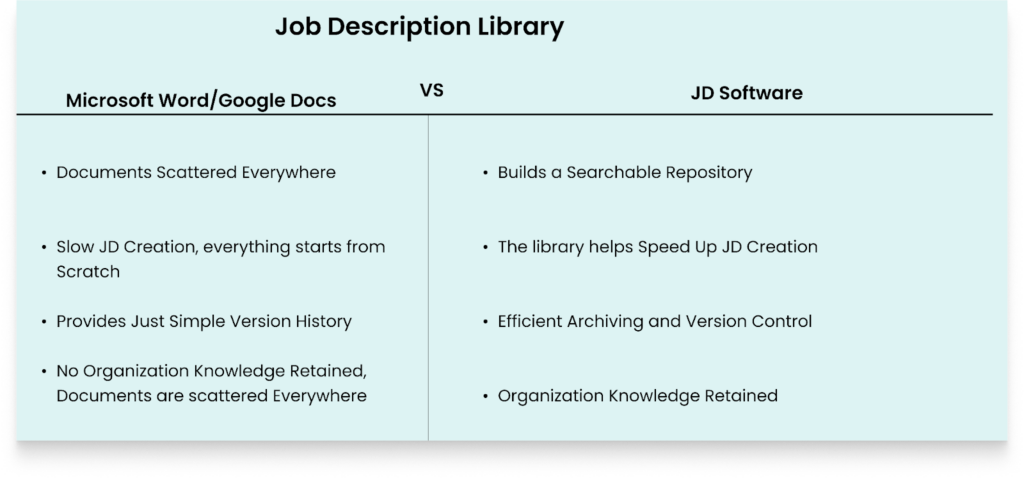
- Building a Searchable Repository: All your job descriptions get a centralized storage place. You easily search and filter your JDs by title, keywords, department, and specific phrases for what you’re hoping to find. So you don’t spend hours buried in different folders trying to locate the documents you need.
- Speeding up JD Writing: You can use any previously written, approved, and published job descriptions you want as templates. So you use all the approved formatting and language guide instead of starting from scratch.
- Efficient Archiving and Version Control: A job description library not only creates a unified space for your JDs. The tool also stores the JD history. So everyone on your team can see the evolution of a role over time, and go to a previous version if needs arise. This way, they understand what they want without asking anyone for the reasons for those changes.
- Organization Knowledge Retained: Every detail about your job descriptions becomes a permanent record. And this includes every written and approved job description, standardized JD language, and more. So even if the employee who was managing the JDs leaves, anyone can still take over and understand everything.
5. Your Job Description Writing Process is Time-Consuming
At first, writing a JD seems like a simple, few-hour task.
But when you consider all the first drafting, reviews, back-and-forth revision cycles, email threads, approval delays, and formatting for various platforms to post the JD, you realize it’s a comprehensive, intense process.
Then here comes the challenge: you’re using Microsoft Word and Google Docs, which aren’t specialized JD tools. So the whole process becomes draining because:
- The two tools don’t provide a centralized JD storage, so each time you’re writing a JD, you start from scratch
- You have to manually inspect all the JD documents for standardization
- For everyone to get and provide feedback, there are endless email chains in the process
- There’s no proper approval workflow. So you never know who’s holding the JD for the next stage.
Lastly, you might even reach the publishing date, approve and post the JD, only for someone on the team to realize that the posted JD has conflicting information. So you start afresh, waste hours, and miss out on top talent.
How Job Description Management Software Helps
Job description tools such as Ongig Text Analyzer help speed up your JD writing process in some of these ways:
- AI-Automated JD Building: Ongig’s Text Analyzer employs AI automation to shorten your JD writing process by helping produce a good first draft. It’s easy: write the title of the JD you want to create and watch the software generate a good draft.
- Customized Template Creation: Ongig makes use of pre-approved templates to auto-populate certain job description fields, such as the organization’s mission and vision section. So you don’t start from scratch to create your JD. Plus, with Ongig its also easy to create your own templates and store them as content libraries that you can use for other JDs.
- User Management Workflow Creation: Ongig ensures everyone on your writing team has only permission-based access control. This way, everyone knows their tasks. Once their turn to provide input reaches, a custom email alert is sent to them with a link to the JD.
Job Description Enhancement:
- Bias Minimization: Ongig Text Analyzer’s “Optimize Content” feature helps reduce different forms of unconscious biases, such as age bias. So you build inclusive job descriptions that attract candidates from different backgrounds.
- JD Score Improvement: When writing your JD, you’ll see the score of your JD rise as Ongig Text Analyzer boosts your JD draft. So you check the suggestions the tool provides, so you know where to improve.
- Discriminatory Term Elimination: Ongig flags unwelcoming language by deleting any discriminatory words and phrases. Then it recommends fair words to use.
6. Your Job Descriptions Have Compliance Risks
Every word and every section in your job description matters when it comes to compliance issues.
So if a JD compliance challenge arises, you need to prove when those words got written, the reasons for the inclusion of the words, and who approved them.
But using Microsoft Word and Google Docs for your JDs exposes your organization to different legal risks.
For instance, you can’t prove who made approvals, there’s no way to create compliant-ready templates to use, and the two tools make it easy to use discriminative language.
Plus, the chaotic collaboration process created by the two tools makes it easy to publish a JD document with critical legal sections missing.
So, you might publish some JDs with good EEO statements and others without, because there’s no proper legal compliance consistency in your JDs.
How Job Description Management Software Helps
Here’s how JD tools help create and maintain compliant JDs:
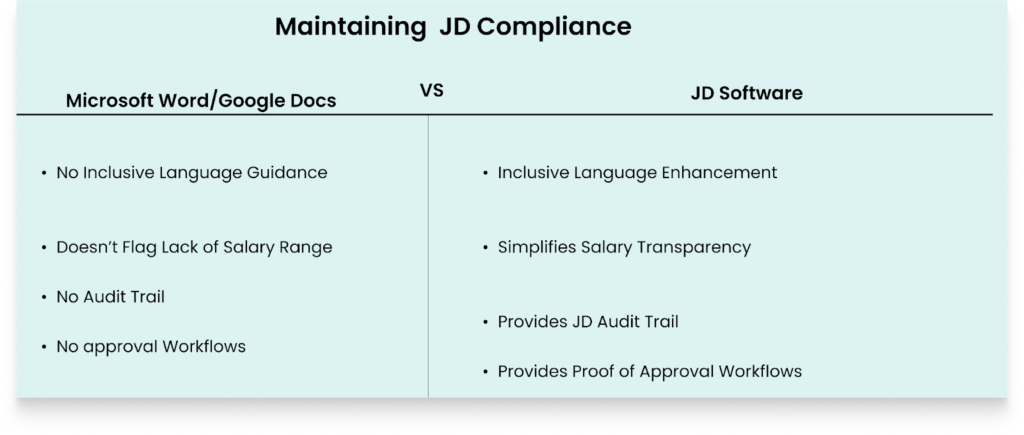
- Inclusive Language Enhancement: The tool scans and highlights any discriminatory language that’s against employment compliance laws. Then, you’ll get recommendations for phrases to replace the problematic phrases.
- Provides JD Audit Trail: The software tracks any JD change and edit with a timestamp and the team member who made the revisions. This audit trail now becomes your defense when you run into compliance challenges.
- Avails Customizable Templates: The software provides templates to use for building any critical compliance-required sections in your JD. Plus, you can lock in templates that aren’t supposed to get edited by everyone on the team.
- Provides Proof of Approval Workflows: The tool makes it easy to show that you had a proper JD approval process. And this shows due compliance that helps protect your organization from legal issues.
- Simplifies Salary Transparency: If you try to publish a JD with any missing salary ranges, the software automatically flags the JD. This becomes helpful if you’re publishing a JD in states that require JDs to include the salary.
7. Your Job Descriptions Collaboration Process is Messy
Writing job descriptions using Microsoft Word and Google Docs tricks you into thinking you’re doing efficient collaboration.
But when you use the two tools for the extensive process of writing job descriptions, they create a disorganized collaboration process.
Because creating job descriptions doesn’t only involve writing. It’s a process with different stages, such as writing, and a continuous approval process comprised of team members with different roles. But Microsoft Word and Google Docs group everyone as an “editor”.
And in the end, this leads to your team experiencing issues such as:
- Disorganized Email Feedback: The two tools don’t create a central structure for communication. This leads to a rise in endless email feedback loops. Thus making it hard for someone to know what to reply to first. Plus, there’s also no structured process of submitting feedback.
- Overlapping JD Revisions: Since there’s no structured communication, not everyone gets to understand what task was worked on and what task wasn’t worked on. So someone can easily come and make revisions that conflict with the previous edits.
- Delay in JD approvals: Microsoft Word and Google Docs build frequent confusion in JD approvals because there’s no proper approval workflow. So anybody on the team can approve whichever section of a JD they want.
How Job Description Management Software Helps
A job description tool, such as Ongig, enhances structured collaboration and communication in different ways, such as:
- Creates a Centralized Feedback Medium: Ongig eliminates the disorganized feedback process by ensuring all comments, approvals, and revisions stay in a central place. You can see communication chain of everyone without going through endless email threads.
- Allows Role-Based Access Collaboration: With Ongig software, everyone on the team has specific permissions. This makes collaboration easy because everyone gets to work on only their specific tasks.
- Efficient User Management Process: With Ongig software, easily set an “administrator” control to manage the user accounts. And easily add new team members when the need arises. For instance, if you need to add a new team member from the department of the role you’re working on, it’s easy to add them and remove them when their input is no longer needed.
8. You have an Ineffective Job Description Revision and Update Process
Job descriptions are living and active documents.
And the challenge with using Microsoft Word and Google Docs is that once the team finishes writing and publishing the document, that’s it. Then it’s buried in the Shared Google Drive and folders.
But organizational priorities change, roles evolve, the market demands change, and labor laws evolve. So, a once good JD a few years ago becomes unfit for the current role and market.
So, having an effective JD description revision and update process is crucial. But that’s where Google Docs and Microsoft Word fail.
For instance, there’s no proper way to create a smooth JD revision process, no way to create an approval workflow, and there’s no easy way to create a good feedback process for the revision. So your organization stays with outdated JDs year in, year out.
How Job Description Management Software Helps
JD tools simplify your JD revision and updating process in these ways:
- JD Version Comparisons: Easily see the differences between two versions of your JDs to understand what needs to change. And you can review any change you’re interested in in the JD, such as the user who made the changes, the date, the time of the changes, and any specific edit.
- Restoration Capabilities: In case of any unwanted changes during the revision process, go back to the correct JD version you want.
- Use of Standardized Templates: While editing and modifying the job description, your team can leverage the platform’s provided templates. This ensures you don’t start the revision process from scratch.
- Easily see the Workflow Step of the JD: When revising and editing a JD, it’s crucial to see the step the JD is at. And tools like Ongig make it easy to create a workflow to see the stage you’re at. And you can see the priority level of your JD, if it’s at a high, medium, or low priority.
The Hidden Costs of a Lack of Specialized Job Description Software
Aside from the usual challenges we’ve talked about that occur when using Microsoft Word and Google Docs for JD management, there are more hidden challenges that you never know you’re experiencing till you’re keen.
Some of these issues:
- Expensive and Inefficient Recruitment Process: Good JDs are the foundation of an effective hiring process. So if you’re not producing good JDs, you’ll attract the wrong talent, miss out on qualified talent, experience a longer time to hire, and use more resources each time you repeat writing the same JD
- Lost Productivity: You spend many days and weeks trying to write a JD that was supposed to take a few days, because each time you come across different challenges.
- Poor Candidate Experience: An ineffective JD misleads candidates because it contains incorrect information. So they get disappointed when they’re at the interview stage and find that what’s written in the JD is the opposite of what they’re supposed to do.
- Tarnished Employer Brand: If you’re consistently producing bad JDs, you’ll stop receiving applications from qualified candidates. And the word might spread that you create misleading JDs.
Why I Wrote This
If you’re still using Google Docs and Microsoft Word, you’re only creating an inefficient JD process. So it’s time build a good process with a job description management software.
This way, you get efficient version control, a collaborative JD process, organized approval stages, and more.
If you’re ready for an effective JD software, contact us for a demo.
FAQs: Why Microsoft Word and Google Docs Fail at Job Description Management
1. Why can’t We Use Microsoft Word and Google Docs To Create Job Descriptions, and yet they are Text Editors?
The two tools don’t account for the whole JD management process. They only focus on writing surface-level JDs. You won’t get content guidance, a collaborative process, or any way to create JD approval stages.
2. Google Docs is Collaborative When Creating Content. Why can’t we use it To Build Job Description Content?
Google Docs groups everyone as an “editor”. So it becomes challenging to understand everyone’s tasks because the people writing a JD don’t always have the same tasks.
3. Why can’t we use SharePoint and Google Drive Folders for JDs storage?
SharePoint and Drive folders build a siloed JD process. So you find it hard to access your JDs when you want to use them because you have to dig through different folders. Plus, each time you’re writing your JD, you have to start from scratch.
4. Can Microsoft Word and Google Docs Help with Inclusive Hiring?
No, the two tools only help with grammar and formatting. They can’t help you understand if your job description contains bias for different candidates.
