Add a job title and a few bullet points to an AI tool, and in seconds, you’ll have a polished job description.
But can you actually be sure the draft is free of bias?
Probably not.
In fact, Ongig tested this firsthand. A ChatGPT-generated sales and marketing job description scored just 19.4/100 for gender bias in Ongig’s Text Analyzer. 😯
So here’s the bigger question: If AI writes the job description, who checks it for bias and accuracy?
To answer this, we’re breaking down how AI-generated job descriptions can introduce hidden biases and what exactly to look for before you hit publish. 👇
AI Can Carry Human Biases and Create New Ones
Large language models learn from existing data. And if the data reflects historical hiring biases for a particular role, AI may reproduce them in a job description.
But inherited bias is just the tip of the iceberg.
More recent ICML research suggests generative AI can also produce new combinations of biased language when models identify patterns and apply them in new contexts. These biases don’t always come from a single rule or an obviously biased piece of training data.
Instead, they can emerge from how the model ranks, predicts, and connects information.
The problem: Not all biases are obvious
What’s more problematic is that biased AI patterns don’t always show up as obvious discrimination.
Sometimes, they hide in words that sound perfectly normal in a job description.
For example, an AI-generated job description may describe the ideal candidate as “aggressive,” “champion,” or a “ninja.” At first glance, these words may simply suggest confidence and capability.
But some of these terms carry gendered associations that can discourage women and other people from applying.
The good news? You can reduce gender bias in a job description by removing common masculine-coded words.
Similarly, watch for other forms of bias beyond gender and race, including those related to disability, mental health, LGBTQ+ identity, socioeconomic status, age, immigration status, and criminal history.
As a best practice, create a list of words that account for all of the above types of bias, then screen every job description against the list. You can also use a tool like Ongig to automatically flag 10,000+ biased words from AI-generated job descriptions and replace them with more inclusive language at scale.
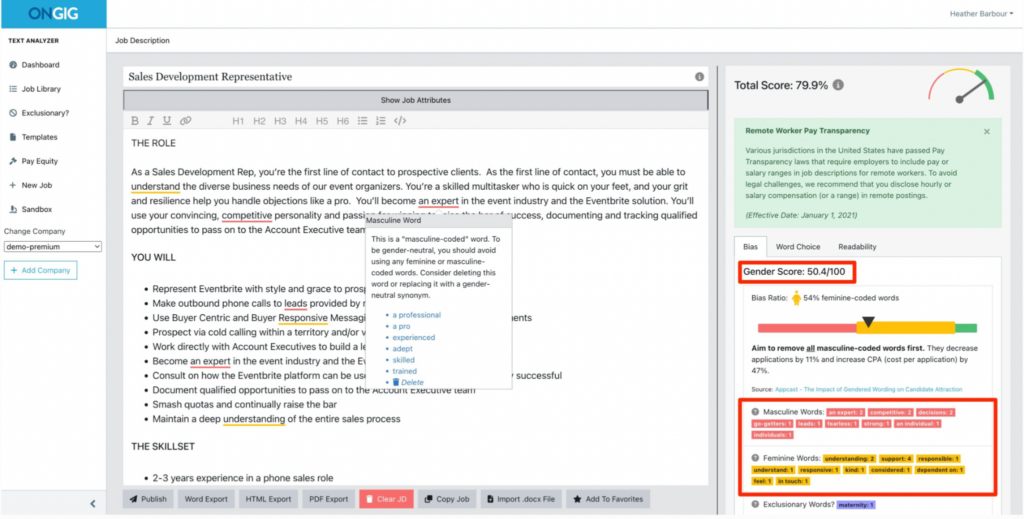
Source: Ongig Text Analyzer
Alt Title: Ongig Text Analyzer
Alt Description: Ongig Text Analyzer highlighting potentially biased language in a job description.
Here’s an example of what that list could look like:
| Biased Word | Bias It Carries | Inclusive Alternative |
| Chairman | Gender | Chairperson |
| Mastermind | Gender | Strategist |
| He or She | LGBTQ+ | They or You |
| Walk | Disability | Move |
| Guys | LGBTQ+ | Folks or People |
| MBA from a top university | Elitism | Have an MBA |
| High pressure | Mental health or Neurodiversity | Fast-paced |
| Experienced worker | Age | Demonstrated skills |
| English native speaker | Immigration or nationality | Fluent/Proficient in English |
| Criminal background check | Criminal history | Background check |
AI Can Write the First Draft, but Humans Need to Apply Judgment
AI learns from existing data patterns. So it works best when you use it to draft the repeatable parts of the job description that follow a clear structure.
This includes tasks like:
- Creating headings an applicant tracking system (ATS) can read
- Writing the pay range disclosure or summarizing benefits
- Drafting the EEO statement and compliance language
- Translating a post for different locations
- Cleaning up formatting
Once you have the initial draft, add details to give the job description personality and separate it from every other company’s role with the same title.
For example, include:
- An opening paragraph that hooks the candidate or explains why this role even exists
- Insights you heard from the hiring manager that the AI can’t know
- The honest hard parts of this role and why it’s interesting
- What success looks like after six and 12 months
Why is this important?
Beyond the obvious risk of bias, AI doesn’t know what matters most to your team or candidates.
It can turn a list of responsibilities into a clean format. But it can’t understand whether you care more about building new tools, fixing specific processes, or hitting a particular goal in the next few months.
These details give candidates a reason to care about your role and help you hire the right talent. For example, for specialized organizations like Abacus Global, a more specific job description can help attract finance professionals whose experience actually matches the role.
When you combine AI with human oversight, you achieve two goals:
- Improve hiring efficiency.
- Verify that job descriptions attract the right candidates and accurately represent job responsibilities.
Check the Choice of Words First, then Confirm the Sentiment
You’ve flagged and replaced potentially biased words with more inclusive language. But even then, your job is only half done.
A description can use inclusive language and still sound overly demanding, negative, or intimidating.
So, it’s equally important to check the tone of your draft.
For example, simply replacing “aggressive” with “driven” doesn’t fix the problem if the rest of your job description says the candidate must “thrive under constant pressure and deliver results at all costs.”
To make sure this doesn’t happen, ask yourself:
- Can the same message sound more welcoming without hiding the hard parts of the role?
- Does the description give candidates a realistic sense of the work expectations?
- Does it sound demanding without explaining why?
- Does the tone reflect your work culture?
The goal is to build an honest tone that tells candidates what the job demands while staying approachable.
Check that AI Doesn’t Invent the Job
Another big problem with AI-generated job descriptions? It can fill in details based on what similar roles usually look like, not what your role actually requires.
Open ChatGPT and paste the title “Senior Product Manager.” It may add responsibilities like roadmap planning, user research, analytics, or team leadership, since these details commonly appear in similar job descriptions.
This is another consequence of AI relying on patterns from similar roles.
It’s not factually wrong, but it may not be accurate for your role.
So, instead of letting AI define the role for you, use human judgment and involve the appropriate experts to capture role-specific nuances, internal jargon, acronyms, and process notes.
For example, generic AI tools frequently hallucinate medical terminology or get important details wrong. Bringing in a knowledgeable virtual medical admin assistant to review job listings helps ensure patient-scheduling requirements and HIPAA-related responsibilities are accurately represented before the listing goes live.
Check That Your Job Description is Compliant
We mentioned earlier that AI is useful for drafting standard compliance language. And, honestly, it can save you a lot of time. But please don’t treat AI as a legal expert.
The reason is: AI can pull in generic or superseded laws from the internet that don’t currently apply to your hiring location. Worse, it can hallucinate and may factor in laws that simply don’t exist.
So, before you hit that publish button, check the job description against the employment laws and disclosure requirements that apply to where you’re hiring. If you’re hiring across multiple locations, loop in your HR or legal team to make sure all the details are correct and compliant.
Review areas such as:
- Equal employment opportunity language
- Local hiring and disclosure rules
- Pay transparency requirements
- Required salary or pay ranges
- Protected-class language
Check With Your New Hires for Honest Insights, Then Improve
You can review an AI-generated job description before publishing. But some inaccuracies only become obvious once someone is actually doing the job.
That’s why your newest hires can be some of your best sources of feedback.
Ask them what matched the job description and what didn’t. Were certain responsibilities more important than advertised? Were any expectations missing? Did the role turn out differently from what they expected?
For frontline and deskless employees, having an employee experience platform like Blink gives new hires a direct line to managers through chat and quick polls, making it easier to collect this feedback while the hiring experience is still fresh.
Then use those insights to improve the next job description you create.
How to Combine AI + Human Review for Accurate, Unbiased Job Descriptions
You don’t need to choose between writing every job description manually and letting AI take over. Instead, create a workflow that combines both.
Here’s a practical job description review process that can save you hours and still produce accurate results. 👇
1. Generate the First Draft Using AI
To generate a more accurate first draft, give AI the exact job title, responsibilities, team details, location, and approved language list.
The more context it has, the better the output.
2. Add the Human Judgment Layer
Have your team add the details that make the role specific to your company.
3. Check the Language Bias
Run the description through a bias and inclusivity check. Reminder: Ongig’s Text Analyzer automatically flags biased words and suggests alternatives.
4. Check the Tone
Read the full job description out loud. Make sure it sounds realistic and approachable without hiding the job’s difficult parts.
5. Verify the Details
Bring in your reviewers to confirm the responsibilities, requirements, tools, experience level, reporting structure, and success measures.
6. Check Compliance
Review location-specific pay, Equal Employment Opportunity (EEO), privacy, and employment requirements to avoid legal complications later on.
All of these steps can be done manually, but that’s a LOT of back-and-forth. To simplify the process, use a single AI-powered platform like Ongig to manage it end to end.
The Bottom Line
The point of publishing a job description is to encourage a diverse group of talented professionals to apply. To do that, it must be genuinely inclusive and accurate.
AI in recruiting can speed up the process, but speed doesn’t guarantee an accurate or inclusive job description.
The best approach combines both sides.
Let AI handle the repeatable work, let hiring managers add the context, and use tools like Ongig to flag and replace bias before you hit publish.
To learn more, request a free demo and see what potential bias may be hiding in your job descriptions.
Frequently Asked Questions
Can AI-generated job descriptions be biased?
Yes. AI can reproduce biases found in its training data and may generate language with gender, age, disability, racial, socioeconomic, or other biases. Review every AI-generated job description before publishing.
How can you check an AI-generated job description for bias?
Review individual words as well as the overall tone.
Look for gendered, exclusionary, ableist, age-related, or otherwise biased language, and use a bias detection tool like Ongig to identify language that human reviewers may miss.
Should you use AI to write job descriptions?
Yes, but AI works best as a drafting tool, not a replacement for human judgment. Use AI to create the first draft, then have human reviewers verify the responsibilities, requirements, tone, inclusivity, and compliance before publishing.
Author Bio

Kelly Moser is the co-founder and editor at Home & Jet, a digital magazine for the modern era. She’s also the content manager at Login Lockdown, covering the latest trends in tech, business, and security. Kelly is an expert in freelance writing and content marketing for SaaS, Fintech, and ecommerce startups.
