
- How to Write a Job Description — Best Practices & Examples (2026 Update) - February 26, 2026
- 10+ Examples of Top Companies with Autistic Hiring Programs (2026) - February 23, 2026
- What I’ve Learned About AI, Rigid SaaS, and Job Content Since Joining Ongig in 2019 - February 17, 2026
Ever tried tracking edits in a job description across three teams, two time zones, and a dozen email chains? Our client shave too. It’s like playing Jenga with legal risk.
If you’re in a regulated industry (think healthcare, finance, pharma), every tweak to a job description matters. Every word. Every comma. One undocumented change? It can cost you thousands in audit penalties.
The Case for a Job Description Revision Tracker
One of our clients in the healthcare space put it best: “We don’t need bells and whistles, we need a change log that tracks everything.” They’re talking about audit-ready version control. A place where you can see who changed what, when, and why. Because who has time for backtracking through Slack threads or Word docs titled “JD_FINAL_FINAL_REAL_FINAL.docx”?
That’s the goal of a job description revision tracker. It’s not just a nice-to-have. It’s the difference between passing your next compliance audit or scrambling for answers under pressure.
How the Best Teams Handle Job Description Revisions
We’ve seen teams manually redline job descriptions in Word or Google Docs. Some even print them out to mark changes. That might work when you’re dealing with two roles. But at scale? It’s a version control nightmare.
What these teams really want:
- Automated redlining of changes (so no edit gets lost)
- Clear user tracking (who made what changes, and when)
- Side-by-side comparisons of versions
- Downloadable audit logs they can show to compliance teams, fast
That’s exactly what we’ve been building toward at Ongig. While we’re not 100% there yet, here’s what we do offer today:
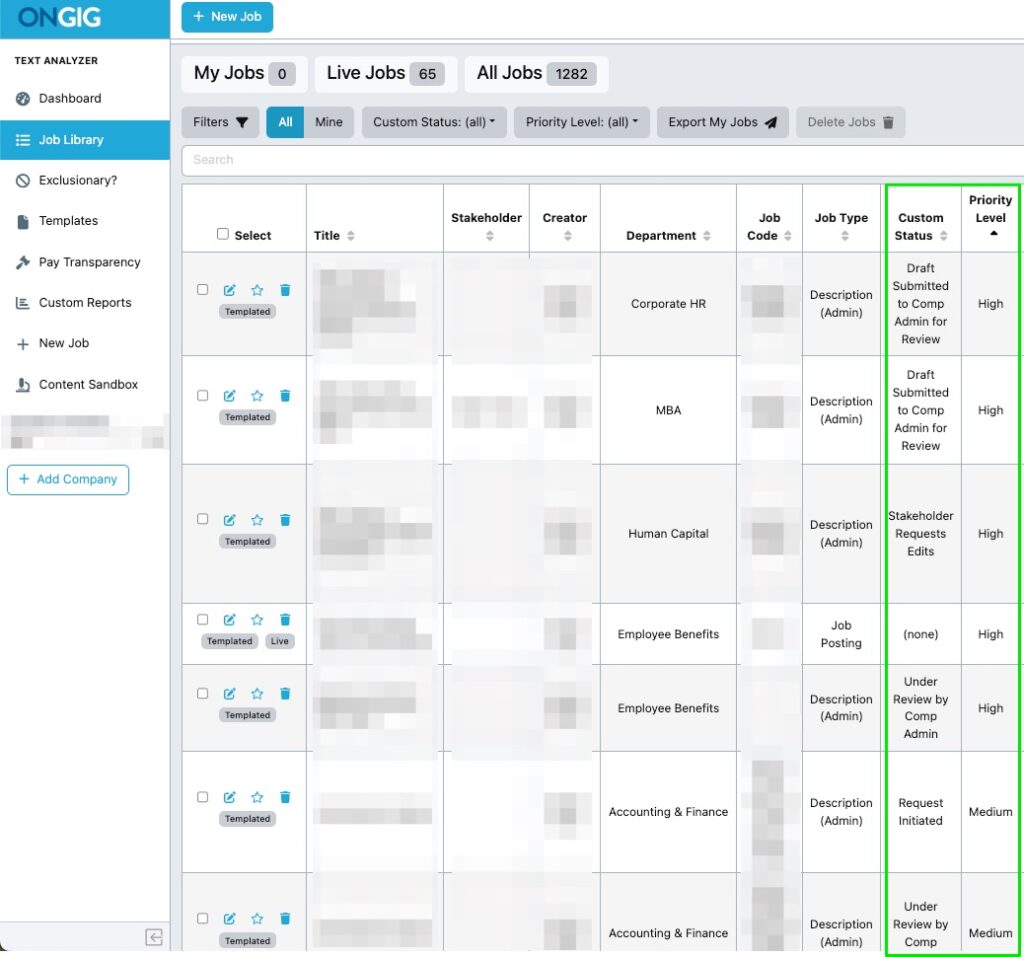
- You can see where a JD is in the workflow (and if it is high, medium, or low priority)
- You can track who’s editing, when, and what they changed
- You can compare versions side-by-side
- And we’re actively working with clients on custom downloads that match their audit log needs
Real Time Saved. Real Money Saved.
One client estimated that not having to manually redline job descriptions saves their team 3 to 8 hours a week. Multiply that by your team’s hourly rate, and it adds up quick.
More importantly? It reduces your exposure. In regulated industries, a single undocumented change can cost $5K–$50K+, depending on the audit body. That’s not a scare tactic. That’s real data from clients dealing with federal, state, and internal compliance reviews.
Sure, compliance might be what gets this on your roadmap. But the real benefit is clarity. Everyone is on the same page. Hiring managers, recruiters, and comp teams all work from the same job description library.
No more guessing if the latest version is actually the latest. No more “who edited this?” questions. Just a clean, auditable trail you can pull up in a click.
What’s Next with Ongig’s Job Description Revision Tracker?
We’re not done. The next evolution of Ongig’s job description revision tracker will include PDF exports, full change history downloads, and even more robust approval tracking tailored by industry.
If you’re dealing with high-stakes job descriptions, we’re here to help. Because documentation shouldn’t be a four-letter word.
Why I Wrote This
This post was inspired by real conversations with clients in healthcare, banking, and other highly regulated industries. They needed a job description revision tracker that saves time and cuts audit risk. We’re helping them build it. Want to see what that looks like? Request a demo and see Ongig in action.
FAQs
- What is a job description revision tracker?
A tool that automatically tracks changes to job descriptions, including who made edits and when. - Why is this important for regulated industries?
To avoid compliance penalties and ensure every JD has a clean audit trail. - Does Ongig offer PDF downloads of JD history?
We’re working on custom export features tailored to client needs. - Can I compare job description versions in Ongig?
Yes, side-by-side version comparison is already available. - How does this save time?
It reduces rework, confusion, and manual redlining—saving teams hours each week.
